
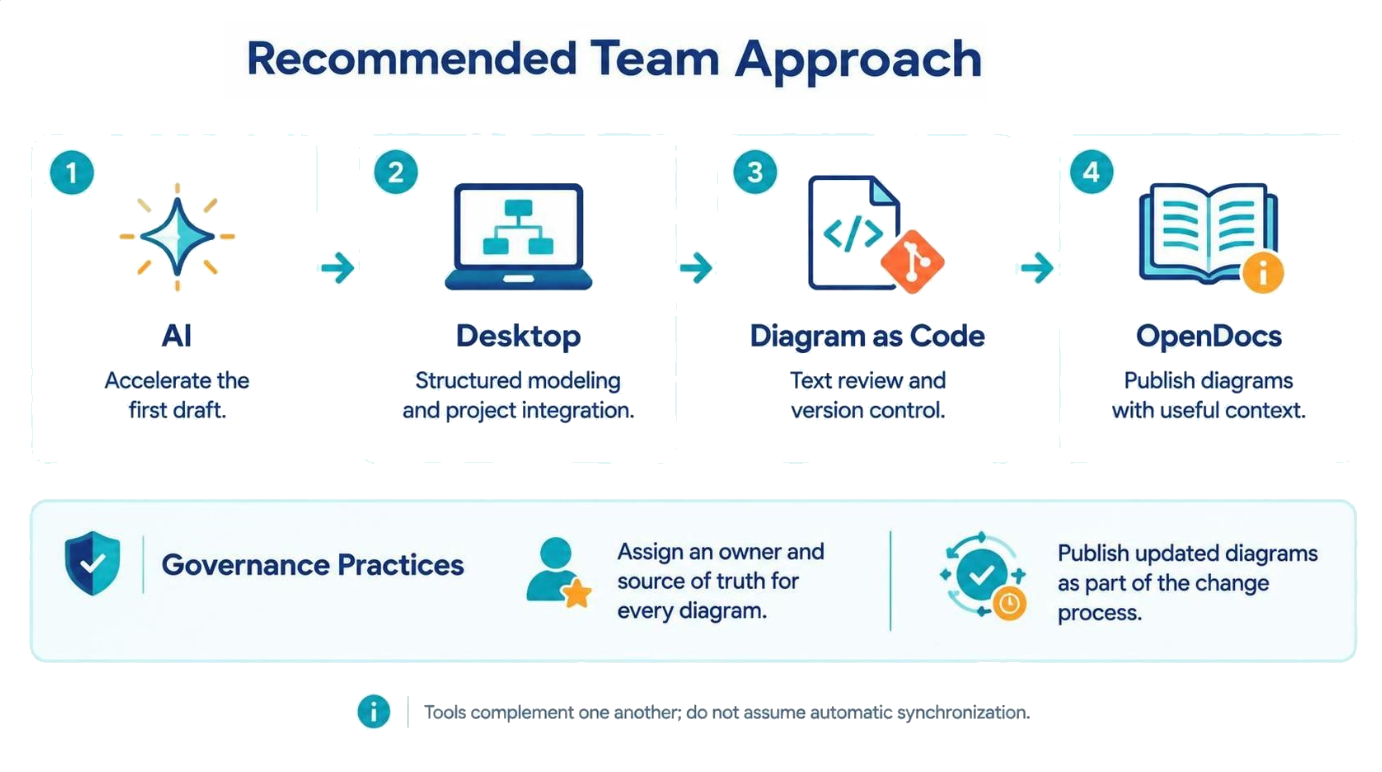
In the realm of complex system architecture, the gap between a raw idea and a robust, version-controlled model can often be bridged by a single, well-orchestrated workflow. Visual Paradigm has introduced a comprehensive ecosystem that transforms how teams approach modeling. This tutorial explores the recommended team approach, which integrates AI acceleration, desktop power, text-based version control, and automated publishing.
By understanding the synergy between these tools—specifically Visual Paradigm Desktop, AI capabilities, Diagram as Code, and OpenDocs—you can establish a “source of truth” that remains synchronized with your development reality without relying on magic.
The 4-Step Architecture Workflow
The core philosophy of this ecosystem is that different tools serve different stages of the lifecycle. No single tool is sufficient for the entire process. Instead, a sequential pipeline ensures that creativity is captured, refined, reviewed, and published effectively.
Step 1: AI for Rapid Prototyping
The journey begins with ideation. In a traditional workflow, starting a diagram can be a slow, manual process of drawing boxes and connecting lines. The recommended approach utilizes Artificial Intelligence to accelerate this first draft.
- Function: AI acts as the creative spark. It allows architects to input a concept or a requirement and instantly generate a structural draft.
- Benefit: This removes the “blank page syndrome,” allowing the team to focus on architectural decisions rather than drawing mechanics.
Step 2: Desktop for Structured Modeling
Once the AI draft is generated, the model must be hardened. This is the domain of Visual Paradigm Desktop.
- Function: Desktop provides the heavy lifting for structured modeling. It is where complex relationships are defined, and the model is integrated into the broader project context.
- Benefit: It ensures that the diagram is not just a picture, but a data-rich model that adheres to strict architectural standards.
Step 3: Diagram as Code for Governance
For teams that prioritize text-based review and version control, the workflow moves to “Diagram as Code.” This approach treats the diagram definition as source code.
- Function: Instead of binary files, the diagram is represented in a text format. This allows it to be stored in Git repositories, reviewed via Pull Requests, and merged just like application code.
- Benefit: It brings the rigor of software engineering to system architecture, ensuring that changes are tracked, reviewed, and auditable.
Step 4: OpenDocs for Contextual Publishing
The final stage is communication. A diagram is useless if it sits in a local file. OpenDocs is designed to publish these diagrams with useful context.
- Function: It transforms the static diagram into a web-ready, interactive document.
- Benefit: Stakeholders can view the architecture within the context of the project documentation, ensuring everyone is on the same page.
Crucial Governance Practices
The tools described above are powerful, but they require governance to prevent “diagram drift”—the state where the drawing no longer matches the actual system. The ecosystem relies on two non-negotiable practices:
- Explicit Ownership: Every diagram must have an assigned owner. This creates accountability for the accuracy and currency of the model.
- Integrated Change Process: Updating a diagram is not an optional extra; it is part of the team’s standard change process. Just as code changes trigger a build, architecture changes must trigger a diagram update.
Conclusion
By following this path—from AI acceleration to Desktop integration, through Code-based review, and finally to OpenDocs publishing—you create a practical path from an idea to a reviewed model. This structured approach ensures that your documentation remains a living, breathing part of your development lifecycle.