
In the realm of software architecture, the gap between a brilliant idea and a concrete system design is often bridged by the tedious process of drawing diagrams. Visual Paradigm’s VPasCode tool revolutionizes this workflow by combining the precision of “Diagram-as-Code” with the generative power of Artificial Intelligence. This tutorial explores how to leverage AI to generate complex system architectures, specifically focusing on the transition from a textual prompt to a visual PlantUML model.
The Power of Generative Modeling
Traditionally, creating a detailed Use Case or Sequence diagram requires deep knowledge of the underlying syntax (like PlantUML) and significant manual effort to position actors, boxes, and connection lines. VPasCode changes this paradigm by allowing you to describe your system in natural language. The AI engine acts as a bridge, interpreting your intent and rendering the corresponding code and visual representation instantly.
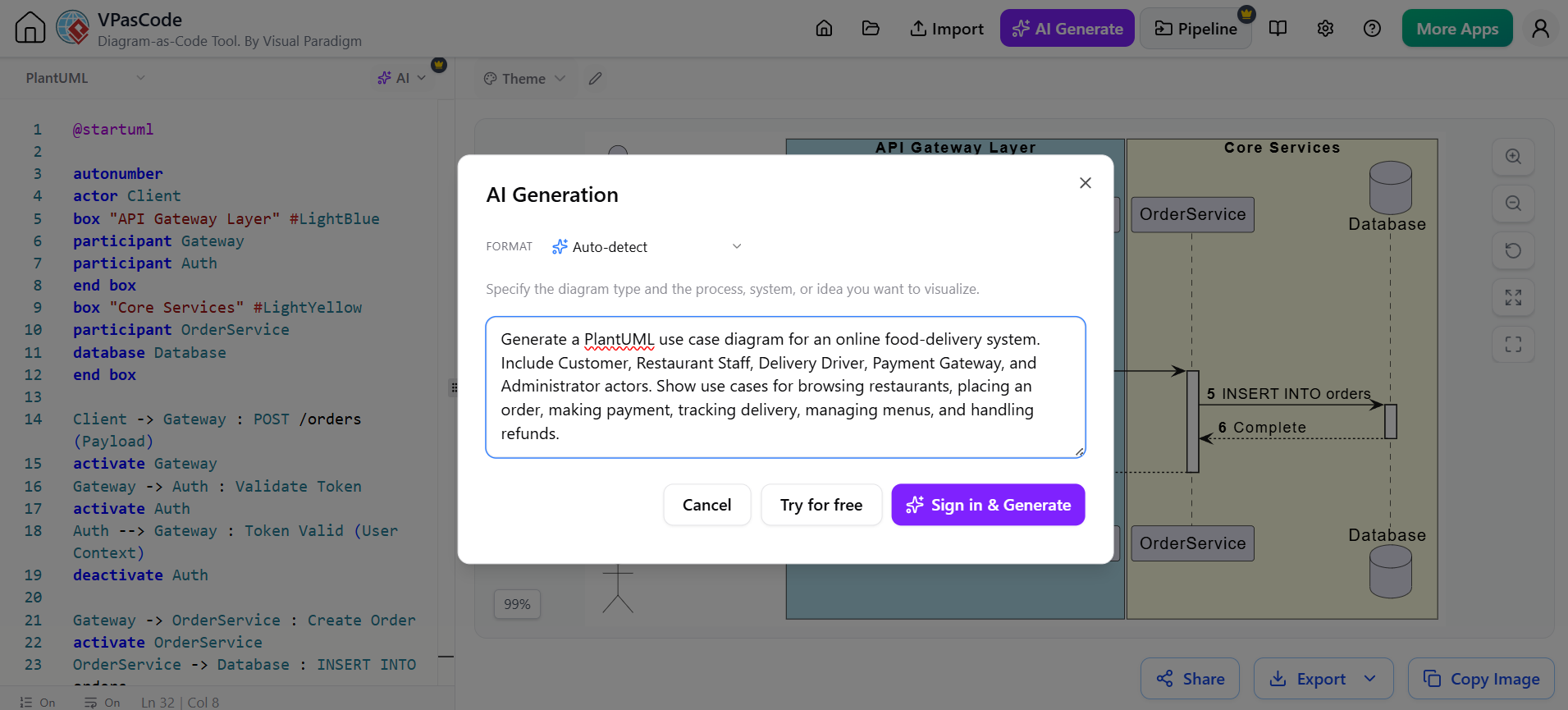
As shown in the interface, the AI Generation modal sits centrally between the code editor and the rendered diagram, highlighting a seamless integration of text and visuals. This approach is particularly useful for high-level architectural planning, where you want to iterate on the structure of your system rather than getting bogged down in the syntax.
Step 1: Defining the Scope
The process begins with a clear prompt. In the example provided, the user needs to model an Online Food-Delivery System. The key to a successful AI generation lies in specificity. You must define:
- The Actors: Who interacts with the system? (e.g., Customer, Restaurant Staff, Delivery Driver).
- The System Boundaries: What services are included? (e.g., Payment Gateway, Database).
- The Functional Requirements: What are the key processes? (e.g., Browsing, Placing Orders, Refunds).
By explicitly stating these requirements, you guide the AI to generate a relevant and comprehensive diagram structure.
Step 2: AI Interpretation and Syntax Generation
Once the prompt is submitted, the AI generates the underlying PlantUML code. This is where the “Code-as-Document” philosophy shines. The code is not just hidden logic; it is the source of truth for the diagram. It uses standard PlantUML directives to define the structure.
Here is an example of the syntax that the AI might generate based on the prompt to create a structured system view:
@startuml
autonumber
actor Client
box "API Gateway Layer" #LightBlue
  participant Gateway
  participant Auth
end box
box "Core Services" #LightYellow
  participant OrderService
  database Database
end box

Client -> Gateway : POST /orders (Payload)
activate Gateway
Gateway -> Auth : Validate Token
activate Auth
Auth --> Gateway : Token Valid (User Context)
deactivate Auth

Gateway -> OrderService : Create Order
activate OrderService
OrderService -> Database : INSERT INTO orders
@enduml
Notice the use of box directives. This is a crucial modeling concept. Instead of a flat list of components, the AI organizes participants into logical containers (like “API Gateway Layer” or “Core Services”). This visual grouping helps stakeholders understand the architectural layers of the application.
Step 3: Refinement and Iteration
VPasCode allows for iterative refinement. If the generated diagram misses a specific use case or the styling doesn’t match your standards, you can simply edit the text in the code editor or re-prompt the AI with corrections. The tool automatically re-renders the diagram, ensuring that the visual output always matches the code.
Why This Matters for System Architects
By integrating AI generation with a robust code editor, architects can focus on the what and why of their system design. The AI handles the how—the syntax, the alignment, and the styling. This results in:
- Speed: Reducing diagram creation time from hours to minutes.
- Consistency: Ensuring that naming conventions and architectural patterns are applied uniformly across the entire system.
- Collaboration: Providing a shared text-based language that teams can version control and discuss, just like source code.
Whether you are designing a simple microservice interaction or a complex enterprise system, tools like VPasCode empower you to visualize your architecture with unprecedented efficiency.