
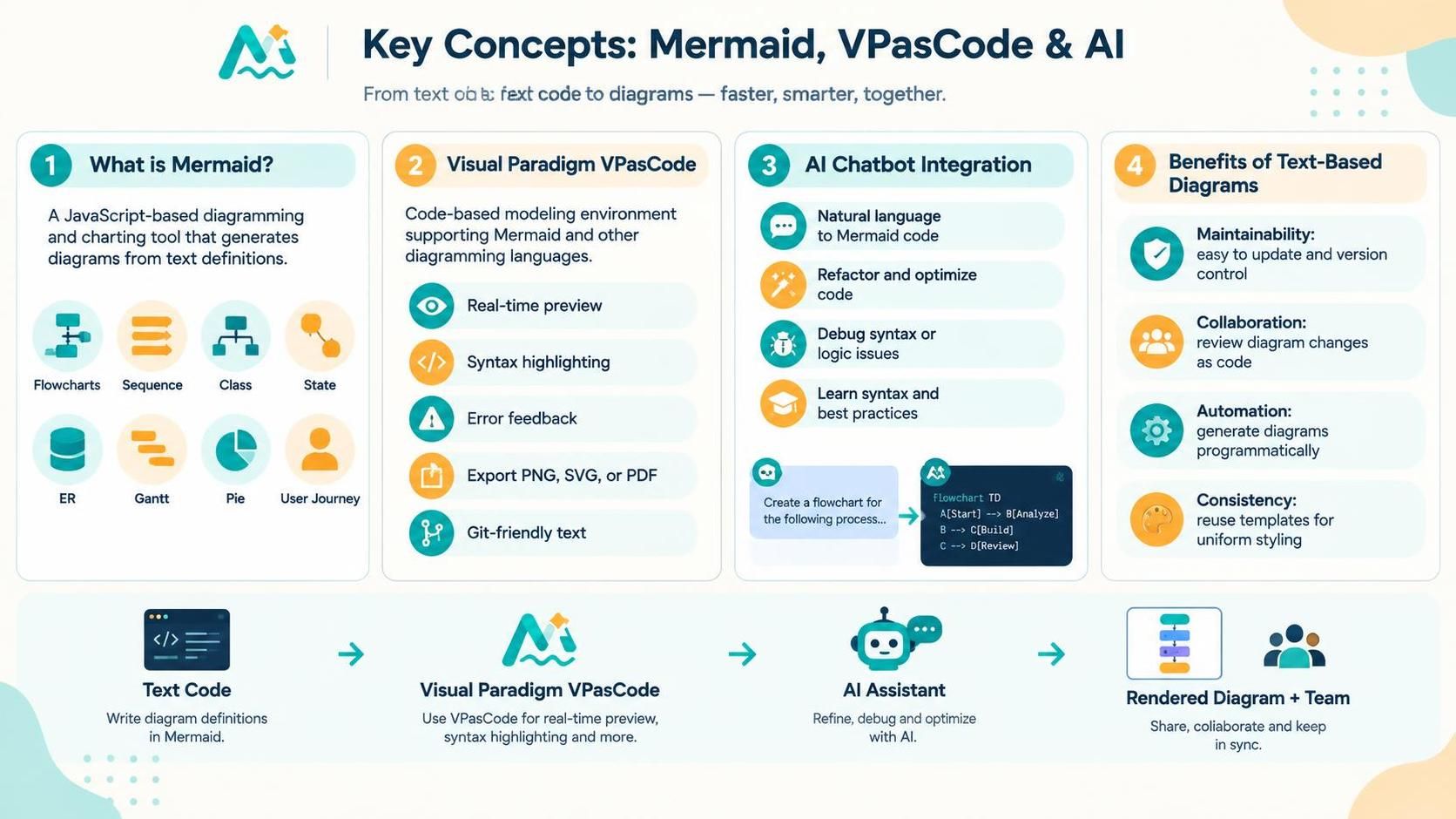
In the modern era of software engineering and system architecture, the approach to visualization is shifting rapidly from purely manual drag-and-drop interfaces to a code-centric workflow. This tutorial explores the transformative synergy between text definitions, intelligent modeling environments like Visual Paradigm VPasCode, and the power of Artificial Intelligence. Together, these technologies create a streamlined pipeline for generating, debugging, and maintaining complex diagrams.
1. The Foundation: Understanding Mermaid
At the heart of this text-based revolution is Mermaid. It is not merely a charting tool but a JavaScript-based diagramming and charting tool that interprets text definitions to generate visual representations. By moving away from clicking buttons to draw shapes, developers and architects can define logic and structure using simple syntax.
Mermaid is renowned for its versatility. It supports a wide array of diagram types that are essential for different phases of the software lifecycle:
- Flowcharts: Ideal for visualizing business processes and logical decision trees.
- Sequence Diagrams: Crucial for understanding the interaction order between system components.
- Class & State Diagrams: Essential for object-oriented design and state machine logic.
- ER Diagrams: Used to model database relationships and entity structures.
- Gantt & Pie Charts: Perfect for project scheduling and data distribution analysis.
- User Journeys: Maps the path a user takes through a product.
The beauty of Mermaid lies in its abstraction. You do not need to worry about pixel-perfect alignment or color palettes; the tool parses the text and renders a clean, consistent diagram automatically.
2. The Engine: Visual Paradigm VPasCode
While Mermaid provides the syntax, the environment in which you write it is critical for productivity. Visual Paradigm VPasCode acts as a robust, code-based modeling environment specifically designed to support Mermaid and other diagramming languages.
VPasCode transforms the diagramming experience by introducing the power of a modern Integrated Development Environment (IDE) to your visualizations. Key features include:
- Real-time Preview: As you type your Mermaid code, the diagram updates instantly. This immediate feedback loop eliminates the frustration of compiling code and then switching windows to view results.
- Syntax Highlighting: Just like in a Python or Java editor, different parts of your diagram definition are color-coded. This makes it significantly easier to spot missing brackets, typos, or structural errors.
- Error Feedback: The tool actively identifies syntax or logic issues in real-time, preventing the generation of broken diagrams.
- Git-Friendly Workflow: Because diagrams are stored as plain text, they can be version-controlled effectively. Teams can review diagram changes as code, utilizing branch management and diff tools to track architectural evolution.
- Export Capabilities: Once the diagram is finalized, it can be exported in standard formats such as PNG, SVG, or PDF for documentation or presentation purposes.
3. The Accelerator: AI Chatbot Integration
The integration of AI into the modeling workflow is the game-changer that bridges the gap between abstract ideas and executable code. The “AI Chatbot Integration” feature allows users to interact with the system using Natural Language.
Instead of memorizing the specific syntax required for a complex Mermaid flowchart, a user can simply describe the process in plain English. The AI then:
- Generates the corresponding Mermaid code.
- Refactors and optimizes existing code for better readability.
- Debugs syntax errors or logical inconsistencies.
- Teaches best practices by explaining the generated code.
This interaction turns the AI into a pair-programming partner for visual modeling, allowing architects to focus on the what and why of their system, while the AI handles the how of the syntax.
4. The Workflow: From Text to Team
The complete ecosystem functions as a cohesive pipeline. The workflow typically begins with the Text Code, where a developer writes the initial diagram definition. This code is fed into the Visual Paradigm VPasCode environment, which provides syntax checking and real-time rendering. Next, the AI Assistant steps in to refine, debug, or optimize the logic. Finally, the team collaborates on the Rendered Diagram, ensuring everyone stays in sync.
This process offers four distinct benefits that define the modern standard for system architecture:
- Maintainability: Updating a diagram is as simple as editing a text file. Version control systems can track exactly who changed a node or edge and when.
- Collaboration: Reviewing changes as code allows for rigorous peer reviews, ensuring architectural decisions are documented and justified.
- Automation: Diagrams can be generated programmatically, enabling the automation of documentation generation within CI/CD pipelines.
- Consistency: By reusing templates and definitions, teams ensure that styling and notation remain uniform across all documentation.