
🔍 New Introduction: Why We Turned to the C4 Model
As software systems grow in complexity, traditional architecture diagrams often become dense, ambiguous, and inaccessible to anyone outside the core engineering team. After spending years evaluating architectural documentation frameworks across multiple product teams, our group began searching for a model that balanced technical depth with stakeholder accessibility. That’s when we discovered the C4 Model. Created by software architect Simon Brown, the C4 framework isn’t just another diagramming standard—it’s a pragmatic, audience-first approach to visualizing software architecture.
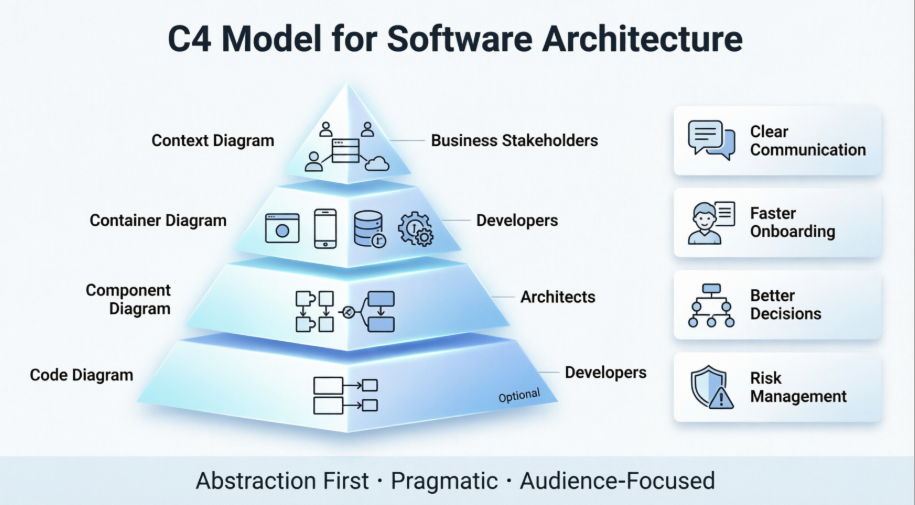
In this guide, we’re sharing our hands-on experience, breaking down how the model works, where it delivers real value, and how we successfully implemented it alongside modern diagramming tooling. Whether you’re a platform engineer, product manager, or technical lead, this review will help you understand why the C4 model has become our go-to standard for architectural communication.
📐 What Is the C4 Model?
The C4 model is a lightweight framework for visualizing software system architecture. Unlike heavy, notation-heavy methodologies (like UML’s full specification), C4 advocates for simplicity, pragmatism, and progressive disclosure. Its core philosophy is “abstraction first”: start with a high-level view and drill down only as needed.
In our experience, this approach eliminates the common pitfall of “wall-to-wall” architecture diagrams that overwhelm non-technical stakeholders while leaving developers guessing about system boundaries. By structuring documentation into four distinct, zoomable levels, teams can maintain a shared understanding of the system without sacrificing technical accuracy.
🧱 The Four Levels of Abstraction
The model’s name comes from its four hierarchical diagram types, each serving a specific audience and purpose:
1. Context Diagrams (Level 1)
-
Focus: System boundaries and external interactions.
-
What it shows: How your system fits into the broader environment, including users (actors) and external systems/services.
-
Our Take: This is the single most effective diagram for aligning product, business, and engineering teams. It clearly communicates scope, dependencies, and the problem space without drowning readers in technical jargon.
2. Container Diagrams (Level 2)
-
Focus: High-level technology choices and runtime boundaries.
-
What it shows: Web applications, mobile apps, microservices, databases, message brokers, and how they communicate.
-
Our Take: Ideal for developer and DevOps conversations. It surfaces technology decisions, data flow, and deployment boundaries, making it invaluable during sprint planning and infrastructure reviews.
3. Component Diagrams (Level 3)
-
Focus: Internal structure of a single container.
-
What it shows: Logical components, their responsibilities, and interactions. These map closely to code-level abstractions (e.g., packages, modules, or services) without showing raw syntax.
-
Our Take: Perfect for architectural deep dives, codebase refactoring, and onboarding senior engineers. It bridges the gap between system design and actual implementation.
4. Code Diagrams (Level 4)
-
Focus: Classes, interfaces, and relationships within a component.
-
What it shows: Detailed code structure, typically via UML class diagrams or similar.
-
Our Take: Optional and often skipped in practice. Modern IDEs and static analysis tools generate this automatically. We only use this level for documenting complex algorithms or critical domain logic.
🛠️ Real-World Applications: Where the C4 Model Delivers
After rolling out C4 diagrams across multiple initiatives, we’ve identified several high-impact use cases:
| Use Case | Why It Works |
|---|---|
| Architecture Documentation | Creates a living, layered reference that scales with the system and stays relevant across releases. |
| Developer Onboarding | Reduces time-to-productivity by giving new hires a clear visual roadmap of system structure and data flow. |
| Architecture Decision Making | Makes dependencies visible, helping teams evaluate the blast radius of changes before committing. |
| System Analysis & Improvement | Highlights coupling, redundancy, and bottlenecks, guiding refactoring and optimization efforts. |
| Cross-Functional Communication | Context diagrams translate technical scope for PMs, sales, and support; deeper levels keep engineers aligned. |
| Risk Management & Security | Exposes critical paths and single points of failure early, enabling proactive testing and hardening. |
| Compliance & Auditing | Provides a clear, versioned trail of architectural decisions for regulatory reviews. |
| Microservices Observability | Maps service boundaries, APIs, and messaging protocols, simplifying tracing and monitoring strategies. |
📝 Step-by-Step Implementation Guide
Implementing the C4 model doesn’t require a steep learning curve. Here’s how we structured our rollout:
1. Establish Consistent Notations
-
C4 doesn’t enforce a rigid visual syntax. We standardized on simple shapes, consistent color coding, and explicit labels for name, type, technology, and description.
-
Always include a legend to prevent misinterpretation across teams.
2. Build Context Diagrams First
-
List all user roles and external systems your software interacts with.
-
Place your system in the center. Draw labeled connectors showing interaction types (e.g.,
HTTPS,gRPC,Sync/Async). -
Validate with product and business stakeholders before moving deeper.
3. Develop Container Diagrams
-
Identify runtime boundaries: web apps, APIs, databases, queues, file stores, etc.
-
Document each container’s responsibility, tech stack, and communication protocols.
-
Ensure all containers sit within the system boundary defined in Level 1.
4. Drill into Component Diagrams
-
Pick one container at a time. Break it into logical components.
-
Map responsibilities and interactions. Avoid showing implementation details that change frequently.
-
Use these diagrams during design reviews and component ownership assignments.
5. (Optional) Add Code Diagrams
-
Reserve for high-complexity or high-risk components.
-
Generate from IDEs or static analysis tools rather than drawing manually.
-
Keep them narrowly scoped to avoid documentation rot.
💡 Field-Tested Best Practices
Through iterative use, our team distilled several rules that keep C4 diagrams useful rather than burdensome:
-
Iterative Refinement: Start broad. Accept that diagrams will evolve with the codebase. Treat them as living artifacts, not polished museum pieces.
-
Tool Agnosticism: You don’t need a specialized C4-only platform. Choose tools that support drag-and-drop, real-time collaboration, version control, and easy export.
-
Strict Consistency: Standardize naming conventions, symbols, and detail levels across all diagrams. Inconsistent notation defeats the model’s clarity purpose.
-
Cross-Disciplinary Collaboration: Involve developers, architects, DevOps, and product owners in diagram creation and review. Architecture is a team sport, not a solo exercise.
-
Automate Where Possible: Integrate diagram generation into CI/CD or documentation pipelines to reduce manual overhead and keep visuals in sync with code.
🖥️ Tooling Review: Visual Paradigm Online C4 Editor
When evaluating diagramming platforms for C4 implementation, we tested Visual Paradigm’s Online C4 Model Software. Here’s our hands-on assessment:
✅ Strengths
-
Intuitive Interface: Drag-and-drop shapes and connectors make diagram creation fast, even for non-designers.
-
Rich Template Library: Over 2,000 professionally designed templates, including pre-built C4 Context, Container, Component, and System Landscape diagrams for common use cases (e.g., Internet Banking, API Applications, Big Bank Plc).
-
Seamless MS Office & Visio Integration: Embed diagrams directly into Word, Excel, and PowerPoint. Import existing
.vsdxfiles without losing formatting. -
Flexible Export Options: Share via PNG, JPG, SVG, GIF, or PDF—ideal for documentation, wikis, and stakeholder presentations.
-
Real-Time Collaboration: Team members can co-edit, comment, and iterate simultaneously, reducing feedback loops.
-
Beyond C4: The platform doubles as a comprehensive diagramming suite supporting UML, BPMN, ArchiMate, ERD, cloud architecture (AWS, Azure, GCP), flowcharts, mind maps, and more.
⚖️ Considerations
-
While the free tier is excellent for getting started, advanced collaboration and enterprise features may require a paid license.
-
As with any diagramming tool, discipline is required to prevent overcomplication. The tool won’t enforce C4 principles—teams must.
🏁 Verdict
Visual Paradigm Online is a robust, user-friendly platform that aligns well with the C4 model’s philosophy of clarity and accessibility. Its template ecosystem and collaboration features make it a strong choice for teams looking to standardize architectural documentation without heavy upfront setup.
📌 New Conclusion: Why the C4 Model Sticks
Architectural communication fails when complexity outpaces clarity. The C4 model succeeds because it doesn’t try to capture everything at once. Instead, it meets each audience where they are: executives see scope, engineers see boundaries and components, and auditors see decision trails.
In our review and implementation journey, the C4 model has proven to be more than a diagramming convention—it’s a catalyst for alignment, faster onboarding, and more resilient system design. Paired with a flexible tool like Visual Paradigm Online, teams can transform architectural ambiguity into shared understanding. If your organization struggles with fragmented documentation, siloed knowledge, or slow decision-making, adopting the C4 model is one of the highest-leverage investments you can make.
References
- Mastering C4 Diagrams in Visual Paradigm: A Hands-On Review of All Four Creation Methods: Comprehensive practitioner review comparing manual modeling, AI generation, PlantUML integration, and API-based approaches for C4 diagram creation in Visual Paradigm.
- The AI Revolution in C4 Architecture Diagramming: A Comprehensive Guide: In-depth exploration of how AI is transforming traditional C4 modeling workflows, featuring step-by-step tutorials for Visual Paradigm’s AI-powered tools.
- Comprehensive C4 Model Software | Visual Paradigm: Official feature overview detailing Visual Paradigm’s support for all six C4 diagram types, AI-powered generation capabilities, and enterprise reporting features.
- C4 Diagram Tool Features | Visual Paradigm: Central hub documenting the full capabilities of Visual Paradigm’s C4 modeling solution, including desktop and online platform comparisons.
- C4 Diagram Tool Solution | Visual Paradigm: Solution-focused page highlighting use cases, benefits, and implementation strategies for C4 modeling with Visual Paradigm.
- Visual Paradigm Full C4 Model Support Release: Official release announcement detailing native support for all six C4 diagram types in Visual Paradigm Desktop, with technical implementation notes.
- AI Diagram Generator: Complete C4 Model: Release notes for the AI-powered feature that generates entire C4 model suites from single text prompts, including workflow examples.
- From Prompt to Architecture: My Hands-On Review of Visual Paradigm’s AI-Powered C4 Diagram Studio: First-person review comparing traditional manual control versus AI-powered speed for C4 diagram creation.
- Mastering C4 Diagrams: All Four Creation Methods: Detailed comparison of manual modeling, AI generation, PlantUML integration, and programmatic API approaches.
- C4 Model Support Discussion | Visual Paradigm Forums: Community forum thread discussing implementation experiences, feature requests, and user tips for C4 modeling in Visual Paradigm.
- Beginner’s Guide to C4 Model Diagrams | Visual Paradigm Blog: Accessible introduction to C4 modeling concepts with practical examples using Visual Paradigm templates.
- Online C4 Model Tool | Visual Paradigm: Feature page for the web-based C4 diagram editor, highlighting drag-and-drop functionality, templates, and collaboration features.
- Visual Paradigm C4 Tutorial | YouTube: Video walkthrough demonstrating C4 diagram creation workflows in Visual Paradigm, suitable for visual learners.
- Diagrams as Code: The Power of C4: Deep dive into treating architecture diagrams as version-controlled code artifacts, with practical CI/CD integration examples.
- AI-Powered C4-PlantUML Markdown Editor Release: Announcement of the integrated Markdown editor that combines AI-generated PlantUML code with live preview for documentation-as-code workflows.
- C4-PlantUML Studio | Visual Paradigm: Feature page for the specialized browser-based tool that bridges AI-powered diagram generation with PlantUML code export for version control.
- From Blank Page to Architecture Blueprint: A Review of Visual Paradigm’s AI-Powered C4-PlantUML Studio: Practitioner review highlighting how the C4-PlantUML Studio addresses real-world documentation challenges with AI assistance.