
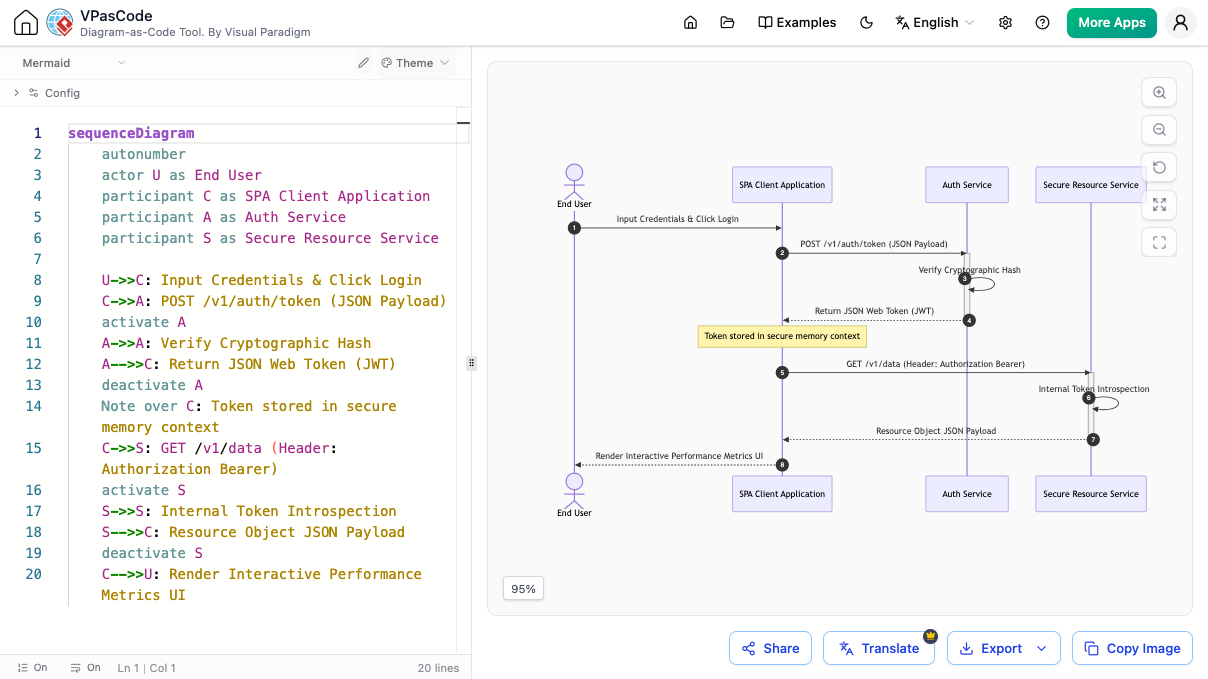
In the realm of modern software architecture, few concepts are as critical as the orchestration of interactions between a client and a server. Whether you are building a simple login page or a complex microservices ecosystem, understanding the chronological flow of data is paramount. This tutorial explores how to model a robust User Authentication process using a Sequence Diagram, utilizing the power of VPasCode and the Mermaid syntax.
Understanding the Sequence Diagram
A Sequence Diagram is a type of UML (Unified Modeling Language) diagram that shows how objects interact with one another in a specific scenario. Unlike a Flowchart, which depicts logic, a Sequence Diagram focuses on time and order. It visualizes the “story” of a request as it travels through your system.
When we look at the architecture of a secure web application, we typically see three distinct actors:
- The User: The human initiating the request (often represented as an Actor).
- The Client: The frontend application (like a Single Page Application or Mobile App) that the user interacts with.
- The Server: The backend infrastructure responsible for authentication, validation, and data retrieval.
Deconstructing the Authentication Flow
To model a secure login process, we must simulate the exchange of credentials and the subsequent token management. In the code snippet provided, we utilize the sequenceDiagram keyword to define the context. Let’s break down the interaction step-by-step:
- Initiation: The User enters credentials into the Client. The Client then initiates a
POSTrequest to the Server’s login endpoint. - Authentication: The Server validates the credentials. In a more advanced system (as hinted in the diagram), this might involve verifying cryptographic hashes or checking against an Auth Service.
- Token Generation: Upon successful validation, the Server generates a JSON Web Token (JWT). This token is a stateless, secure way to pass identity information.
- Response: The Server returns this token to the Client. The Client stores this token (often in a secure memory context) and uses it for subsequent requests.
This flow ensures that the Client is “authenticated” for future interactions without needing to send passwords repeatedly.
Writing Diagrams as Code with Mermaid
Visual Paradigm’s VPasCode allows developers to write these diagrams using text. This approach, known as “Diagrams as Code,” offers version control benefits that dragging and dropping boxes in a GUI cannot match. Here is how the logic translates into the Mermaid syntax:
sequenceDiagram
    autonumber
    actor U as End User
    participant C as SPA Client Application
    participant A as Auth Service
    participant S as Secure Resource Service

    U->>C: Input Credentials & Click Login
    C->>A: POST /v1/auth/token (JSON Payload)
    activate A
    A->>A: Verify Cryptographic Hash
    A-->>C: Return JSON Web Token (JWT)
    deactivate A
    Note over C: Token stored in secure memory context
    C->>S: GET /v1/data (Header: Authorization Bearer)
    activate S
    S->>S: Internal Token Introspection
    S-->>C: Resource Object JSON Payload
    deactivate S
    C-->>U: Render Interactive Performance Metrics UI
Notice the use of activate and deactivate. These keywords are crucial in sequence diagrams. They draw the “activation bar” (the vertical rectangle) on the participant’s lifeline, visually indicating the duration of the object’s activity during the process.
Advanced Modeling Concepts: Internal Logic and Storage
The diagram goes beyond simple request/response. It highlights two advanced concepts essential for security:
- Internal Processing: The line
A->>A: Verify Cryptographic Hashrepresents an internal loop. It shows that the Auth Service does work on its own before responding. This is vital for modeling the latency and processing steps. - Data Persistence Notes: The
Note over Celement indicates that the Client Application stores the token. In a real-world scenario, this note might specify that the token is stored inHttpOnlycookies or local storage, which is a critical security decision.
From Text to Visualization
One of the most powerful features of VPasCode is the instant rendering. As you type the code on the left, the diagram updates on the right. You can see how the actor U renders as a stick figure, while the participants become rectangular boxes. The arrows are automatically styled as solid lines for synchronous calls and dashed lines for return messages.
This tooling bridges the gap between abstract logic and visual architecture, allowing teams to align on the interaction design before a single line of production code is written.