
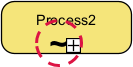
In the world of Business Process Model and Notation (BPMN), we often strive for rigid structures to ensure predictability. However, real-world human behavior is rarely that linear. This is where the Adhoc Marker becomes an essential tool for process architects. Represented by a tilde (~), this marker signals to the process engine that strict sequence rules are suspended, granting human actors the autonomy to determine the flow of work dynamically.
The Core Concept: What is the Adhoc Marker?
The Adhoc Marker is a specialized symbol used within BPMN to define a sub-process where the order of execution is not pre-determined. While standard BPMN relies on sequence flows (arrows) to dictate exactly which task happens before another, the Adhoc marker introduces a layer of flexibility.
When you see a tilde (~) at the bottom of a Sub-Process container, it acts as a “flexibility toggle.” It tells the system: “The tasks inside this box are available, but you don’t need to do them in a specific order.”
Key Technical Characteristics
- Visual Symbol: A tilde (~) located at the bottom of a Sub-Process element.
- Function: It relaxes standard sequence flow rules, allowing activities to execute in any order.
- User Discretion: Execution logic shifts from a system-driven script to a human-driven decision. The actor decides at runtime which task to perform next.
- Dependency Rule: Tasks within an Adhoc sub-process are independent. There are no rigid incoming or outgoing sequence flows dictating a specific path.
Real-World Application: The Medical Patient Checkup
To understand the necessity of the Adhoc marker, consider the workflow of a doctor conducting a patient checkup. In a highly automated system, the doctor might be forced to check blood pressure, then pulse, then temperature, in that exact order every single time. This is inefficient and often clinically unnecessary.
With an Adhoc sub-process, the workflow adapts to the doctor’s clinical judgment:
- The doctor enters the room.
- The system presents the available tasks: Check BP, Listen to Heart, Check Temperature.
- The doctor decides to check BP first.
- Based on the BP reading, the doctor decides to skip the temperature check because the patient reports no fever symptoms.
- The doctor finishes with the heart check.
In this scenario, the “Process” is not a rigid checklist but a flexible set of options available to the expert.
Modeling in Visual Paradigm
When using Visual Paradigm (VP) to model these scenarios, it is crucial to apply the marker correctly to maintain model integrity. The Adhoc marker applies to Sub-Processes, not individual tasks.
Step-by-Step Implementation
- Create a Sub-Process: Start by adding a standard Sub-Process element to your diagram. This container will hold your flexible tasks.
- Add Activities: Place the relevant tasks (e.g., “Check BP”, “Heart Check”) inside the Sub-Process container.
- Apply the Marker: With the Sub-Process selected, look for the Marker Toolbar. Select the Adhoc marker option. This will render the tilde (~) symbol at the bottom of the container.
- Connect Flow: Because the internal order is now arbitrary, the sequence flows inside the Adhoc sub-process should typically be treated as available options rather than mandatory steps.
Summary
The Adhoc marker is the bridge between rigid automation and human adaptability. By using the tilde (~), you acknowledge that in many processes, the “right” path is determined by the person doing the work, not the flowchart. This results in more realistic, efficient, and human-centric business process models.