
In the world of Business Process Model and Notation (BPMN), clarity is king. While the core of a process diagram defines how a task is executed—the sequence of events, the decisions made, and the data flowing between them—there is often a need to provide context, explanations, or supplementary details that do not interfere with the actual workflow logic. This is where the Association becomes an indispensable tool for modelers using Visual Paradigm.
What is an Association in BPMN?
An Association is a specific type of connecting object used to link a process element (such as a task, event, or gateway) to supplementary information. Unlike sequence flows, which dictate the order of operations, or message flows, which show communication between pools, an Association is purely informational.
Think of an Association as a “sticky note” or an annotation line. It allows you to:
- Attach text annotations to specific steps.
- Link visual artifacts, such as forms or documents, to the tasks that create or consume them.
- Clarify complex logic without cluttering the execution path.
In the context of Visual Paradigm, associations are vital for creating models that are not just executable specifications but also comprehensive documentation for stakeholders.
Visualizing the Association
When you look at a BPMN diagram, an Association is represented by a line connecting a process object to an artifact. The line can take two distinct forms, each serving a subtle purpose:
- Undirected Association: A simple line without an arrowhead. This is typically used to attach a text annotation (a rectangular box with a folded corner) to an element. It implies a general relationship, such as “This task is described by this note.”
- Directed Association: A line with an arrowhead pointing towards the target object. This is often used to indicate that a specific artifact (like a form or a data store) is associated with the process element it points to.
It is crucial to remember that associations never dictate the order of operations. They do not influence the process engine. If you have a sequence of tasks A, B, and C, adding an association from A to a note about B will not make the engine wait to read the note before executing B.
Practical Application: The Nomination Process
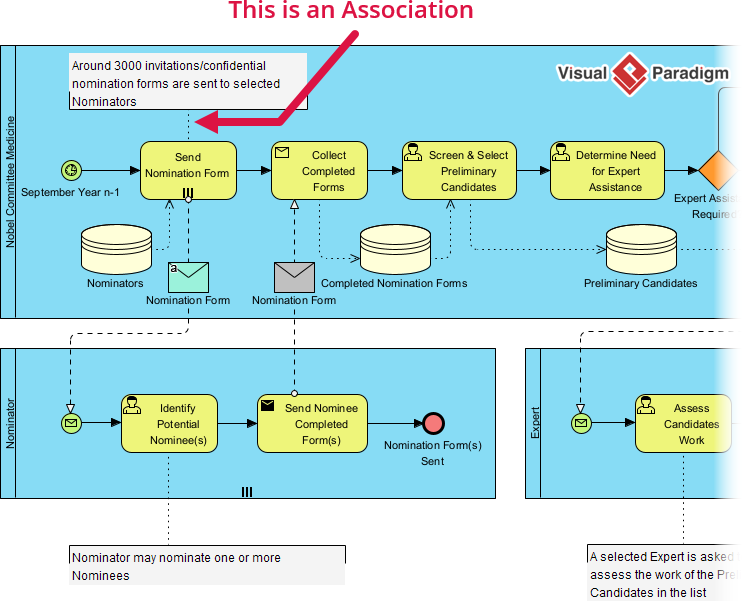
Let’s look at a practical scenario involving a “Nobel Committee” process, as depicted in the reference diagram. In this workflow, various tasks are performed to manage nominations.
Consider the task labeled “Send Nomination Form”. A process modeler might want to specify exactly what happens during this step. Instead of changing the task name to “Send Nomination Form (3000 copies),” which is verbose and hard to read, the modeler can use an Association.
By drawing a directed association from the “Send Nomination Form” task to a text annotation, we can add the text: “Around 3000 invitations/confidential nomination forms are sent to selected Nominators.” This provides the necessary operational detail without altering the flowchart’s structure.
Associations and Data Artifacts
Associations are also frequently used to link process tasks to data objects, such as documents or databases. In the reference diagram, you can see dashed lines connecting tasks to icons representing:
- Nominators: A data store or group.
- Nomination Form: A document artifact.
- Completed Nomination Forms: Another document or data store.
These dashed lines (often styled as associations in Visual Paradigm) clarify that the “Screen & Select Preliminary Candidates” task interacts with the “Completed Nomination Forms” data store. This visual cue tells the viewer, “This task reads from this data,” without needing a complex data flow diagram.
Best Practices for Using Associations
To maintain a clean and professional model, follow these guidelines when using associations in Visual Paradigm:
- Keep it Informative: Use associations to add value. If a text box repeats information already obvious from the task name, skip it.
- Use Directed Lines for Artifacts: When linking a task to a document or data store, use the arrowhead to clearly indicate the direction of the relationship (e.g., Task -> Document).
- Avoid Overcrowding: Don’t attach a dozen notes to a single task. If a task requires extensive explanation, consider using a “Detailed Task” sub-process to encapsulate the complexity.
- Consistent Styling: In Visual Paradigm, ensure your associations are styled consistently (e.g., dashed lines for data associations, solid lines for annotations) to help stakeholders distinguish between different types of relationships.
Conclusion
Mastering the Association is a key step in becoming proficient with BPMN. It bridges the gap between the rigid logic required by process engines and the fluid, explanatory nature required by human readers. By using associations effectively, your process models become powerful tools for communication, ensuring that everyone from business analysts to IT developers understands not just the what and how, but also the why and details of your business processes.