
In modern enterprise architecture, few processes are as complex and multi-faceted as Employee Onboarding. It is not merely a sequence of tasks; it is a symphony of coordination between disparate teams—Human Resources, IT, Facilities, Hiring Managers, and the New Employee. While many organizations default to a “Command and Control” approach (Orchestration), where a central authority dictates every step, a more resilient and scalable approach is often Choreography.
This tutorial explores the system architecture of decentralized workflows, specifically analyzing a visual model of employee onboarding. We will break down how to model complex interactions where teams coordinate through agreed events rather than direct commands, ensuring flexibility and “loose coupling” in your business processes.
The Core Concept: Orchestrated vs. Choreographed
To understand the diagram, we must first distinguish between two fundamental architectural patterns:
- Orchestration: A central “conductor” tells everyone what to do. In onboarding, this would mean HR sends a task to IT, waits for a “Done” signal, and then tells Facilities to start. This creates a bottleneck.
- Choreography: There is no central conductor. Instead, participants listen for specific events (e.g., “Start Date Confirmed”) and act accordingly. If IT needs to finish before Day 1, they simply see the deadline and work backward.
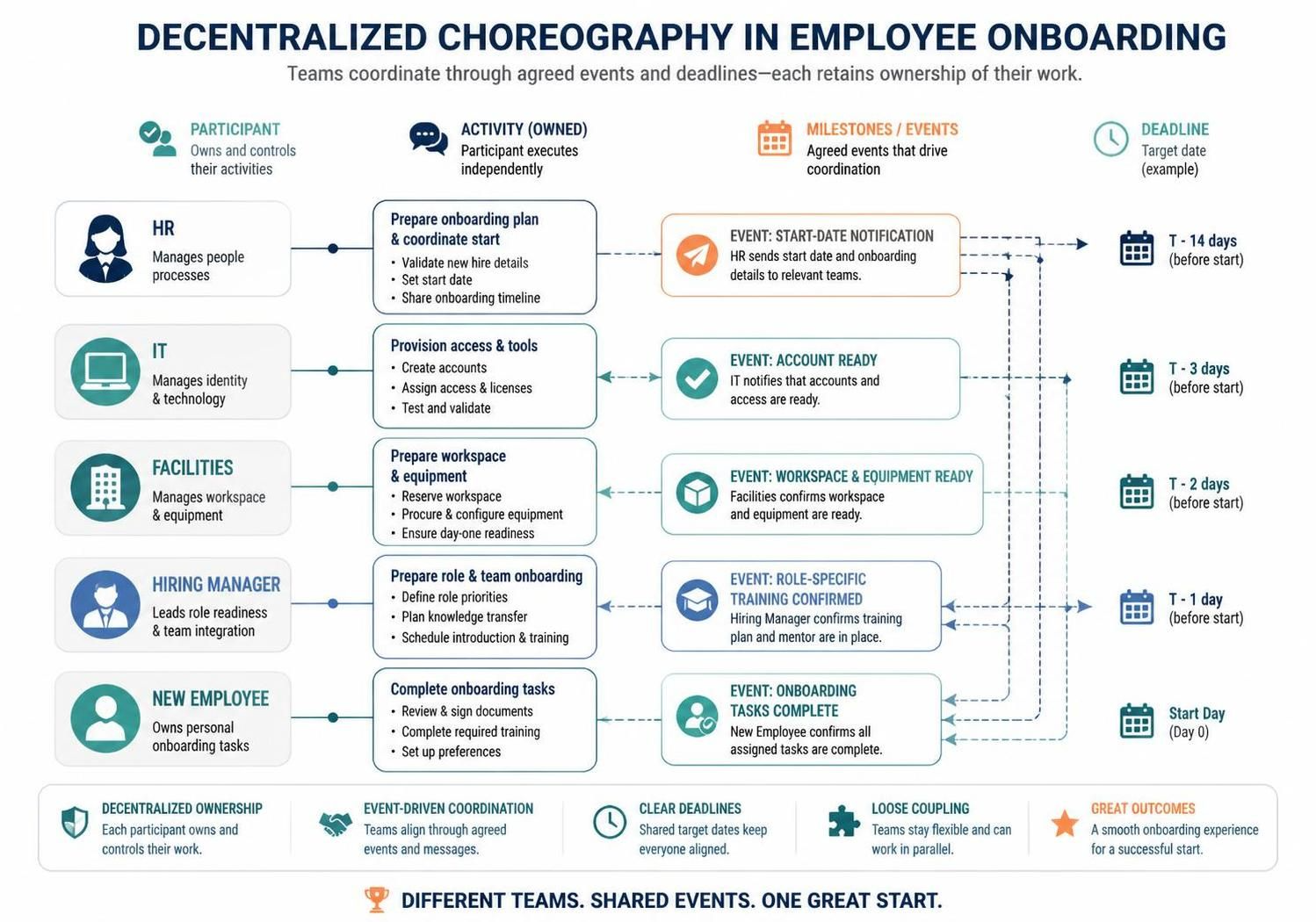
The diagram provided illustrates a Decentralized Choreography model. Here, ownership is distributed, and coordination happens through shared milestones.
Architectural Elements of the Model
The visual model is structured around four key pillars that define the workflow. Let’s examine each component:
1. The Participants (Actors)
On the left side of the diagram, we see the distinct entities involved in the process. In a system architecture context, these are your Service Providers or Actors:
- HR: Manages people processes and sets the timeline.
- IT: Manages identity, technology, and security.
- Facilities: Manages physical workspace and equipment.
- Hiring Manager: Leads role readiness and team integration.
- New Employee: The final recipient of the service.
2. Owned Activities (Tasks)
Next to each participant is a box labeled Activity (Owned). This represents the internal workflow of that specific team. Crucially, the diagram emphasizes that these activities are owned by the participant.
For example, the “Provision access & tools” activity belongs to IT. The hiring manager cannot dictate how IT creates the accounts, only when they need to be ready.
3. Milestones / Events (The Glue)
The heart of a choreography model is the Milestone / Event. These are the agreed-upon triggers that drive coordination. Notice the icons:
- Event: Start-Date Notification: The trigger that initiates the entire process.
- Event: Account Ready: A signal that IT has completed its work.
- Event: Workspace & Equipment Ready: A signal from Facilities.
4. Deadlines (The Constraints)
On the far right, we see the timeline. In a choreographed system, deadlines are critical because there is no central manager constantly reminding teams of the next step.
- T – 14 days: HR sets the start date.
- T – 3 days: IT must have accounts ready.
- Start Day: The employee begins work.
Visualizing the Flow: How It Works
The arrows in the diagram tell a story of Event-Driven Coordination. Let’s trace the logic:
- The Trigger: HR completes their “Prepare onboarding plan” activity and sends the Start-Date Notification.
- The Parallel Execution:
- IT sees the deadline (T-3 days) and provisions access independently.
- Facilities sees the deadline (T-2 days) and prepares the desk independently.
- The Hiring Manager sees the deadline (T-1 day) and plans training.
- The Convergence: On Start Day, all these independent streams converge. The New Employee arrives to find everything ready, having confirmed that Onboarding Tasks are complete.
Why Choose Choreography?
Why not just use Orchestration? The diagram highlights a specific architectural advantage: Loose Coupling.
In an orchestrated system, if IT changes their internal process for creating accounts, HR’s workflow might break because HR expects a specific signal at a specific time. In the Choreography model shown here, IT only needs to communicate the Event (“Account Ready”). The internal sequence of how they do it remains hidden and flexible.
This model supports Decentralized Ownership. Each team retains control over their work, reducing bottlenecks where everyone waits for a central manager to approve the next step.
Conclusion
The diagram effectively communicates that while teams are different, they share a common goal: One Great Start. By modeling the process as a series of agreed events and deadlines rather than a rigid script, organizations can build more resilient, flexible, and human-centric workflows.