
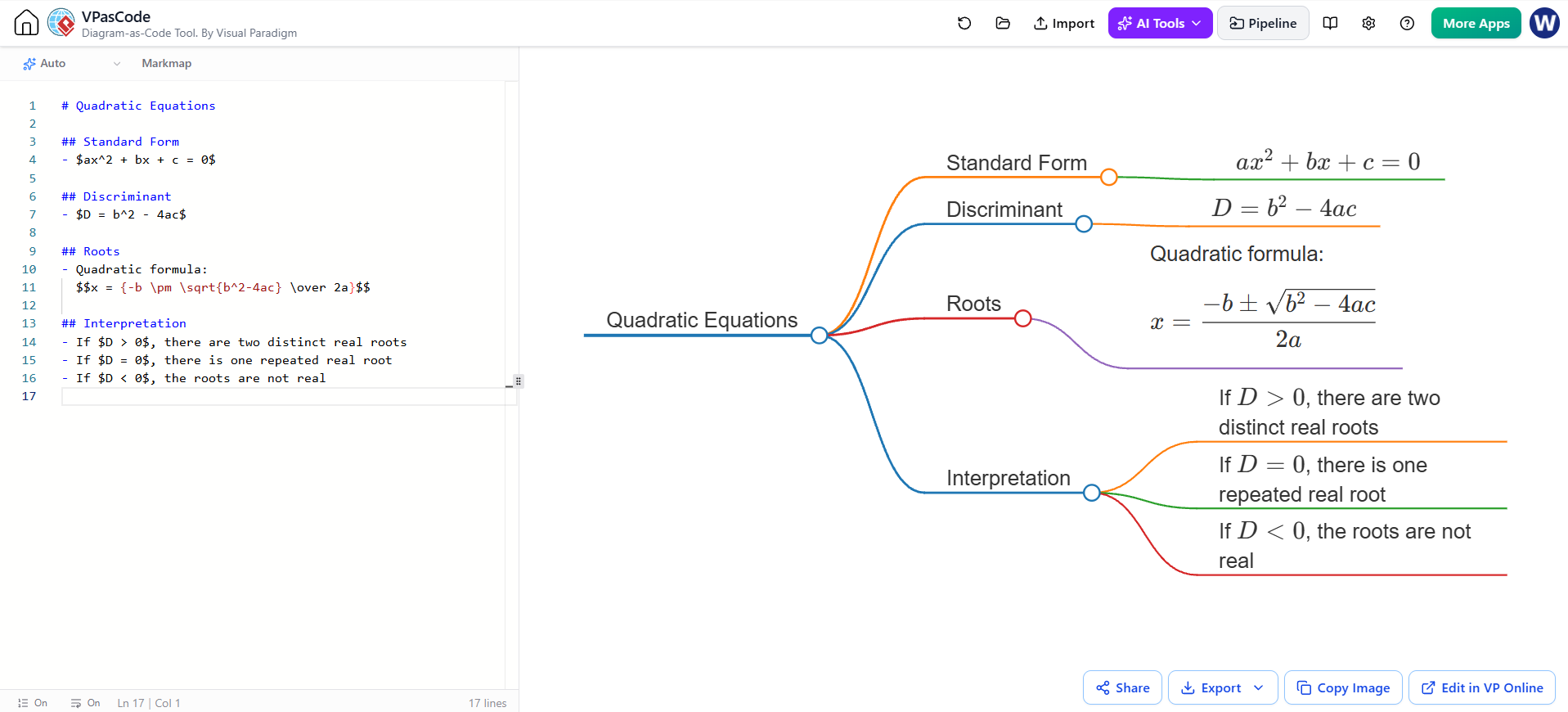
In the realm of technical documentation and educational software, the ability to bridge the gap between complex mathematical theory and visual representation is invaluable. VPasCode, a powerful “Diagram-as-Code” tool by Visual Paradigm, allows users to generate sophisticated mind maps directly from text. This tutorial explores how to leverage this tool to create a comprehensive visual guide on Quadratic Equations, demonstrating the seamless integration of structured text, Markdown syntax, and mathematical rendering.
Understanding the Core Architecture: Text-to-Diagram
At the heart of VPasCode is the concept that documentation should be written in plain text that is easily version-controlled and readable, yet capable of rendering into high-fidelity graphical outputs. The system architecture relies on a parser that interprets Markdown headers and special mathematical syntax to construct the nodes and edges of a mind map.
When a user inputs a document, the system identifies the hierarchy: the main title becomes the central root node, while subsequent headers define the primary branches. This approach ensures that the visual structure is strictly synchronized with the textual content, eliminating the manual labor of dragging and dropping shapes in traditional diagramming software.
Step-by-Step Modeling Concepts
1. Defining the Hierarchy with Markdown
The foundation of the diagram lies in Markdown syntax. VPasCode interprets header tags to determine the level of the node in the hierarchy. In our Quadratic Equations example, the hierarchy is established as follows:
- # Quadratic Equations: This creates the root node, the starting point of the visualization.
- ## Standard Form: This creates a primary branch extending from the root.
- ## Discriminant: Another primary branch, establishing the relationship between the concept and its definition.
- ## Roots: This branch leads to the most complex part of the equation.
- ## Interpretation: This branch serves as a logical classifier for the results of the discriminant.
2. Rendering Math with LaTeX
One of the most critical features of VPasCode is its support for mathematical expressions. The tool utilizes LaTeX syntax for rendering equations, allowing for precise mathematical notation. There are two distinct modes for rendering math in this context:
- Inline Math ($…$): Used for short expressions embedded within a node’s text. For example, the standard form is written as
$ax^2 + bx + c = 0$. This keeps the node compact and readable. - Display Math ($$…$$): Used for complex equations that need to be the focal point of a node. This is evident in the “Roots” branch, where the full Quadratic Formula is rendered using the
$$delimiters.
The rendering engine processes these tags to generate scalable vector graphics (SVG) for the math, ensuring that the resulting diagram looks professional and crisp at any zoom level.
Analyzing the Logical Flow
The resulting mind map is not just a static collection of facts; it represents a logical flow of information. The “Interpretation” branch, for instance, acts as a decision tree. It breaks down the behavior of the roots based on the value of the discriminant ($D$):
- If $D > 0$: The diagram indicates two distinct real roots. This implies the parabola intersects the x-axis twice.
- If $D = 0$: The diagram indicates one repeated real root. This corresponds to the vertex of the parabola touching the x-axis.
- If $D < 0$: The diagram indicates non-real roots. This implies the parabola does not intersect the x-axis.
This logical structuring allows students and engineers to quickly grasp the conditional outcomes of the quadratic formula without needing to memorize abstract rules.
Best Practices for VPasCode Documentation
To achieve the best results when using VPasCode for technical diagrams, consider the following guidelines:
- Keep Nodes Concise: While VPasCode supports rich text, large blocks of text can clutter the visual layout. Use headers for titles and bullet points for lists.
- Use Semantic Delimiters: Be consistent with your use of
$and$$. Mixing them up can cause rendering errors or ugly formatting. - Structure for Hierarchy: Plan your document structure before writing. Ensure that your headers logically follow the hierarchy of your intended mind map.