
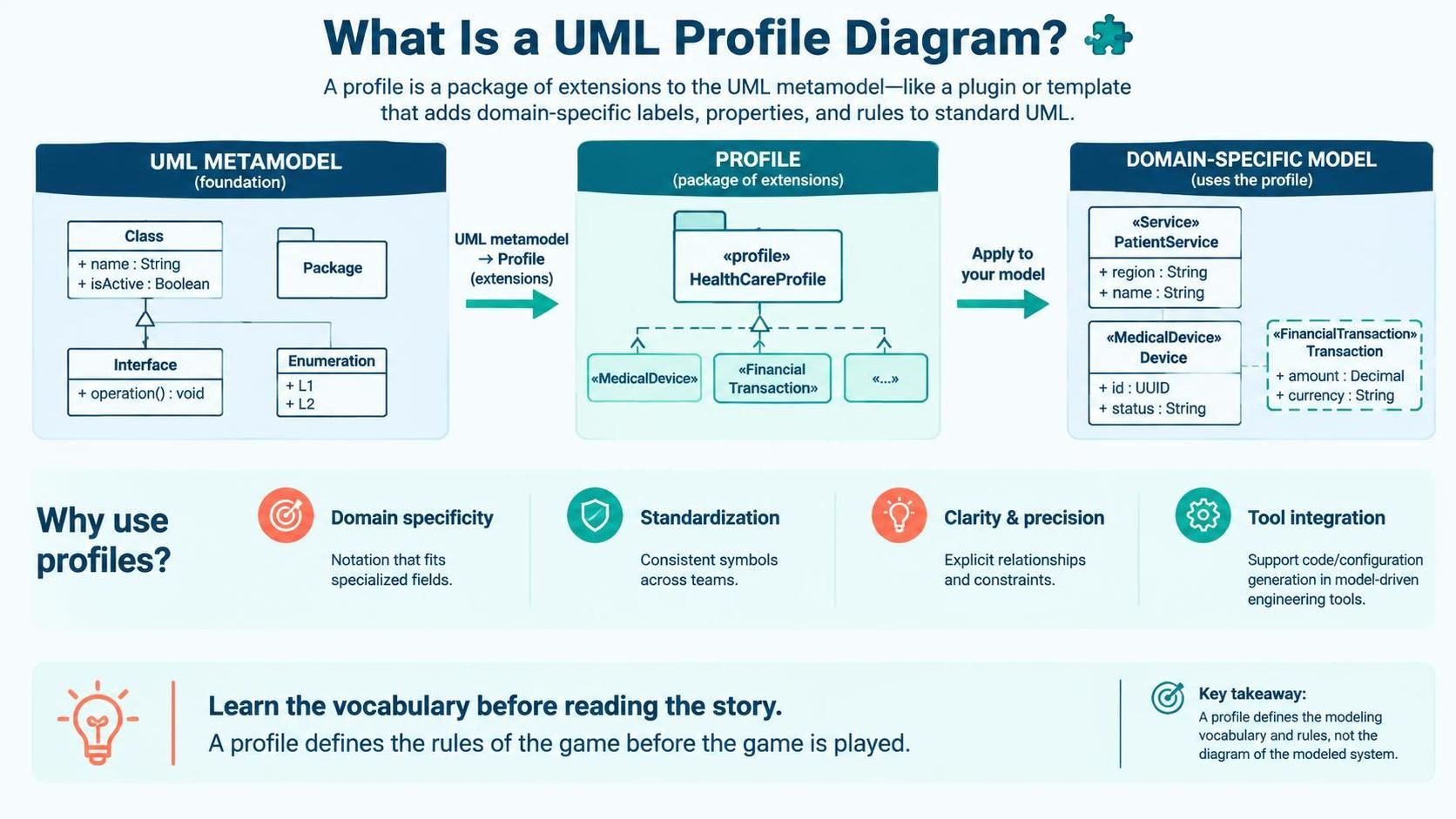
In the world of software architecture and system design, standard Unified Modeling Language (UML) diagrams like Class Diagrams or Sequence Diagrams are the universal standard. However, what happens when a standard “Class” doesn’t accurately represent a specific concept in your industry, such as a “Medical Device” or a “Financial Transaction”? This is where the UML Profile Diagram becomes an essential tool.
A Profile Diagram is not just another diagram; it is a meta-modeling construct. It acts as a powerful plugin that allows you to extend the UML metamodel itself. By defining a profile, you create a new vocabulary tailored to your specific domain, ensuring precision and consistency across your system architecture.
The Anatomy of a Profile Diagram
To understand how a Profile Diagram works, we must look at the three distinct layers of modeling described in the architecture: the Foundation, the Extension, and the Application.
1. The UML Metamodel (The Foundation)
At the base, we have the standard UML metamodel. This is the rigid set of rules and standard elements provided by the UML specification. It includes fundamental concepts like:
- Class: A blueprint for objects with attributes and operations.
- Interface: A contract specifying operations without implementation.
- Package: A grouping mechanism for organizing model elements.
- Enumeration: A set of named values.
2. The Profile (The Extension)
The Profile Diagram sits in the middle layer. It takes the elements from the metamodel and creates a Profile Package (e.g., HealthCareProfile). Within this package, you define new stereotypes. These stereotypes are essentially tags that extend the behavior or notation of the standard elements.
For example, you might define a stereotype called <<MedicalDevice>>. This stereotype tells the modeling tool to treat a standard Class as a Medical Device, adding specific properties or visual cues.
3. The Domain-Specific Model (The Application)
The final layer is where you apply your profile to your actual system design. When you create a Class Diagram in your domain, you apply the stereotypes defined in your profile. A standard Class becomes a <<MedicalDevice>> Device, and you can define specific constraints like id: UUID or status: String.
Why Use Profile Diagrams?
Why not just use standard UML? The answer lies in clarity, standardization, and tool integration.
Domain Specificity
Standard UML is generic. In specialized fields, generic terms can lead to ambiguity. A <<MedicalDevice>> stereotype immediately tells a stakeholder in the healthcare industry that this element represents a physical piece of equipment, whereas a standard Class could be anything.
Standardization & Clarity
Large teams often struggle with inconsistent modeling. Profile diagrams enforce a strict vocabulary. By defining the profile centrally, you ensure that every developer and architect uses the same symbols, labels, and relationships. This reduces ambiguity and explicitly defines how elements must relate to one another.
Tool Integration & MDE
Profile diagrams are the backbone of Model-Driven Engineering (MDE). Once you have defined a profile, you can integrate it with model-driven tools. These tools can read the stereotypes (e.g., <<FinancialTransaction>>) and automatically generate boilerplate code, database configurations, or API specifications based on the custom rules you defined.
Step-by-Step: Constructing a Profile
Creating a profile diagram in a tool like Visual Paradigm involves a logical flow of defining the extension and then applying it. Here is the conceptual workflow:
- Create the Profile Package: Start by creating a new Package and marking it as a Profile (often by setting the stereotype of the package to
<<profile>>). - Define Stereotypes: Inside the profile, create new classes that represent your domain concepts. You must link these to a standard UML element using a generalization (inheritance) relationship. For example,
<<MedicalDevice>>extendsClass. - Add Properties and Constraints: Add attributes to your new stereotypes. These are the specific data points required for your domain (e.g.,
region: String). - Apply to Diagrams: Now, in your standard Class Diagram, you can drag your new stereotype onto a Class. The class will now adopt the notation and properties defined in your profile.
The “Vocabulary Before the Story” Concept
A profound insight into Profile Diagrams is that they define the rules of the game before the game is played. When you read a profile diagram, you are learning the vocabulary of the system. You are understanding what terms like <<FinancialTransaction>> mean before you read the story of the system’s behavior in a sequence diagram.
By mastering Profile Diagrams, you move from simply drawing boxes to engineering a consistent, extensible, and domain-aware modeling language.