
Welcome to the ultimate guide on designing robust software architecture using VPasCode. This tutorial will walk you through the powerful capabilities of Visual Paradigm’s Diagram-as-Code tool, specifically focusing on how to leverage the PlantUML engine to build complex Class Diagrams. Whether you are a senior architect defining enterprise standards or a developer sketching quick models, understanding the underlying syntax and AI integration is key to mastering this workflow.
The Core Concept: Diagram-as-Code (DaC)
In traditional modeling, you often spend more time dragging boxes and connecting lines than defining the actual logic. VPasCode flips this paradigm by treating diagrams as text files. This approach brings several critical benefits:
- Portability: Your diagrams are just text. They live in Git, they diff cleanly, and they are version-controllable.
- Speed: Typing code is often faster than clicking UI elements.
- AI-Native: Because the input is natural language code, AI engines can easily parse, generate, and refactor your diagrams.
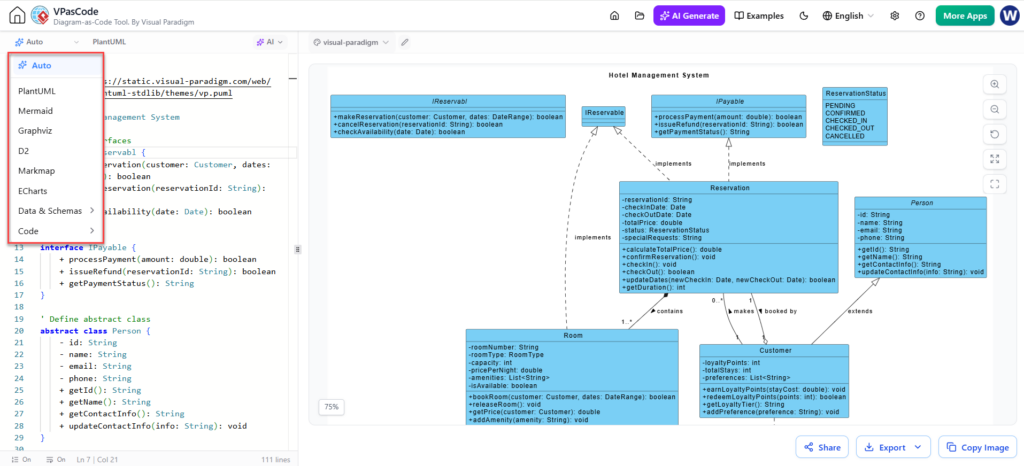
As seen in the interface, VPasCode offers a unified workspace. On the left, you have your code editor, and on the right, a real-time rendering canvas. This Interactive AI Modification allows you to see changes instantly without manual layout adjustments.
Understanding the Visual Paradigm Class Diagram
The diagram shown in the provided screenshot is a classic Object-Oriented Design representation for a “Hotel Management System.” It utilizes the PlantUML syntax to define classes, interfaces, and their relationships. Let’s break down the specific modeling concepts demonstrated in this example.
1. Defining Interfaces and Abstract Classes
Good software design relies on abstraction. The diagram demonstrates this by separating the Reservation logic from the implementation details using an interface named IReservable.
Key Concept: Interfaces define “what” a class can do, while abstract classes define “how” it partially does it.
In the code editor, you can see the definition for the IReservable interface and the Person abstract class. The syntax uses the interface and abstract class keywords to distinguish these from concrete classes.
interface IReservable {
    - processPayment(amount: double): boolean
    - issueRefund(reservationId: String): boolean
    - getPaymentStatus(): String
}

Define abstract class Person {
    - id: String
    - name: String
    - email: String
    - phone: String
    - getId(): String
    - getName(): String
    - getContactInfo(): String
    - updateContactInfo(info: String): void
}
2. The Power of Inheritance (Implementation)
The diagram shows the Reservation class implementing the IReservable interface. In VPasCode, this relationship is visually represented by a dashed line with a hollow triangle pointing to the interface.
This ensures that any object of type Reservation must provide implementations for processPayment, issueRefund, and getPaymentStatus. This strict adherence to the interface contract is a hallmark of robust enterprise architecture.
class Reservation {
    - reservationId: String
    - checkOutDate: Date
    - totalPrice: double
    ...
    - checkIn(): void
    - checkOut(): boolean
}
IReservable ..|> Reservation : implements
3. Managing Relationships and Associations
One of the most complex parts of class modeling is defining relationships. The diagram illustrates several types of associations:
- Composition/Containment: The
Roomclass “contains” aRoomType(implied by attributes). - Association with Multiplicity: The line connecting
ReservationandRoomshows a multiplicity of1, indicating a one-to-one relationship for this specific instance. - Inheritance: The
Customerclass extends the abstractPersonclass, inheriting properties likeemailandphone.
The syntax for these relationships often involves specific arrowheads and labels. For example, the dashed line labeled “implements” clearly separates the structural dependency from the data flow.
4. The PlantUML Layout Engine
Notice how the diagram is organized. The PlantUML engine (indicated in the dropdown menu of the screenshot) uses an automatic layout algorithm. However, for complex enterprise diagrams, you often need to guide the engine.
VPasCode allows you to define themes (like theme(vp.puml)) to ensure your diagrams look professional and consistent with Visual Paradigm’s branding standards. This is crucial for maintaining a unified look across large documentation sets.
Step-by-Step: Building Your Own Class Model
- Select the Engine: In the VPasCode sidebar, ensure PlantUML is selected. It is the industry standard for class diagrams.
- Define the Root: Start by defining your main entities (e.g.,
class Hotel,class Customer). - Add Attributes and Methods: Use the standard notation
+ getMethod(): typefor public methods and- privateAttribute: typefor private data. - Connect the Dots: Use relationships like
Customer --* Roomto denote aggregation or composition. Useextendsorimplementsfor inheritance hierarchies. - Refine with AI: If the layout is messy, use the “AI Generate” or “AI Refactor” buttons to ask the system to “Align the Customer and Reservation classes to the right.”
Why Choose VPasCode?
The screenshot highlights the “Auto” feature in the sidebar, which suggests intelligent suggestions. By combining the raw power of text-based syntax with the visual convenience of a GUI, VPasCode bridges the gap between Diagram-as-Code and Model-Based Engineering.
Furthermore, because the output is standard PlantUML code, your diagrams are not trapped in a proprietary format. You can export them as SVG, PNG, or PDF, or even import them back into Visual Paradigm Desktop for advanced model-based editing. This Transparent Version Control ensures your intellectual property remains portable and safe.
Conclusion
By mastering the PlantUML syntax within VPasCode, you gain the ability to architect complex systems with precision and speed. The separation of code and layout allows you to focus on the logic of your system—the relationships, the inheritance, and the data structures—while the engine handles the visual representation.
Whether you are building a simple user flow or a massive enterprise architecture, the “Diagram-as-Code” approach in VPasCode is your gateway to scalable, maintainable, and AI-enhanced documentation.