
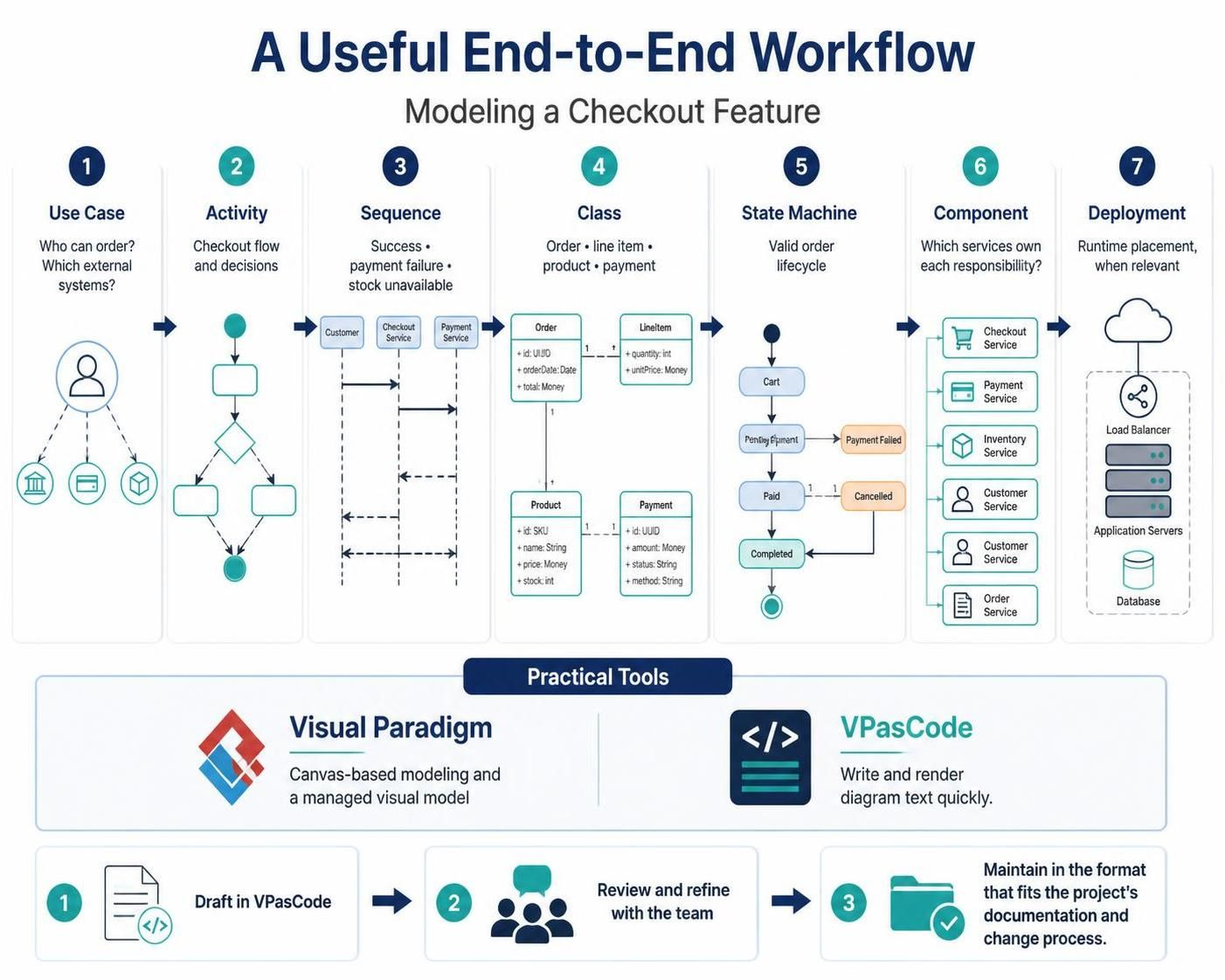
System architecture is often described as the blueprint of software, but without a structured workflow, these blueprints can become disconnected from business reality. This tutorial explores a comprehensive, seven-step workflow for modeling a critical business feature: the Checkout Process. By combining high-level business logic with low-level technical implementation, you can create a cohesive system design that is both easy to understand and robust enough for engineering.
We will walk through the progression from identifying actors to defining infrastructure, utilizing the Visual Paradigm ecosystem—specifically the text-based VPasCode and the canvas-based Visual Paradigm tool—to bridge the gap between ideation and execution.
The 7-Step Architecture Workflow
Effective modeling isn’t about drawing pretty pictures; it’s about asking the right questions at the right time. Here is the logical progression for modeling a checkout feature:
1. Use Case: Defining Boundaries
The process begins with the Use Case. This step is purely about scope and actors. Before writing code or drawing boxes, you must answer: Who can place an order? and Which external systems participate?
- Actors: The Customer.
- External Systems: Banking/Financial institutions (for payment) and Inventory providers.
2. Activity: Mapping the Flow
Once the actors are identified, we move to the Activity Diagram. This maps the chronological flow and decision points. For a checkout, the critical decision diamond is: Is the item in stock? If yes, proceed to payment; if no, alert the user.
3. Sequence: Detailing Interactions
The Sequence Diagram zooms in on the timing of interactions. It is vital here to model not just the “Happy Path” (success), but the error paths. You must explicitly diagram:
- Success Path: Customer sends request -> System validates -> Payment Service processes.
- Failure Paths: What happens if the payment gateway returns a “Declined” status? What if the inventory API times out?
4. Class: Defining Data Structure
With the flow established, the Class Diagram defines the static structure. This is where you define the entities and their attributes:
- Order: Contains a UUID, Order Date, and Total Money.
- LineItem: Links an Order to a Product, holding quantity and unit price.
- Payment: Contains transaction status, amount, and payment method.
5. State Machine: The Lifecycle
Crucially, an Order is not just a data object; it is a living entity with a lifecycle. The State Machine Diagram ensures that invalid states are impossible. For example, an Order cannot transition directly from “Cart” to “Completed” without passing through “Pending Payment” and “Paid.”
6. Component: Service Ownership
Now we shift from logic to structure. The Component Diagram assigns responsibilities to services. This enforces the separation of concerns:
- Checkout Service: Orchestrates the flow.
- Payment Service: Handles external bank interactions.
- Inventory Service: Manages stock levels.
7. Deployment: Runtime Placement
Finally, the Deployment Diagram addresses the infrastructure. This maps the components to physical or virtual nodes, such as Application Servers behind a Load Balancer, and a dedicated Database for persistence.
Tooling Strategy: VPasCode vs. Visual Paradigm
One of the most effective workflows described in modern modeling is the hybrid approach. You do not necessarily have to choose one tool for everything; instead, use the strengths of each.
The Drafting Phase: VPasCode
VPasCode (Visual Paradigm as Code) is ideal for the initial “Draft” phase. Because it relies on text, it allows architects to define complex logic and diagrams quickly without the mouse fatigue of dragging and dropping. It is perfect for:
- Rapid prototyping of Sequence and Class diagrams.
- Version control (Git) friendly modeling.
- Sharing snippets with developers who prefer code over GUIs.
The Refinement Phase: Visual Paradigm
Once the VPasCode draft is reviewed by the team, you can import it into Visual Paradigm. This is where the “Canvas-based modeling” shines. It allows for:
- Visual polish and professional presentation.
- Managed visual models where constraints are enforced by the UI.
- Creating the final documentation for stakeholders.
The Workflow
- Draft in VPasCode: Write the logic in text.
- Review and Refine: Collaborate with the team on the generated diagrams.
- Maintain: Move the diagrams to Visual Paradigm for long-term maintenance and documentation.
Conclusion
By following this seven-step workflow, you ensure that every architectural decision is backed by a specific model. Whether you start with the text of VPasCode or the canvas of Visual Paradigm, the key is consistency: ensuring that your State Machine matches your Sequence Diagram, and your Class Diagram supports your Component architecture.