
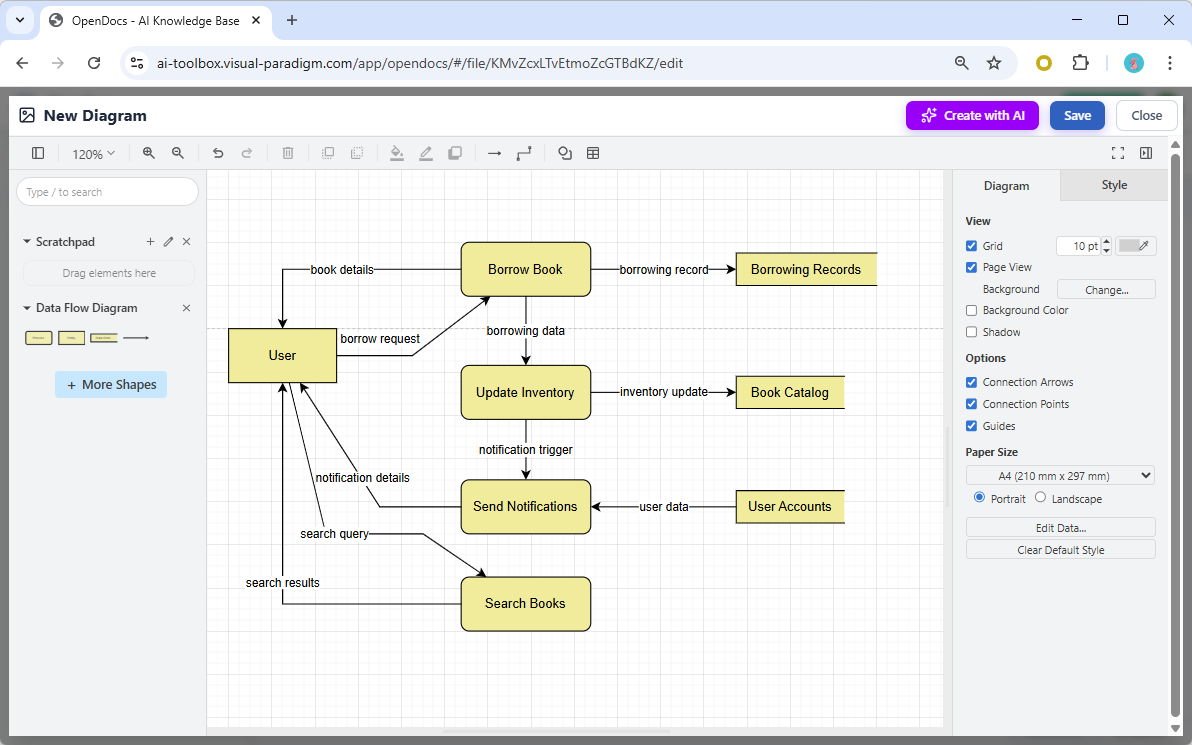
Data Flow Diagrams (DFDs) are essential tools for software architects and business analysts to visualize how information moves through a system. Unlike flowcharts that focus on control logic, DFDs focus strictly on data. In this tutorial, we will analyze a complex library management system diagram generated by OpenDocs, breaking down its structure, the specific modeling rules it follows, and how to edit it for maximum clarity.
Understanding the Core Components
The diagram displayed in the OpenDocs interface represents a classic Level 1 DFD. It decomposes a broader system into four distinct categories of elements. To effectively model a system, you must first understand the role of each shape:
- External Entities (The “Source” and “Sink”): Represented by the User box on the left. These are people, organizations, or other systems that exist outside the boundary of your current system but interact with it. In this model, the User initiates actions and receives final results.
- Processes (The “Transformers”): Represented by the yellow rounded rectangles (e.g., Borrow Book, Update Inventory). A process takes input data, performs a specific action, and produces output data. Notice how the arrows do not cross arbitrarily; they connect inputs to the process and outputs away from it.
- Data Stores (The “Warehouse”): Represented by the rectangular shapes (e.g., Borrowing Records, Book Catalog). These are repositories where data rests when not in use. In DFDs, processes must read from or write to data stores to maintain system state.
- Data Flows (The “Arteries”): The arrows connecting the elements. Crucially, every arrow in this diagram is labeled (e.g., search query, notification trigger). This labeling is a strict rule in DFD modeling; an arrow without a label implies data is flowing without definition, which is a modeling error.
Analyzing the System Logic
By tracing the lines in the OpenDocs canvas, we can reconstruct the narrative of the library system:
- Search and Discovery: The process begins when the User sends a search query to the Search Books process. The system returns search results back to the user.
- The Borrowing Transaction: When the user decides to borrow a book, they send a borrow request to the Borrow Book process. This process acts as a gatekeeper, sending book details to the Borrowing Records store to log the transaction.
- Inventory Management: Once a book is borrowed, the system must update its availability. The Borrow Book process sends borrowing data to the Update Inventory process. This, in turn, updates the master list in the Book Catalog data store.
- Notification Loop: Finally, the system ensures the user is informed. The Update Inventory process triggers a notification trigger that flows to the Send Notifications process. This process retrieves user data from the User Accounts store to ensure the correct notification details are sent back to the User.
Refinement and Editing with OpenDocs
While the AI provides a strong starting point, OpenDocs ensures you retain full control over the architectural model. The generated diagram is not a static image but a live, editable component. You can:
- Adjust the layout for better readability: The grid system in the screenshot allows for precise alignment of processes. If the diagram becomes cluttered, you can drag elements to create a cleaner hierarchy.
- Add or remove elements as requirements evolve: Perhaps the library wants to add a “Renew Book” feature. You can simply drag a new process from the Scratchpad and connect it to the existing flows.
- Change notation styles if needed: While this example uses standard symbols, you can often switch between Gane Sarson and Yourdon/DeMarco notations depending on your team’s preference.
- Embed the diagram directly into your documentation pages: As shown in the browser context, these diagrams are web-native components that can be easily integrated into wikis or requirement specifications.
Practical Example: Extending the Model
Let’s apply this logic to a different domain to prove the versatility of the model. Imagine we are modeling an E-Commerce Checkout instead of a library system.
- Entity: Customer
- Process: Validate Payment
- Data Store: Order History
- Flow: Customer sends “Payment Details” -> Process validates -> System updates “Order History” -> System sends “Confirmation” to Customer.
Conclusion
Data Flow Diagrams are powerful because they strip away the complexity of code to show the “flow of value” in a system. By using tools like OpenDocs, you can leverage AI to generate these structures instantly and then refine them to meet the exact needs of your project requirements. Whether you are mapping a hospital intake system or a simple book search, the principles of input, process, output, and storage remain constant.