
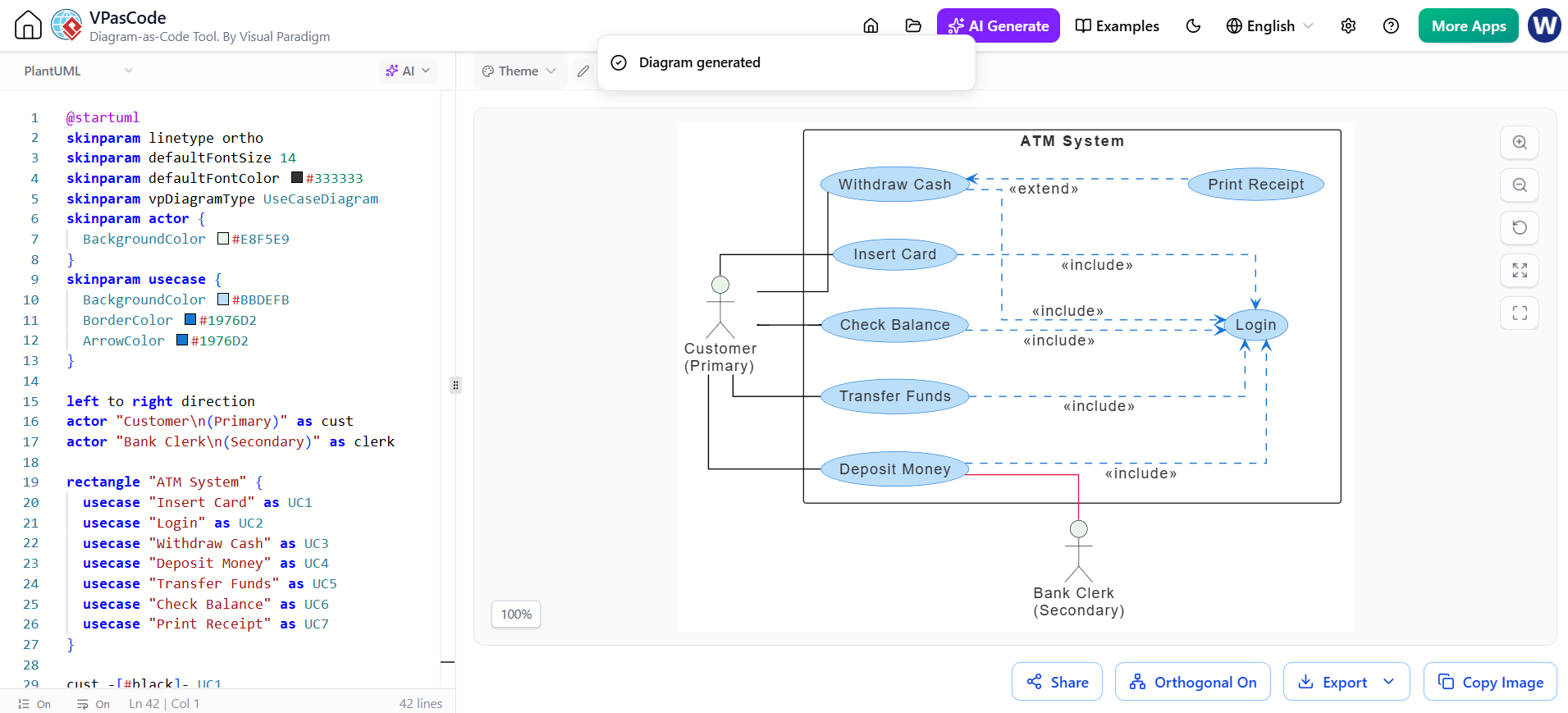
Welcome to this deep-dive tutorial on leveraging VPasCode, Visual Paradigm’s powerful diagram-as-code tool, combined with AI capabilities. In the modern software engineering landscape, the gap between high-level system architecture and visual representation often leads to inefficiencies. This tutorial demonstrates how to bridge that gap by using natural language prompts to generate complex Use Case Diagrams for an ATM system, utilizing the unique “Render on the Fly” architecture of VPasCode.
Understanding the Architecture: The VPasCode Loop
The screenshot provided illustrates a revolutionary workflow known as the Instant Feedback Loop. Unlike traditional AI coding assistants where you generate code, copy it, paste it into a diagramming tool, and then render it—a process fraught with copy-paste errors and latency—VPasCode integrates the generation and rendering engine directly.
Here is how the system architecture functions in this context:
- Input Generation: The user initiates a prompt or uses the AI interface to request a diagram (e.g., “Generate an ATM Use Case Diagram”).
- Code Injection: The AI generates the
PlantUMLsyntax and inserts it immediately into the left-side editor panel. - Real-time Rendering: The engine parses the code and updates the right-side canvas instantly, visualizing the diagram as the code is written.
This architecture eliminates the friction of manual synchronization, allowing architects to verify if the generated structure matches their mental model immediately.
Deconstructing the Diagram Code
To master this tool, one must understand the underlying PlantUML syntax. The code in the editor panel is not just a script; it is the source of truth for the visual representation. Let’s break down the key components visible in the screenshot.
1. Theme and Skinparam Configuration
The code begins with styling directives. These skinparam blocks define the visual “skin” of the diagram, ensuring consistency and professional aesthetics.
@startuml
skinparam linetype ortho
skinparam defaultFontSize 14
skinparam defaultFontColor #333333
skinparam vpDiagramType UseCaseDiagram
skinparam actor {
  BackgroundColor #E8F5E9
}
skinparam usecase {
  BackgroundColor #BBDEFB
  BorderColor #1976D2
  ArrowColor #1976D2
}
Key Concepts:
@startuml: The mandatory declaration that tells the engine we are starting a PlantUML script.skinparam linetype ortho: Sets the connection lines to orthogonal (90-degree angles) style, which is standard for clean system architecture.vpDiagramType UseCaseDiagram: Explicitly informs the renderer that this is a Use Case diagram, activating the specific visual rules for actors and use cases.
2. Defining Direction and Actors
Once the theme is set, we define the flow of data and the participants (Actors) in the system.
left to right direction
actor "Customer
(Primary)" as cust
actor "Bank Clerk
(Secondary)" as clerk
The left to right direction directive sets the layout flow, ensuring the diagram reads naturally from left to right. The actor definition creates the stick figures representing the system users. The
character is used for line breaks within the actor label, creating a stacked name format.
3. The System Boundary (Rectangle)
The system boundary encapsulates the functionality being analyzed. In the diagram, this is the large box labeled “ATM System”.
rectangle "ATM System" {
  usecase "Insert Card" as UC1
  usecase "Login" as UC2
  usecase "Withdraw Cash" as UC3
  usecase "Deposit Money" as UC4
  usecase "Transfer Funds" as UC5
  usecase "Check Balance" as UC6
  usecase "Print Receipt" as UC7
}
Using a rectangle container is best practice for defining the system scope. Inside, we define usecase objects. Note the use of aliases (e.g., as UC1); while optional for simple diagrams, these make it easier to reference specific use cases when drawing relationships.
4. Establishing Relationships
The final step is connecting the actors to the use cases. The screenshot shows two distinct types of relationships: Includes and Extends.
cust -[#black]- UC1
cust -[#black]- UC2
cust -[#black]- UC3
cust -[#black]- UC4
cust -[#black]- UC5
cust -[#black]- UC6
cust -[#black]- UC7

UC1 ..> UC2 : «include»
UC2 ..> UC3 : «include»
UC2 ..> UC4 : «include»
UC2 ..> UC5 : «include»
UC2 ..> UC6 : «include»

UC3 ..> UC7 : «extend»
Understanding the Arrows:
cust-[#black]- UC1: A solid line representing a standard association between an actor and a use case...>: A dashed arrow representing a dependency relationship.<<include>>: This indicates that the target use case (Login) is a mandatory part of the source use case (Insert Card). You cannot “Insert Card” without “Logging In”.<<extend>>: This indicates an optional behavior. The “Withdraw Cash” use case can optionally “Print Receipt”.
Best Practices for AI-Generated Modeling
When using AI to generate diagrams, it is crucial to understand that the AI produces code, not just images. This gives you the power to refactor.
- Iterative Refinement: If the generated diagram is slightly off, do not redraw it manually. Instead, edit the code in the left panel. The AI and the rendering engine will instantly reflect your changes.
- Validation: As mentioned in the context, this immediate feedback loop allows you to verify that the generated structure aligns with your mental model. If the AI misses a dependency, you can see the gap immediately and correct the code.
- Modularity: Keep your use cases atomic. As seen in the code, distinct use cases like “Check Balance” and “Transfer Funds” are defined separately, making the system easier to maintain and scale.
Conclusion
The integration of VPasCode and AI represents a shift from manual diagramming to model-driven development. By defining the system through code, you ensure that your architecture is precise, reproducible, and easily maintainable. The “Render on the Fly” capability turns the diagramming process from a static documentation task into a dynamic, interactive engineering workflow.