
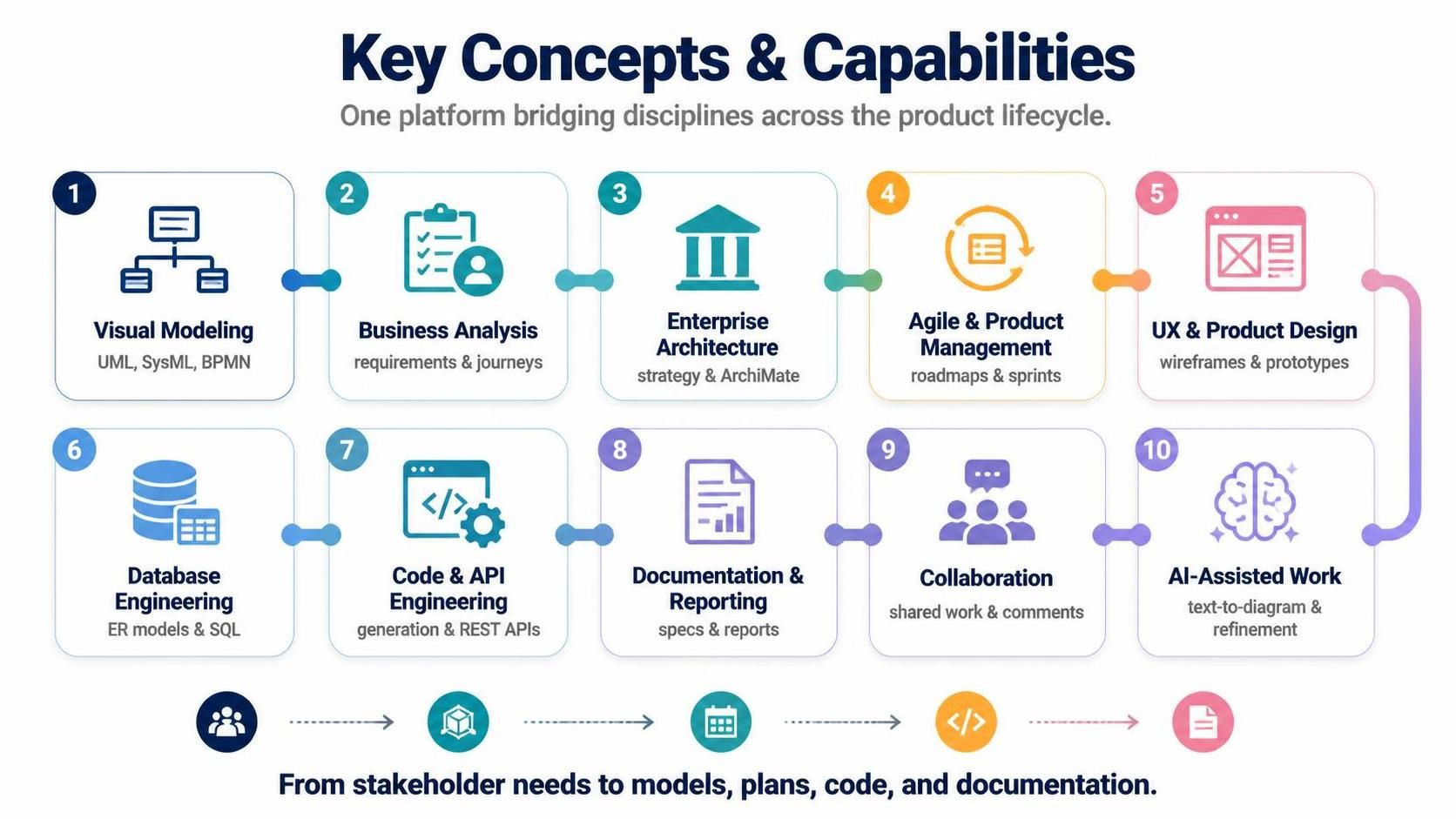
In the modern landscape of software development, the “silo effect” is a major culprit for project delays and miscommunication. Historically, business analysts, architects, and developers often worked in isolation using disparate tools. The Unified Platform paradigm, as visualized in the context of Visual Paradigm’s ecosystem, offers a revolutionary solution: a single environment that bridges these disciplines seamlessly.
This tutorial explores the 10 key capability areas that transform how we approach the system lifecycle. We will walk through the journey from high-level stakeholder needs to the final deployment of code and documentation.
The Unified Lifecycle: From Concept to Code
The core philosophy of this platform is to maintain a continuous flow of information. By integrating modeling, analysis, and engineering tools, we eliminate the need to manually translate requirements into diagrams, and then manually translate those diagrams into code. Let’s break down the integrated workflow.
1. Visual Modeling & Business Analysis
The foundation of any robust system is a clear understanding of structure and behavior. Visual Modeling Tools allow architects to create standardized representations using industry standards like UML, SysML, and BPMN. For instance, a software architect can define the static structure of a microservice using Class Diagrams and map the dynamic API calls using Sequence Diagrams.
Simultaneously, Business Analysis Tools ensure that technical design is grounded in reality. Before writing a single line of code, stakeholders use User Journey Maps and Decision Tables to refine needs. If a business analyst identifies a bottleneck in a checkout process via a Customer Journey Map, that specific pain point directly informs the requirements for the technical solution.
2. Enterprise Architecture & Agile Alignment
Large-scale systems require strategic oversight. Enterprise Architecture Tools utilize frameworks like ArchiMate and TOGAF to model the business, application, data, and technology layers. This ensures that a strategic decision, such as migrating a legacy CRM to the cloud, is analyzed for its impact on dependent applications before execution.
On the execution side, Agile and Product Management Tools bridge the gap between this high-level strategy and daily work. Product Managers convert epics from the roadmap into User Story Maps, organizing them into backlogs for upcoming sprints. This ensures that the daily execution remains aligned with the long-term vision.
3. Design, Data, and Code Engineering
Once requirements are solidified, the focus shifts to the user interface and data structure. UX and Product Design Tools allow designers to create wireframes and prototypes that are directly linked to functional requirements in the backlog. This “design-led” approach ensures developers understand the intended UI behavior before implementation begins.
For the backend, Database Engineering Tools bridge the gap between logical models and physical implementation. An engineer can design an Entity-Relationship (ER) Diagram and automatically generate the SQL DDL scripts for a PostgreSQL database. Similarly, Code and API Engineering Tools enable the creation of REST APIs where the design (Swagger/OpenAPI) generates the skeleton code for the Java or Python backend, keeping design and code synchronized.
4. Documentation, Collaboration, and AI
The final stages involve ensuring that the work is documented and accessible. Documentation and Reporting Tools automate the generation of comprehensive System Specification documents, including all updated UML diagrams and API definitions, saving teams hours of manual formatting.
Collaboration is managed through shared workspaces where remote team members can leave comments on specific BPMN elements, triggering notifications for immediate review. Finally, the platform is empowered by AI-Assisted Work Tools. Users can now leverage artificial intelligence to speed up modeling; for example, typing “Create a login process” can instantly generate a basic Activity Diagram for further refinement.
Step-by-Step: Implementing the Workflow
To effectively utilize this platform, follow this logical progression:
- Define Strategy: Use Enterprise Architecture tools to map the business context and identify constraints.
- Capture Requirements: Engage with stakeholders using Business Analysis tools (e.g., Decision Tables) to refine needs.
- Plan Execution: Organize these needs into Agile backlogs and User Story Maps.
- Design the Solution: Create UX Wireframes for the frontend and ER Diagrams for the database schema.
- Model Behavior: Use Visual Modeling (UML/SysML) to define the system logic and API structures.
- Generate Artifacts: Use Code & API Engineering to generate the initial code scaffolding and SQL scripts.
- Collaborate & Refine: Utilize Collaboration Tools for team reviews and AI Tools for rapid prototyping.
- Document: Auto-generate System Specifications for the final release.
Technical Deep Dive: Model-Based Engineering
The true power of this unified platform lies in Model-Based Engineering. In a traditional workflow, if a database schema changes, the developer must manually update the code. In the Unified Platform, changes propagate automatically.
Consider the workflow of Round-Trip Engineering. If a developer modifies the Java code directly in an IDE, the platform can reverse-engineer those changes back into the UML class diagram. Conversely, if the architect modifies the diagram, the code is regenerated. This bidirectional synchronization is critical for maintaining system integrity in complex environments.
graph LR
    A[Business Requirements] --> B(Strategy & EA)
    B --> C{Agile Planning}
    C --> D[User Stories]
    D --> E[Design: UX & DB]
    E --> F[Code Generation]
    F --> G[Documentation]

    subgraph Unified Platform
    direction TB
    H[Visual Modeling] -.-> E
    H -.-> F
    end

    E -.-> H
    F -.-> H
Conclusion
The transition from siloed tools to a Unified Platform represents a significant leap in productivity and quality. By integrating Visual Modeling, Business Analysis, Enterprise Architecture, and Agile tools into one cohesive ecosystem, organizations can ensure that stakeholder needs are accurately translated into robust, documented, and deployable software solutions.