
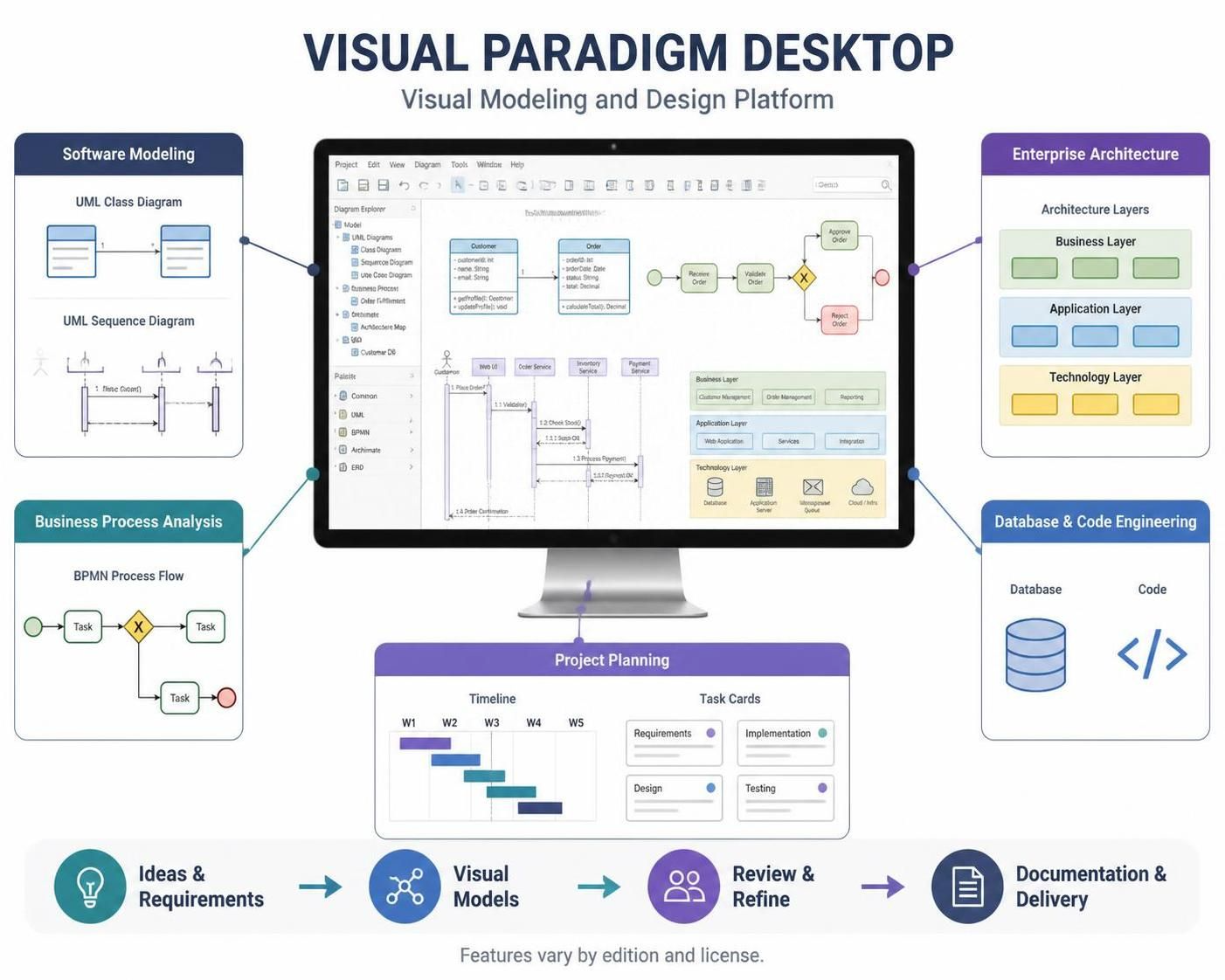
In the realm of software engineering and enterprise architecture, the gap between a high-level business idea and a deployed application is often bridged by complex documentation and fragmented tools. Visual Paradigm Desktop acts as the central nervous system for this transition, unifying Software Modeling, Business Process Analysis, Enterprise Architecture, and Database & Code Engineering into a single, cohesive environment.
This tutorial explores the architecture of this platform and demonstrates how to navigate the workflow from abstract requirements to concrete technical artifacts, effectively turning ideas into structured diagrams and project plans.
1. The Core Workflow: A Unified Lifecycle
The foundation of Visual Paradigm Desktop is its ability to handle the entire software development lifecycle (SDLC). As illustrated in the platform’s architecture, the process flows linearly yet iteratively:
- Ideas & Requirements: The journey begins with capturing raw business needs.
- Visual Models: These requirements are translated into standardized diagrams (UML, BPMN, ERD) to ensure clarity and logic.
- Review & Refine: Stakeholders analyze the models to identify gaps or logical errors before implementation begins.
- Documentation & Delivery: The final phase involves generating technical documentation, database schemas, and even executable code.
2. Deep Dive: Business Process Analysis (BPMN)
Before writing a single line of code, it is crucial to understand the business logic. Visual Paradigm provides robust support for Business Process Model and Notation (BPMN).
Consider a scenario where a customer places an order. The BPMN process flow allows you to model this interaction visually:
- Start Event: Represented by a green circle, indicating the trigger (e.g., “Place Order”).
- Tasks: Rectangular boxes representing specific actions (e.g., “Validate Order”).
- Gateways: The yellow diamond is a critical element. It represents a decision point. In the diagram, the “X” symbol typically denotes an Exclusive Gateway, meaning the process must choose one path (e.g., Approve Order vs. Reject Order) based on specific conditions.
- End Event: The red circle signifies the conclusion of the process.
3. Enterprise Architecture: The Three-Layer View
Enterprise Architecture in Visual Paradigm helps you visualize the structural integrity of the system. The platform advocates for a layered approach to ensure separation of concerns:
- Business Layer: This top layer defines the functional capabilities of the system, such as “Customer Management” or “Order Management.” It is business-facing and technology-agnostic.
- Application Layer: This middle layer details the software components that execute the business functions, such as “Web Application” or “Services.”
- Technology Layer: The bottom layer maps the software components to the underlying hardware and infrastructure, including “Database,” “Application Server,” and “Cloud/Infra.”
By maintaining this separation, architects can modify the technology stack (e.g., migrating from an on-premise server to the cloud) without altering the business logic defined in the upper layers.
4. Database & Code Engineering: From Diagram to Reality
One of the most powerful features of the platform is bidirectional engineering. You do not just draw diagrams; you generate code.
Using the ERD (Entity Relationship Diagram) capabilities, you define your data structure visually. For example, you might define a Customer entity with attributes like customerID (Int), name (String), and email (String). Once the model is complete, Visual Paradigm can automatically generate the SQL scripts to build the database schema.
Furthermore, it extends to object-oriented programming. The platform can reverse engineer existing codebases to create UML Class Diagrams, allowing developers to understand legacy systems, or forward engineer these class diagrams into actual code files (Java, C#, etc.), complete with getters, setters, and logic.
5. Project Planning: Visualizing the Timeline
Technical diagrams are useless if the project is not delivered on time. Visual Paradigm integrates project planning directly into the modeling environment. By utilizing the Timeline and Task Cards, teams can map out weeks (W1, W2, W3) and assign specific tasks like “Requirements,” “Implementation,” or “Testing” to specific timeframes. This ensures that the modeling effort is synchronized with the actual delivery schedule.