
In the complex world of systems engineering and software architecture, data often lives in the connections between elements rather than the elements themselves. Whether you are auditing a system or generating documentation, simply browsing a model is often insufficient. You need to traverse the graph of your model to understand how actors interact with the system.
This tutorial explores Model Queries within Visual Paradigm’s QueryBase environment. We will walk through a specific scenario: tracing the use cases associated with a specific actor. This process demonstrates how to leverage the power of graph traversal to extract precise, relational data.
Why Use Model Queries?
While tools like Project Explorer are excellent for browsing the hierarchy of your project or searching for items by name, they fall short when your question depends on relationships. If you need to know “Who interacts with the Payment System?” or “What modules does this specific class depend on?”, you need a tool that follows the links.
Model Queries allow you to chain logic together. Instead of looking for a single property (like a name), you can follow a path: Start here → Follow this relationship → Find the target. This is particularly powerful for generating reports, exporting data, and validating model integrity.
Step-by-Step: Tracing Use Cases for an Actor
Imagine you have a UML Use Case diagram with a Customer actor. You need to identify every use case this actor performs to verify that no critical functionality has been missed. Here is the logical flow of a Model Query designed for this task.
1. Define the Starting Point
The first step in any query is identifying the entry point. In our scenario, we are looking for a specific actor. The query engine scans the model to find the element representing the Customer.
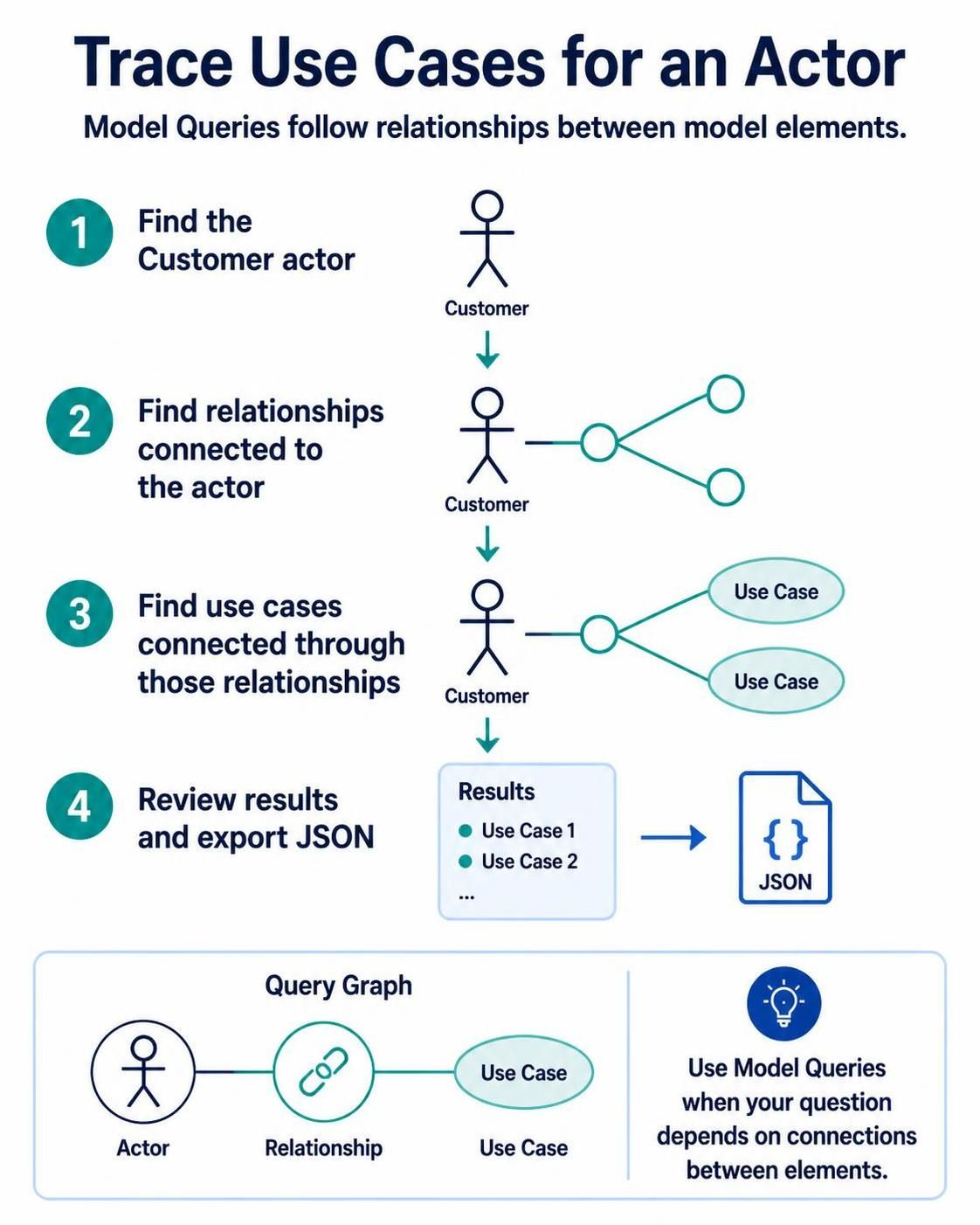
Step 1: Find the model element representing the Customer actor.
- Target Type: Actor
- Filter: Name equals "Customer"
- Result: A reference to the Actor object.
2. Traverse the Relationship
Once the actor is located, the query does not stop. It looks for the connections radiating from this element. In UML, actors interact with use cases via Association relationships. The query identifies these links.
Step 2: Find relationships connected to the actor.
- Source: The Actor found in Step 1.
- Relationship Type: Association (or Include/Extend).
- Result: A list of relationship objects connected to the Customer.
3. Locate the Connected Elements
The final traversal step is to move from the relationship to the destination. Since we started at the Actor, we need to find the Use Case on the other end of the relationship.
Step 3: Find use cases connected through those relationships.
- Source: The Relationships found in Step 2.
- Target Type: Use Case.
- Result: The specific Use Case elements (e.g., "Place Order", "View Account").
4. Review and Export
With the data chain complete, the query engine aggregates the results. You can review the list of found elements directly in the interface. However, the true power of Model Queries lies in automation. You can export this relational data into structured formats like JSON for use in external reporting tools or web applications.
Step 4: Review results and export JSON.
- Output Format: JSON.
- Data Structure: An array of use case objects linked to the actor.
Understanding the Query Graph
Visual Paradigm allows you to visualize this logic as a “Query Graph.” This graphical representation of your query makes it easy to debug and understand the flow of data.
In our example, the Query Graph consists of three distinct nodes connected by lines:
- Actor Node: Represents the starting point of the query.
- Relationship Node: Represents the link (the edge) traversing from the actor.
- Use Case Node: Represents the final target element.
This graph structure—Actor — Relationship — Use Case—is the blueprint the engine executes to find the answer.
Conclusion
Model Queries transform Visual Paradigm from a drawing tool into a database engine for your model. By mastering the logic of tracing relationships, you can automate the extraction of complex architectural data, ensuring your documentation is always in sync with your design.