
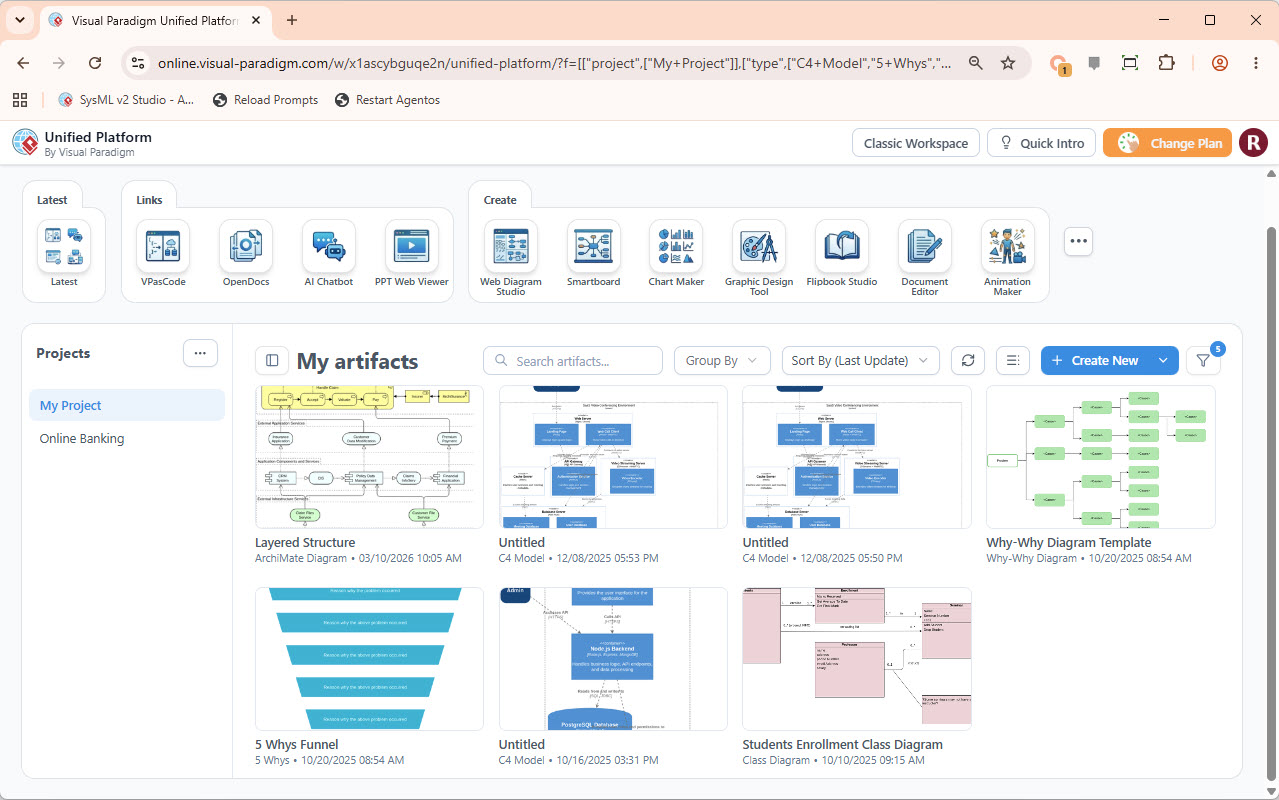
In the modern era of software engineering, the “single source of truth” is no longer just a file on a hard drive; it is a living, breathing digital ecosystem. The screenshot provided showcases the Visual Paradigm Unified Platform, a centralized workspace designed to bridge the gap between heavy-duty desktop modeling and agile web-based collaboration.
This tutorial will guide you through the architecture of this platform, explaining how it solves the problem of fragmented tooling, and how you can leverage its integrated features like VPasCode and OpenDocs to streamline your engineering artifacts.
1. The Architecture of Integration
Historically, software professionals have operated in a fractured digital environment. As highlighted in the platform’s documentation, detailed UML and architectural diagrams often reside in powerful desktop applications, while graphic designs and strategic documents are trapped in isolated web silos.
The Unified Platform acts as a “central nervous system” for your projects. It connects your local desktop modeling power with a suite of online apps. This architecture ensures that your data is not lost in the cloud but is organized within a central hierarchy.
- Desktop Models: These are the heavy lifter models (like C4 or ArchiMate) that require complex processing.
- Cloud Artifacts: The web-based tools that allow for rapid prototyping, team collaboration, and presentation.
- Unified Workspace: The interface shown in the screenshot that unifies both worlds.
2. Navigating the “Create” Ecosystem
The top navigation bar of the Unified Platform offers a powerful suite of tools. Instead of switching between different software suites, you can access various modeling techniques directly from the dashboard.
Key Tools Breakdown:
- VPasCode: A revolutionary tool that allows you to define diagrams using code (similar to Markdown or PlantUML) rather than clicking and dragging. This is essential for version control and “Infrastructure as Code” approaches to modeling.
- OpenDocs: A text-based editor that integrates seamlessly with your diagrams. It allows you to write requirements or documentation that are directly linked to your visual models.
- AI Chatbot: An integrated assistant that can help generate diagrams, explain complex logic, or draft documentation based on natural language prompts.
- Smartboard: A collaborative canvas for brainstorming sessions, allowing teams to map out ideas in real-time.
3. Managing Your Artifacts
The main body of the interface, labeled “My artifacts,” is the core of your project management. It displays a grid of your current work, providing immediate visual feedback on the status of your projects.
In the screenshot, we can see a diverse range of modeling techniques being utilized simultaneously:
- Layered Structure (ArchiMate): Used for Enterprise Architecture, focusing on business, application, and technology layers.
- C4 Model: A hierarchy of diagrams (Context, Container, Component, Code) that helps visualize software architecture at different levels of detail.
- Why-Why Diagram: A root cause analysis tool used in quality management and process improvement.
- 5 Whys Funnel: A specific visualization of the 5 Whys technique to drill down into problem definitions.
4. Deep Dive: VPasCode and Model-Driven Engineering
One of the most powerful features of the Unified Platform is the ability to move away from manual drawing towards Model-Driven Engineering (MDE). By using VPasCode, you can write the logic of your system directly.
For example, if you are designing a C4 model, you don’t need to manually place boxes for your “System” and “User.” You can define them in code:
// Example VPasCode Snippet for C4 Model

Person(user, "User", "A customer using the system")
Container(system, "Web Application", "The main web application", "Java/Spring")
Db(database, "Database", "Stores user data", "PostgreSQL")

Rel(user, system, "Uses", "HTTPS")
Rel(system, database, "Reads/Writes", "JDBC")
This approach ensures that your diagrams are always up-to-date with your requirements and allows for easy sharing and versioning of your architecture.
5. Conclusion: The Future of Unified Modeling
The Visual Paradigm Unified Platform represents a shift from “file-based” modeling to “workspace-based” modeling. By centralizing your artifacts, you eliminate the friction of data silos and enable a holistic view of your projects. Whether you are a developer defining a C4 model or a manager creating a strategic 5 Whys diagram, the platform provides the tools to keep your work connected, visible, and valuable.