
In the realm of Business Process Model and Notation (BPMN), efficiency is not just about speed; it is about resource management and logical flow. One of the most critical yet often misunderstood features for enterprise architects is the Sequential Multi-Instance Marker. This mechanism allows a single activity to be executed repeatedly in a strict, linear fashion, ensuring that data is processed item-by-item without overwhelming system resources.
This tutorial explores the architecture of the Sequential Multi-Instance Marker, its visual representation, and how to implement it effectively using Visual Paradigm.
The Architecture of Sequential Execution
When modeling a business process, you often encounter scenarios where a specific task must be performed on a collection of items. For example, processing a batch of invoices, validating a list of user accounts, or testing a series of hardware components. The decision to use a Sequential approach rather than a Parallel approach is dictated by the constraints of the environment.
A Sequential Multi-Instance creates an execution loop where:
- One Instance at a Time: Only one iteration of the activity is active.
- Strict Ordering: Instance 2 cannot begin until Instance 1 is fully completed.
- Data Iteration: The process iterates through a collection (such as a list or array) provided by a previous step or input.
Visual Symbol: The Triple Bar
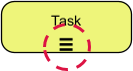
In BPMN, every concept has a visual language. The Sequential Multi-Instance is represented by a specific symbol located at the bottom of the activity box (Task, Sub-Process, or Event).
The symbol consists of three horizontal parallel lines (≡). This icon serves as a universal indicator to stakeholders that the enclosed task will repeat itself. Unlike the parallel marker, which implies concurrency, the sequential marker implies a waiting period between executions.
Real-World Application: Resource-Constrained Environments
To understand why this architectural pattern is vital, consider a real-world scenario in Quality Assurance (QA) or Safety Inspection.
The Scenario: A safety inspector has a batch of ten pressure valves to test. The facility has only one testing rig available.
The Logic:
- The system receives a list of 10 valve IDs.
- The process enters the Multi-Instance block.
- It selects Valve 1.
- The Testing Rig is occupied.
- The test completes, and a report is generated.
- Crucial Step: The system must wait. It cannot start Valve 2 because the rig is busy.
- Only once the rig is free does the process move to Valve 2.
If you were to use a Parallel Multi-Instance here, the system would attempt to load all 10 valves simultaneously, causing a catastrophic failure or resource deadlock. The Sequential Multi-Instance marker solves this by enforcing a “First-In, First-Out” (FIFO) processing queue.
Configuration in Visual Paradigm
Visual Paradigm provides a robust environment for implementing these BPMN standards. When configuring a Multi-Instance activity in Visual Paradigm, the default settings often default to Parallel execution for maximum throughput. To achieve the Sequential behavior described above, you must explicitly alter the configuration.
Step-by-Step Implementation
- Select the Activity: Click on the Task or Activity box in your BPMN diagram that requires iteration.
- Open Properties: Right-click the element and select Properties or use the properties pane on the right side of the interface.
- Locate Multi-Instance: Find the section labeled Multi-Instance.
- Change Loop Type: You will see a dropdown menu for the Type or Loop Type.
- Ensure this is set to Sequential.
- Do not leave this set to Parallel.
- Define Data Source: Map the loop variable to a collection (e.g.,
valveList) that contains the items you wish to process.
The following diagram logic represents the underlying structure of a Sequential Multi-Instance activity within the Visual Paradigm engine:
Task: Inspect Valve
Marker: Sequential (≡)
Condition: Loop Data Collection
Execution Flow:
  1. Get Item from List
  2. Perform Task
  3. Check if List is Empty
  4. IF NOT Empty -> Repeat Step 1
  5. IF Empty -> Exit Loop
Why Sequential Matters for Data Integrity
Beyond resource constraints, sequential processing is often required for data integrity. If the output of “Task A” on Item 1 is required as input for “Task A” on Item 2 (a recursive dependency), the process must be sequential. The architecture of the Sequential Multi-Instance marker ensures that variables are updated and committed before the next instance begins, preventing race conditions.
Conclusion
The Sequential Multi-Instance Marker is a powerful tool in the Visual Paradigm BPMN toolkit. It bridges the gap between theoretical process design and physical limitations, ensuring that your digital models accurately reflect the real-world constraints of hardware, personnel, and data dependencies. By strictly configuring your activities to “Sequential,” you ensure robust, predictable, and error-free process execution.