
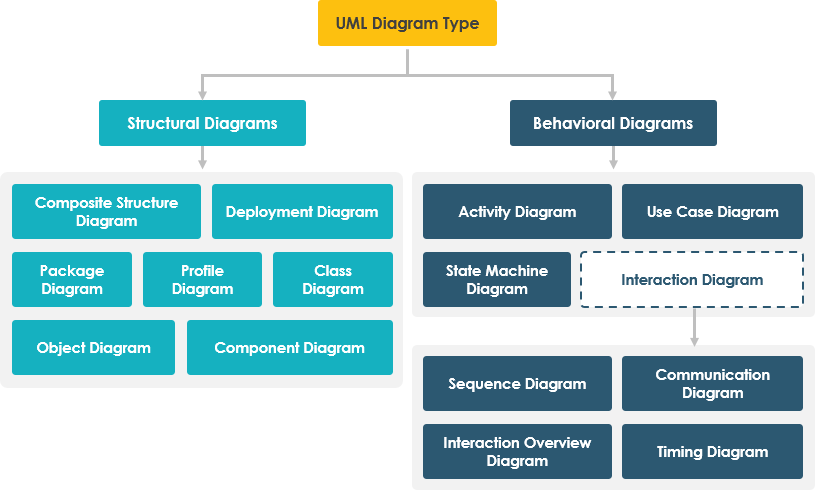
Unified Modeling Language (UML) 2 serves as the industry standard for visualizing, specifying, constructing, and documenting the artifacts of software-intensive systems. At the core of UML are diagrams, which act as the primary communication tools between stakeholders, developers, and architects. As illustrated in the system hierarchy, these diagrams are broadly bifurcated into two distinct categories: Structural Diagrams and Behavioral Diagrams. Understanding the distinction and interplay between these two types is fundamental to mastering system architecture.
1. Structural Diagrams: The Static Skeleton
Structural diagrams capture the static aspects of a system. They represent the physical and conceptual building blocks that make up the system, including classes, objects, components, and nodes. While these diagrams do not show the actions occurring within the system, they define the potential for action by establishing the relationships and constraints between elements.
The 7 Types of Structural Diagrams
According to the UML 2 standard, there are seven specific types of structure diagrams, each serving a unique purpose in modeling different levels of abstraction:
- Class Diagram: The most common structural diagram. It shows the system’s static structure by displaying classes, their attributes, operations, and the relationships among objects. It serves as the foundation for object-oriented programming.
- Object Diagram: A snapshot of the system at a specific moment in time. It displays instances of classes (objects) and the links between them, essentially acting as an instance of a class diagram.
- Component Diagram: Focuses on the implementation level, showing the organization and dependencies among software components, such as libraries, packages, or executable files.
- Deployment Diagram: Maps the software architecture onto the hardware topology. It visualizes the physical nodes (servers, devices) and the artifacts (software components) deployed on them.
- Composite Structure Diagram: A powerful diagram that breaks down the internal structure of a class or component. It shows the internal parts, ports, and connections that allow the classifier to interact with its environment.
- Package Diagram: Used to organize elements of the model into groups (packages) to manage complexity and define namespaces. It is crucial for large-scale system decomposition.
- Profile Diagram: Allows developers to extend UML by creating new metaclasses (stereotypes) and tagged values. This is essential for adapting UML to specific domains like robotics, web services, or embedded systems.
2. Behavioral Diagrams: The Dynamic Flow
If structural diagrams are the skeleton, behavioral diagrams are the nervous system. These diagrams describe the dynamic behavior of the system, capturing how the system changes over time. They focus on interactions, state transitions, and the flow of control, answering the question: “How does the system react to stimuli?”
The 7 Types of Behavioral Diagrams
The behavioral aspect is equally vast, consisting of seven distinct diagram types:
- Use Case Diagram: Provides a high-level view of the system from the user’s perspective. It identifies actors (users) and the use cases (functional requirements) they interact with, defining the system’s scope.
- Activity Diagram: Similar to a flowchart, this models the flow of control or data from activity to activity. It is ideal for modeling business processes, algorithms, and complex workflows.
- State Machine Diagram: Describes the lifecycle of a single object. It shows the states an object can be in, the events that cause transitions between states, and the actions performed upon entry or exit.
- Sequence Diagram: An interaction diagram that emphasizes the time-ordered sequence of messages passed between objects. It is critical for debugging logic flows and understanding API calls.
- Communication Diagram: (formerly Collaboration Diagram) Similar to sequence diagrams but focuses on the structural organization of objects and their links, rather than the strict time sequence.
- Interaction Overview Diagram: A high-level view that combines the features of activity and sequence diagrams. It acts as a roadmap, showing the flow of control among different interaction fragments.
- Timing Diagram: A specialized interaction diagram that focuses on time-critical constraints. It shows the state of objects and signals over a specific timeline, essential for real-time systems.
Understanding Interaction Diagrams
As seen in the hierarchy, the “Interaction Diagram” is a category that encompasses Sequence, Communication, Interaction Overview, and Timing diagrams. These are often referred to as “dynamic” diagrams because they describe the runtime behavior of the system.
- Sequence is best for logical flow.
- Communication is best for structural context.
- Timing is best for temporal constraints.
Conclusion
Mastery of UML 2 requires a dual focus. You must be able to design the static structure (Class, Component, Deployment) to ensure the system is robust and scalable, while simultaneously modeling the dynamic behavior (Sequence, State, Activity) to ensure the system is responsive and functional. By utilizing the right diagram for the specific modeling task, architects can create a comprehensive blueprint that guides development from concept to code.