
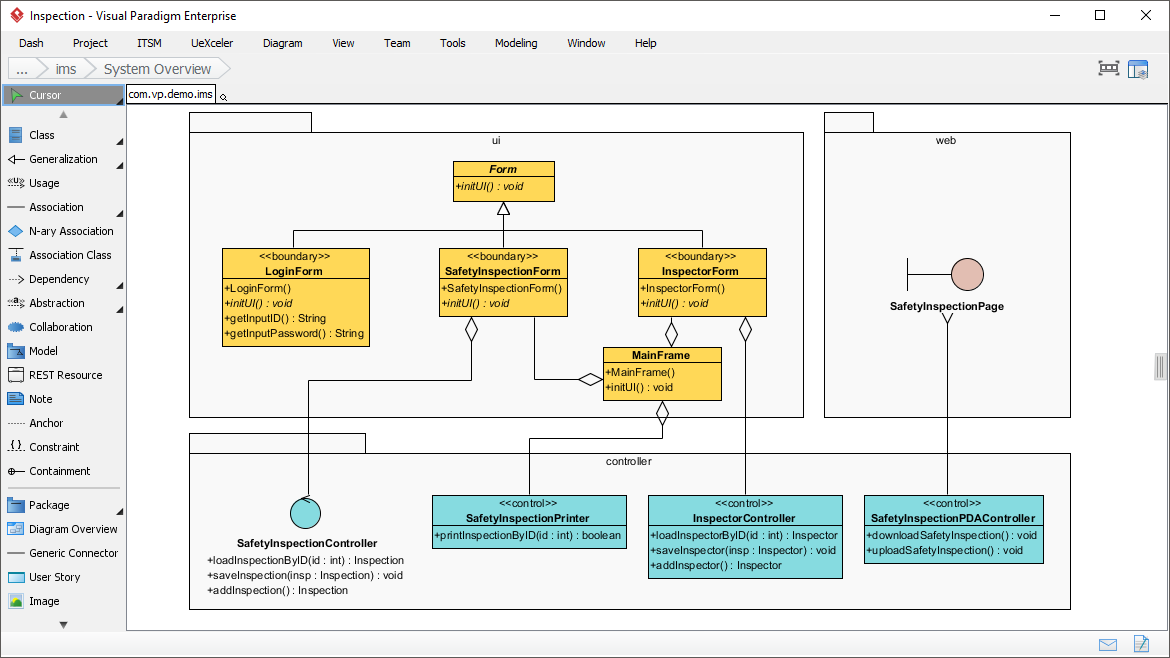
When designing complex software applications, the difference between a chaotic mess and a maintainable masterpiece often lies in how you organize your code structure. Visual Paradigm provides powerful tools to visualize this organization, and one of the most effective ways to do so is through a Package Class Diagram. This specific type of diagram allows developers to define the static structure of a system by grouping related classes into packages, revealing the high-level architecture before a single line of code is written.
In this tutorial, we will dissect a real-world system architecture for an “Inspection” application. We will walk through how to model the separation of concerns using packages for ui (User Interface), controller (Logic), and web (External Interfaces), and how to represent the critical relationships that bind them together.
The Power of Packages: Grouping for Clarity
Before diving into the specific classes, it is essential to understand the role of the “Package” in UML. A package acts as a namespace or a folder. It prevents naming conflicts and, more importantly, defines boundaries. In the diagram provided, we see three distinct architectural layers:
- ui Package: This layer is responsible for the user interface. It contains the visual elements that the user interacts with directly.
- controller Package: This layer acts as the brain of the application. It handles the business logic, processing data received from the UI and managing the flow of information.
- web Package: This layer represents the external interface, likely a web page or API endpoint that interacts with the system.
By separating these concerns, we ensure that the UI does not get tangled with business logic, adhering to the Separation of Concerns principle.
Understanding the UI Layer: Inheritance and Composition
Within the ui package, the diagram illustrates a classic Object-Oriented design pattern. Let’s look at the relationship between the Form class and the specific forms below it.
Inheritance (Generalization)
At the top of the ui package sits the Form class. This is the base class or parent. Notice the solid line with a hollow triangle arrow pointing to Form. This is a Generalization relationship, representing inheritance. It implies that LoginForm, SafetyInspectionForm, and InspectorForm are all types of Form, inheriting its properties (like +initUI()) while adding their own specific behaviors.
Composition (The Diamond)
Observe the relationship between the specific form classes (like SafetyInspectionForm) and the MainFrame class. The line connecting them features a filled diamond at the MainFrame end. This represents Composition.
Composition is a strong form of aggregation. It means that MainFrame “owns” these forms. If the MainFrame is destroyed, the SafetyInspectionForm and InspectorForm cease to exist as well. This is crucial for memory management and lifecycle control in GUI applications.
The Controller Layer: Business Logic
Moving down to the controller package, we see classes like SafetyInspectionController, InspectorController, and SafetyInspectionPrinter. These classes are marked with the stereotype <<control>>.
These classes are the intermediaries. They do not display data directly (that’s the ui layer’s job); instead, they manipulate data. For example, SafetyInspectionController has methods like +loadInspectionById(id : int), indicating it retrieves data, and +saveInspection(insp : Inspection), indicating it persists data.
Connecting the Layers: Dependency and Associations
The magic of the system architecture happens where the packages intersect. The diagram uses lines to show how the UI talks to the Controller.
- Dependency: The
LoginFormandSafetyInspectionFormdepend on theSafetyInspectionController. If you look at the lines, you will see they are connected to the controller, implying that the UI classes will instantiate or call methods on these controller classes to perform actions. - Web Interaction: The
webpackage contains aSafetyInspectionPage, depicted with a specific symbol (often representing an interface or a page). It connects directly to theSafetyInspectionPDACo...(likelyPDAController) and theSafetyInspectionPrinter, suggesting that the web interface can trigger printing or download actions directly via the controller layer.
Visual Paradigm Syntax Guide
When recreating this architecture in Visual Paradigm or similar tools, it is helpful to know the standard syntax for these relationships. Below is a breakdown of the notation used in the provided screenshot:
' Diagram: System Overview
' Package: ui
class Form {
  +initUI() : void
}

class LoginForm <> {
  +LoginForm()
  +initUI() : void
  +getInputID() : String
  +getInputPassword() : String
}

class SafetyInspectionForm <> {
  +SafetyInspectionForm()
  +initUI() : void
}

class InspectorForm <> {
  +InspectorForm()
  +initUI() : void
}

class MainFrame {
  +MainFrame()
  +initUI() : void
}

' Relationships
Form <|-- LoginForm
Form <|-- SafetyInspectionForm
Form <|-- InspectorForm
SafetyInspectionForm *-- MainFrame
InspectorForm *-- MainFrame

' Package: controller
class SafetyInspectionController {
  +loadInspectionById(id : int) : Inspection
  +saveInspection(insp : Inspection) : void
  +addInspection() : Inspection
}

' Relationships between UI and Controller
LoginForm --> SafetyInspectionController
SafetyInspectionForm --> SafetyInspectionController
Conclusion
Understanding this diagram is the first step toward building scalable applications. By clearly defining the ui, controller, and web layers, you create a system that is easier to test, debug, and extend. The use of composition ensures tight coupling where necessary (like a window and its buttons), while dependencies ensure loose coupling where appropriate (like a form triggering a controller).