
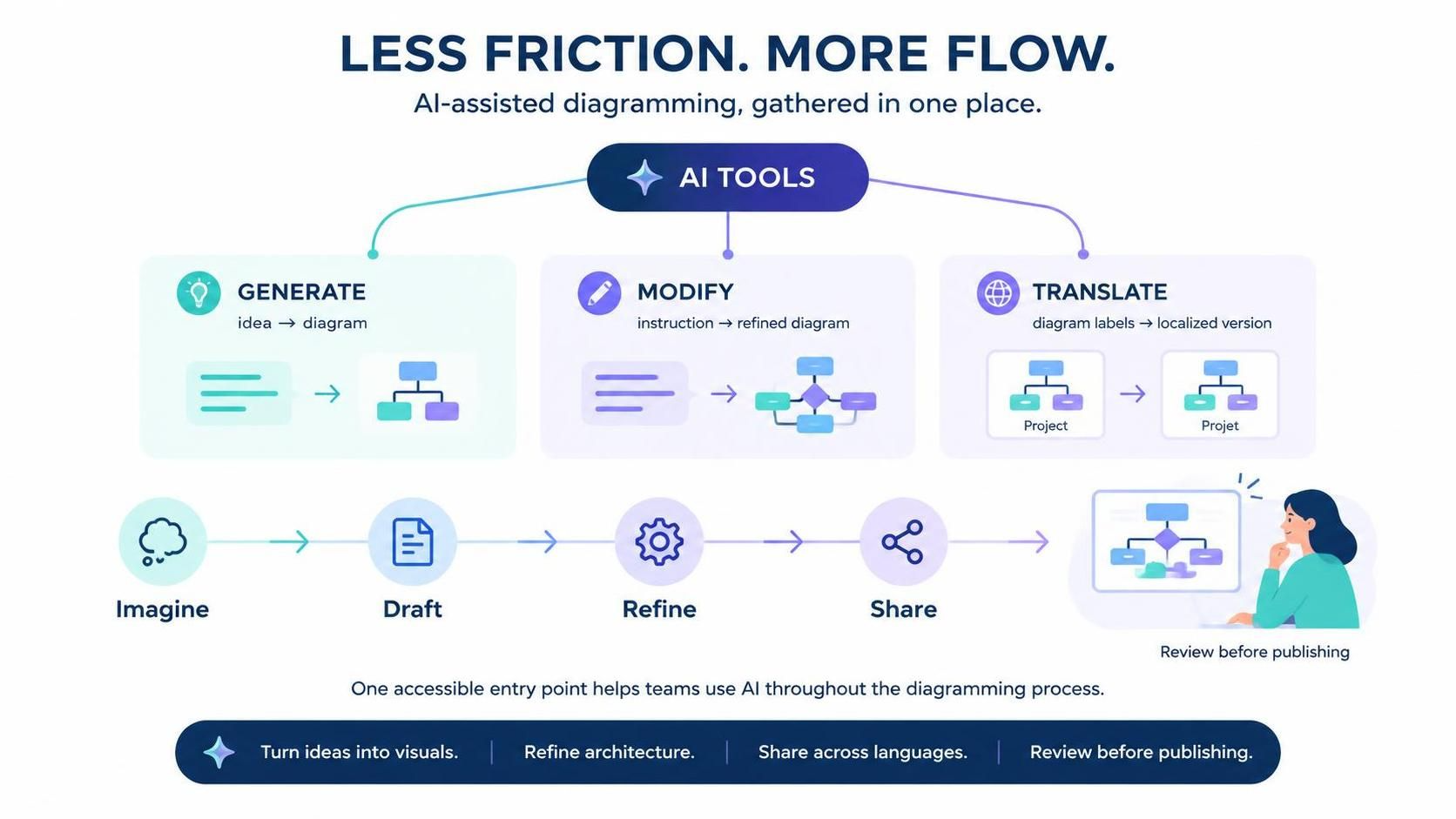
In the rapidly evolving landscape of software engineering and system architecture, the gap between an abstract concept and a concrete visual model is where most projects thrive—or fail. Historically, this transition required manual labor, precise syntax knowledge, and a deep understanding of diagramming standards. However, the introduction of the AI Tools menu in VPasCode represents a significant leap forward, moving the industry from a “draw-and-debug” approach to an “Imagine-and-Execute” paradigm.
This tutorial explores how the unified AI Tools ecosystem transforms the diagramming process. By consolidating generation, modification, and translation into a single, frictionless interface, VPasCode empowers architects to focus on logic and design rather than the mechanics of drawing.
The Three Pillars of AI-Assisted Modeling
The core philosophy behind the new VPasCode AI architecture rests on three distinct but interconnected capabilities. These tools are not isolated features but rather a cohesive suite designed to address every stage of the system modeling lifecycle.
1. Generate: From Idea to Visual Structure
The journey begins with the “Generate” capability. In traditional modeling, a vague idea like “I need a microservices architecture” requires the user to manually drag and drop boxes, define connectors, and arrange them aesthetically. The AI engine in VPasCode acts as a bridge between natural language and formal notation.
- Input: A user provides a high-level description or a text prompt.
- Processing: The AI parses the intent, identifying key entities (e.g., “User,” “Database,” “API Gateway”) and their relationships.
- Output: A structured diagram is instantly rendered, complete with appropriate styling and layout.
This feature is particularly valuable during the Imagine and Draft phases of the workflow. It allows teams to rapidly prototype complex system topologies without getting bogged down in the initial setup.
2. Modify: Refining the Architecture
Once a diagram exists, the iterative process of refinement begins. The “Modify” tool shifts the paradigm from manual editing to instruction-based evolution. Instead of manually resizing a node or re-routing a connector, users can issue natural language commands to the AI.
This capability excels in the Refine stage of the workflow. Whether you are refining complex architectures or making specific adjustments, the AI interprets the user’s intent—such as “Add an authentication layer between the client and server”—and executes the necessary structural changes. This ensures that the diagram remains accurate to the evolving system requirements with minimal effort.
3. Translate: Global Accessibility
System documentation often faces a barrier: language. When collaborating with global teams, diagrams labeled in English may not be immediately clear to a developer in a non-English speaking region. The “Translate” capability democratizes access to technical diagrams.
This tool focuses on the localization of diagram labels. It takes the text within your diagram nodes and relationships and translates them into the target language while preserving the visual integrity of the chart. This is crucial for the Share phase, ensuring that your work is accessible to a global audience without the need for manual re-labeling.
Seamless Integration: The “Less Friction” Workflow
The true power of the VPasCode AI Tools lies in their integration. As illustrated in the workflow diagram, the process follows a logical progression:
- Imagine: Start with a concept.
- Draft: Use Generate to create the initial visual model.
- Refine: Use Modify to adjust the architecture based on feedback.
- Share: Use Translate to localize the content for your audience.
- Review: Finalize the diagram before publishing.
This linear yet flexible flow removes the “friction” typically associated with switching between different tools or modes of operation. By keeping all AI functions in one accessible location, the user maintains their creative flow state, uninterrupted by technical overhead.
Conclusion: The Future of Diagramming
The introduction of the AI Tools menu in VPasCode is more than just a feature update; it is a fundamental shift in how we approach system design. By automating the mundane tasks of drawing and translation, and by enabling natural language interaction for complex modifications, VPasCode allows architects to spend more time on what matters most: solving complex problems.
As you move forward with your projects, remember that the goal is not just to produce a diagram, but to create a living document that evolves with your project. With VPasCode, the path from a vague idea to a polished, global-ready technical diagram is smoother and more intelligent than ever before.