
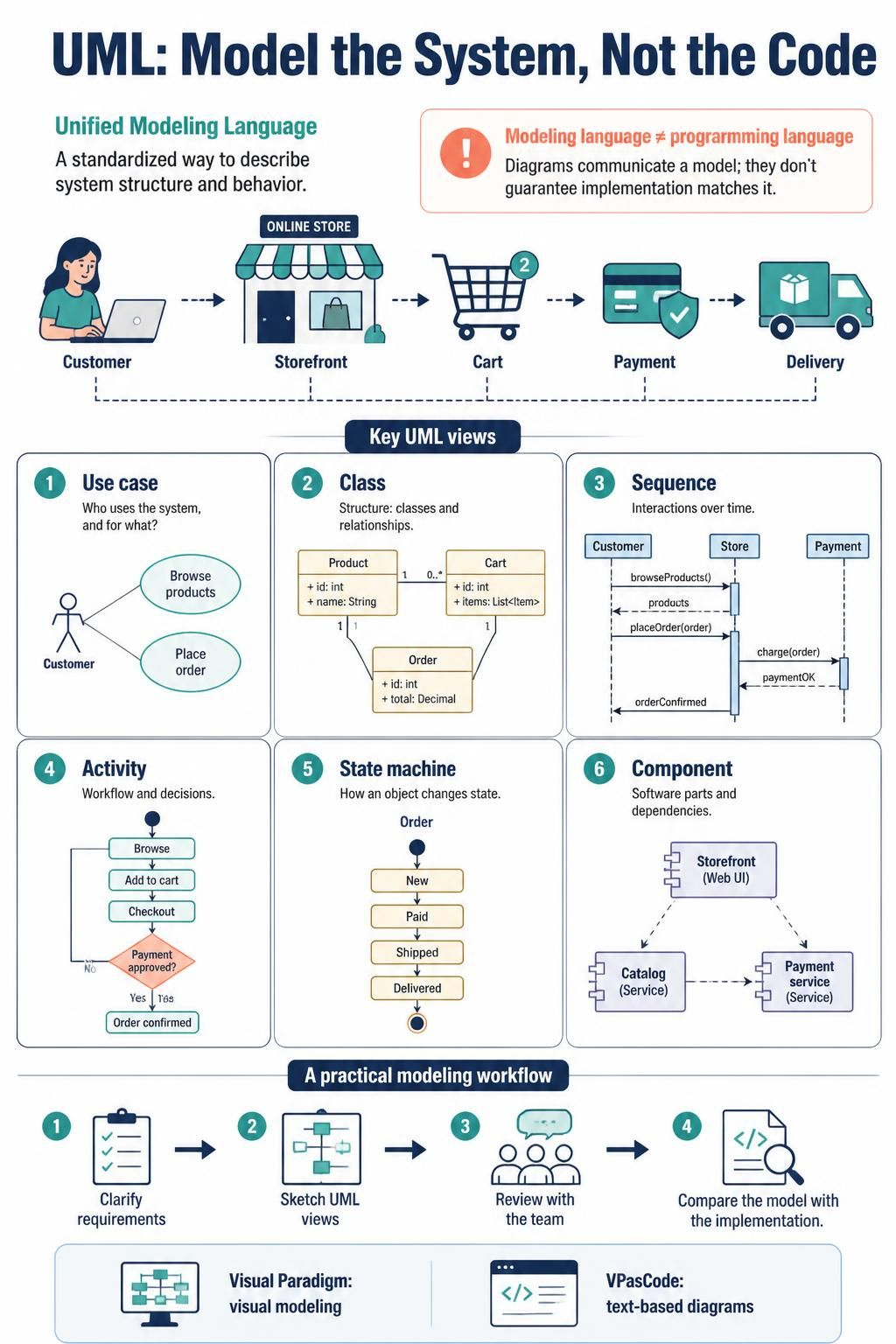
In the realm of software engineering, clarity is currency. The infographic “UML: Model the System, Not the Code” serves as a definitive roadmap for understanding how to bridge the gap between abstract requirements and concrete implementation. UML—the Unified Modeling Language—is a standardized way to describe a system’s structure and behavior. It helps teams discuss requirements, design software, and document decisions.
However, a critical distinction must be made immediately: UML is a modeling language, not a programming language. Diagrams communicate a model, but they do not automatically guarantee that the implementation matches it. This tutorial will deconstruct the six key views of UML presented in the visual guide and demonstrate how to leverage the Visual Paradigm ecosystem—specifically the synergy between visual modeling and VPasCode—to master system architecture.
The Fundamental Distinction: Modeling vs. Coding
Before diving into specific diagrams, we must understand the “Why” behind UML. The infographic highlights a common pitfall: treating diagrams as code. A diagram is a communication tool. It allows stakeholders to visualize the “Online Store” process—from the Customer interacting with the Storefront, to the Cart, Payment, and Delivery—before a single line of executable code is written.
By separating the model from the code, architects can iterate on logic, identify bottlenecks, and refine requirements without the risk of breaking a live system.
Decoding the Six Key UML Views
The infographic categorizes UML into six distinct views. Each serves a unique purpose in the software development lifecycle. Let’s walk through them using the “Online Store” context.
1. Use Case Diagram: The “Who” and “What”
Use Case diagrams answer the question: Who uses the system, and for what? In the provided example, the Customer (Actor) interacts with two primary functions: Browse products and Place order. This view is crucial for requirements gathering, ensuring that all user stories are captured at a high level.
2. Class Diagram: The “Structure”
Class diagrams define the static structure of the system, detailing classes, attributes, and relationships. The infographic illustrates a robust relationship between Product, Cart, and Order.
Notice the cardinality constraints:
- Cart contains 0.. (zero or more) Product items.
- Cart is associated with exactly one Order (1 to 1).
This diagram provides the blueprint for your database schema and object-oriented design.
3. Sequence Diagram: The “When” (Interactions)
While Class diagrams show structure, Sequence diagrams show behavior over time. The example depicts the interaction flow between the Customer, the Store system, and an external Payment service.
@startuml
actor Customer
participant Store
participant Payment

Customer -> Store : browseProducts()
Store --> Customer : products

Customer -> Store : placeOrder(order)
activate Store
Store -> Payment : charge(order)
Payment --> Store : paymentOK
activate Payment
Store --> Customer : orderConfirmed
deactivate Store
deactivate Payment
@enduml
This view is essential for debugging logic flows, ensuring that the Payment service is only called after the placeOrder request is received.
4. Activity Diagram: The “Workflow”
Activity diagrams represent the logic and decision-making processes within a use case. The example shows a conditional flow:
- Browse -> Add to cart -> Checkout.
- A decision diamond asks: Payment approved?
- If No, the process loops back (likely to retry or cancel).
- If Yes, the process moves to Order confirmed.
5. State Machine Diagram: The “Life Cycle”
State machines track the lifecycle of a specific object. Here, we track the Order object. It transitions through states: New -> Paid -> Shipped -> Delivered. This is vital for ensuring business rules are enforced (e.g., an Order cannot be “Shipped” before it is “Paid”).
6. Component Diagram: The “Dependencies”
Finally, the Component diagram looks at the system from an architectural perspective, showing software parts and their dependencies. It reveals that the Storefront (Web UI) depends on the Catalog (Service) and the Payment Service. This view helps in planning microservices architectures and managing deployment units.
A Practical Modeling Workflow
How do we move from theory to practice? The infographic outlines a four-step workflow that integrates visual and text-based modeling:
- Clarify Requirements: Understand the user journey.
- Sketch UML Views: Create the visual models (Use Case, Sequence, etc.).
- Review with the Team: Ensure the model matches the requirements.
- Compare Model with Implementation: Use code generation or analysis to ensure the software matches the diagram.
This is where Visual Paradigm and VPasCode shine. Visual Paradigm allows for drag-and-drop visual modeling, while VPasCode allows developers to define these complex diagrams using text-based syntax, which is often faster to edit and easier to version control.
Conclusion
Modeling the system, not the code, is the hallmark of professional software engineering. By utilizing the six key UML views—Use Case, Class, Sequence, Activity, State Machine, and Component—you gain a holistic understanding of your system’s architecture. Whether you prefer the visual canvas of Visual Paradigm or the precision of VPasCode, the goal remains the same: to create a clear, communicative model that guides successful implementation.