
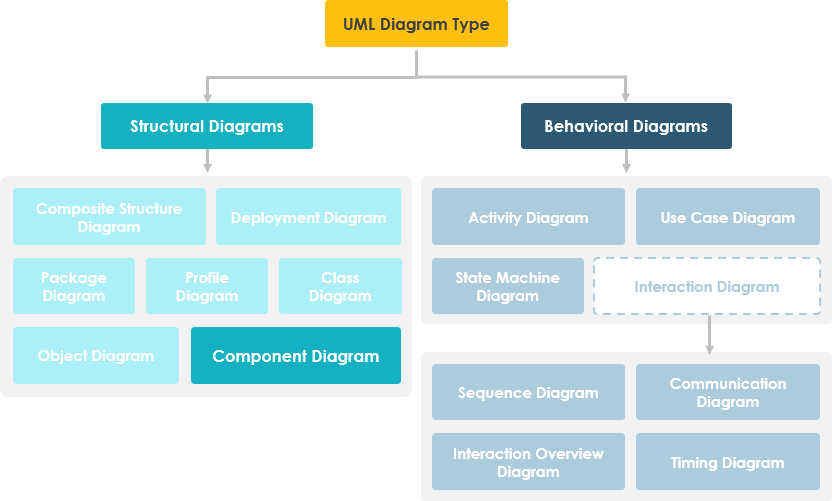
In the vast ecosystem of Unified Modeling Language (UML), diagrams are categorized into two primary families: Structural Diagrams and Behavioral Diagrams. While Behavioral Diagrams (like Activity and Sequence diagrams) describe how a system acts, Structural Diagrams describe the static structure of the system. Among these, the Component Diagram stands out as a critical tool for modeling the physical aspects of object-oriented systems.
Unlike Class Diagrams, which model the logical structure (the blueprint), Component Diagrams focus on the physical implementation. They are used for visualizing, specifying, and documenting component-based systems, and are essential for constructing executable systems through forward and reverse engineering.
1. The Anatomy of a Component Diagram
A component diagram breaks down the actual system under development into various high levels of functionality. Think of it as a high-level map of your software’s architecture. Each component is responsible for one clear aim within the entire system and interacts with other essential elements on a need-to-know basis.
Defining the Component
A component in UML is a modular, replaceable, and runnable physical part of a system. It encapsulates implementation details. In the diagram, a component is often represented by a rectangle with a small icon in the top-right corner (resembling a file with a tab).
Ports and Interfaces: The Communication Channels
The most crucial concept to master in component modeling is the interaction mechanism. Components do not usually talk directly to each other; they communicate via interfaces.
- Ports: These are the physical connection points on a component, similar to sockets on a piece of hardware. Data flows in and out through these ports.
- Provided Interfaces (Lollipop): These represent the services that the component offers to the outside world. If you are looking at a component diagram, the “lollipop” icon indicates, “I can do this for you.”
- Required Interfaces (Socket): These represent the services the component needs to function. If you see a “socket” icon, it means, “I need this service to operate.”
2. Visualizing Internal Structure: The Composite View
One of the most powerful features of Component Diagrams is the ability to show the internal components of a larger system. This is known as the “Composite View.”
Consider a complex component (represented by a large box). This box might contain smaller, internal components that handle specific logic. The large box itself is a component, but it also acts as a container for the subsystem inside. This allows architects to zoom in and out of the system’s complexity without losing context.
Data Flow Example
In a typical internal architecture, data might flow as follows:
- Data (e.g., account ID) enters the component via a Port on the right-hand side.
- The data is converted into a format the internal components can understand.
- The data passes through several internal components via connections.
- Finally, the data is output at the ports on the left side.
This flow illustrates how a large component acts as a black box to the outside world, while exposing specific required and provided interfaces to manage the data flow.
3. Component vs. Class Diagrams
It is vital to understand that while Component Diagrams are essentially Class Diagrams in terms of syntax, their focus is different.
- Class Diagrams: Focus on the logical structure, relationships between classes, and inheritance hierarchies. They are about the design.
- Component Diagrams: Focus on the static implementation view. They represent executable code, libraries, or third-party binaries. They are about the deployment and physical assembly.
4. Tooling and Implementation
To effectively model these systems, professionals often use specialized UML software. Tools like Visual Paradigm allow users to create these diagrams intuitively, supporting all UML diagram types.
By utilizing forward engineering, you can generate actual code skeletons from your Component Diagrams. Conversely, with reverse engineering, you can take existing codebases and visualize them back into component diagrams to understand legacy system architectures.
Conclusion
Component Diagrams are the bridge between high-level design and physical implementation. By mastering ports, interfaces, and the composite structure, you gain the ability to document complex systems clearly, ensuring that every module knows exactly what it needs to do and how to communicate with the rest of the system.