
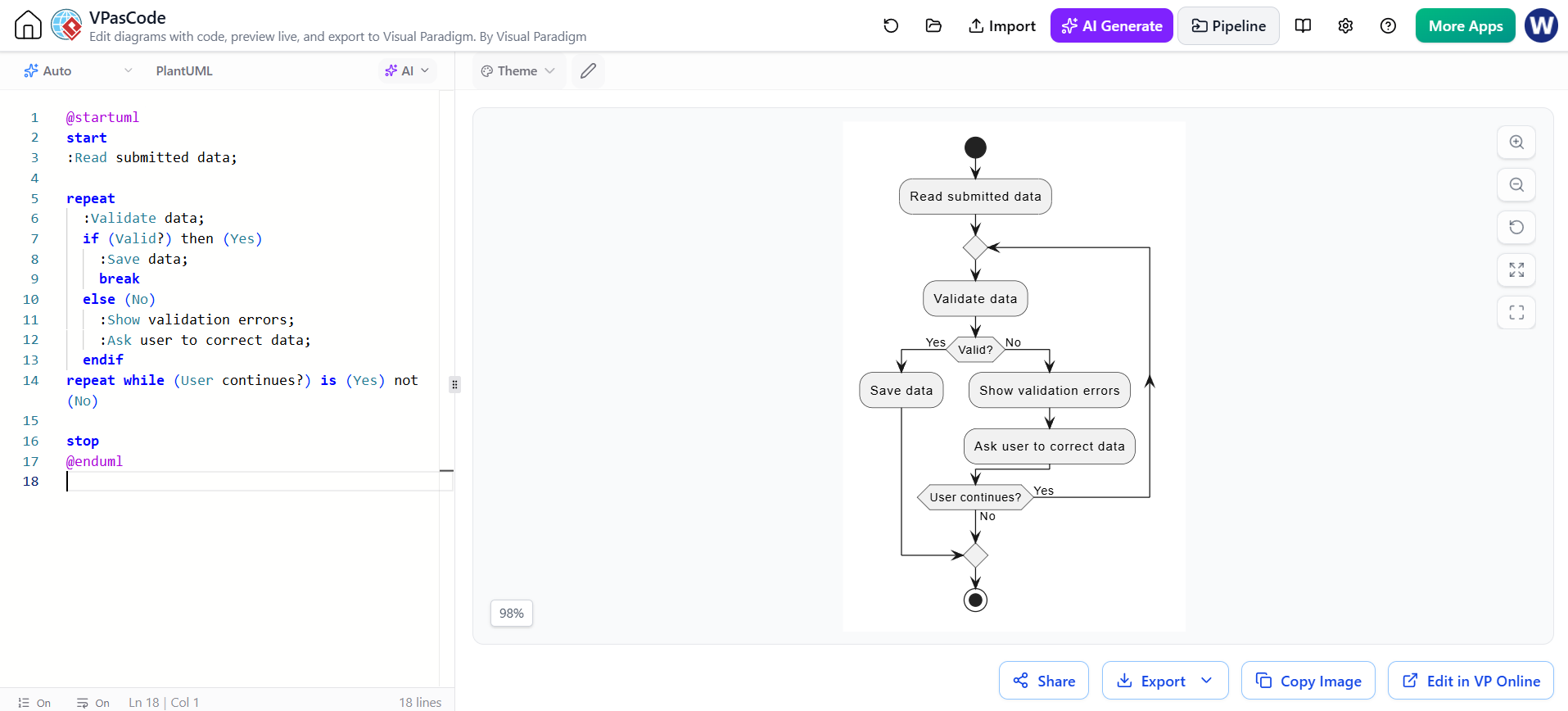
In the realm of system architecture and business process modeling, few scenarios are as critical—and as common—as data validation. Whether you are designing an e-commerce checkout, a user registration form, or an API integration, the system must often handle iterative feedback loops where a user must correct errors before proceeding. This tutorial demonstrates how to model this specific logic using VPasCode and the PlantUML language within the Visual Paradigm ecosystem.
We will dissect a specific scenario: a system that reads submitted data, validates it, and loops back to the user if the data is invalid. By the end of this guide, you will understand how to translate verbose logical requirements into concise, executable code that generates a clear flowchart.
Understanding the Syntax: The repeat and while Loop
The core of the diagram shown in the screenshot relies on a specific type of loop structure known as a do-while or repeat-until construct. In standard programming, loops often check a condition at the start. However, in validation flows, we typically need to execute the validation logic at least once before checking if we should repeat the process.
VPasCode utilizes PlantUML syntax to define this behavior. The key directive here is repeat, which signals the start of a loop block, and repeat while, which defines the termination condition.
repeat
  :Validate data;
  if (Valid?) then (Yes)
    :Save data;
    break
  else (No)
    :Show validation errors;
    :Ask user to correct data;
  endif
repeat while (User continues?) is (Yes) not (No)
Let’s break down the logic step-by-step:
- The
repeatBlock: The code immediately following therepeatkeyword is executed. In this case, it validates the data. - Conditional Logic (
if): Inside the loop, we check the status of the data. IfValid?is true, we execute the:Save data;action and issue abreakcommand. Thebreakis crucial here; it forces an immediate exit from the loop, regardless of thewhilecondition. - The Fallback (
else): If the data is invalid, the system displays errors and prompts the user to correct the data. The flow naturally loops back to the top of therepeatblock. - The Termination Condition: The
repeat while (User continues?) is (Yes) not (No)line acts as the safety net. It ensures that if the user decides to abandon the process (e.g., they choose “No” to correcting the data), the loop terminates gracefully.
Translating Code to Visual Architecture
One of the greatest advantages of using VPasCode is the ability to see the immediate visual representation of your logic. The code snippet above renders into a specific flowchart structure that is intuitive for stakeholders.
- Entry Point: The process begins at a black circle (
start) and moves to the initial action:Read submitted data. - The Loop Entry: The flow enters the decision diamond for
Validate data. This is the entry point of the loop in the visual diagram. - The Decision Fork: The diamond splits into two paths:
- Yes (Valid): The flow moves to
Save dataand then exits the loop via a join point to the end state. - No (Invalid): The flow moves to
Show validation errors, thenAsk user to correct data.
- Yes (Valid): The flow moves to
- The Exit Check: After asking the user to correct data, the flow reaches a second decision diamond:
User continues?.- If Yes, an arrow loops back to the top of the validation step.
- If No, the flow exits the loop to the final stop state.
This visual representation effectively communicates the iterative nature of the process. Unlike a linear list of steps, the loop clearly demonstrates that the system will not proceed to “Save data” until the validation criteria are met.
Best Practices for Loop Modeling
When modeling loops in VPasCode, clarity is paramount. Loops can become “spaghetti logic” if the exit conditions are vague. Based on the provided example, here are three best practices to ensure your diagrams remain readable:
- Explicit Exit Conditions: Always define exactly what causes the repetition to stop. In our example, the repetition stops if (1) validation passes, or (2) the user explicitly chooses not to continue. Avoid implicit stops.
- Use
breakfor Success Paths: When a “happy path” (success) is found inside a loop, use thebreakcommand. This prevents the flow from falling through to the loop’s termination check, which can be confusing for readers. - Limit Iteration Visually: While code can handle infinite loops, diagrams should ideally show a finite number of iterations. Ensure your logic allows for a “No” path to exit the loop, preventing the diagram from looking like an infinite sink.
Conclusion
By leveraging the syntax of VPasCode, you can model complex, interactive processes with high fidelity. The example of data validation demonstrates how a few lines of code can define a robust system architecture that handles errors gracefully. As you continue to build your models, remember to keep your loop conditions explicit and your visual logic clear.