
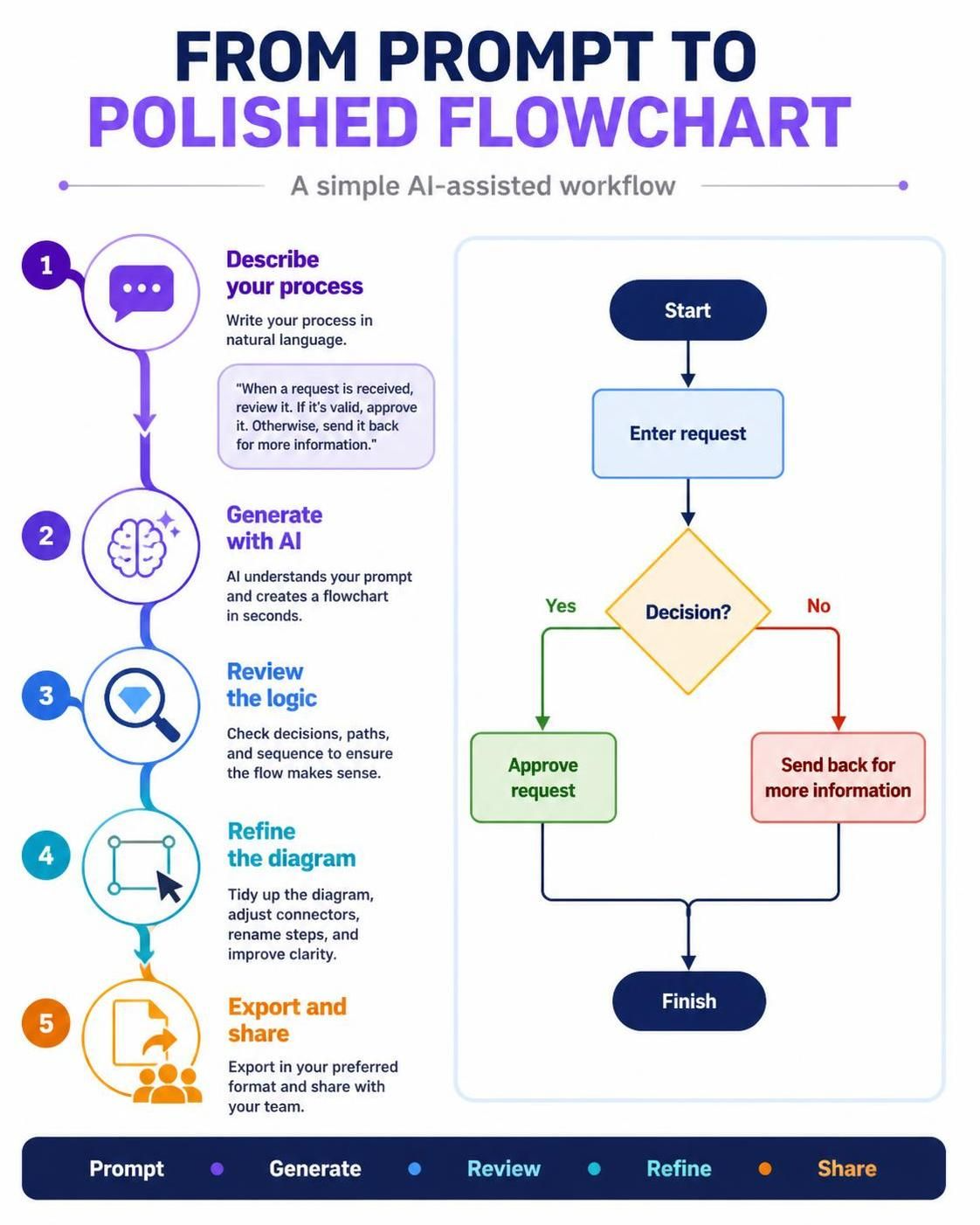
In the modern landscape of systems analysis and software engineering, the bottleneck is often the gap between human intent and formal documentation. Visual Paradigm has revolutionized this workflow by introducing an AI ecosystem capable of translating natural language requirements into precise visual models instantly. This tutorial explores the five-step architecture of creating a polished flowchart, moving from a simple text description to a finalized, shareable professional diagram.
The AI-Assisted Workflow Architecture
The methodology presented in the workflow is a streamlined loop designed to reduce cognitive load. Instead of manually dragging and dropping shapes, the user acts as the “Architect” (defining the logic) while the AI acts as the “Draftsman” (rendering the visual structure). This approach ensures that the technical fidelity of the diagram matches the business logic.
Phase 1: Describe Your Process (The Prompt)
The foundation of any accurate model is a clear requirement. In this phase, the user inputs a natural language description of the system’s behavior. The AI relies heavily on the clarity of this input.
- Input Strategy: Write the process as a narrative. For example: “When a request is received, review it. If it’s valid, approve it. Otherwise, send it back for more information.”
- Key Concept: The AI engine parses keywords such as “If,” “Otherwise,” and “Review” to identify the core control structures (Decisions) and processes.
Phase 2: Generate with AI (Instant Rendering)
Once the prompt is submitted, the Visual Paradigm AI engine instantly constructs the diagram. It maps the semantic meaning of your text to standard UML or Flowchart symbols.
- Start/End Nodes: The system automatically identifies the entry and exit points (Start/Finish).
- Process Blocks: Actions like “Enter request” are rendered as rectangular process boxes.
- Decision Logic: Conditional statements trigger the creation of diamond-shaped decision nodes with branching paths.
Phase 3: Review the Logic (Validation)
Generation is only the first step. The “Review the logic” phase requires the engineer to verify the accuracy of the generated model. This is critical for ensuring the diagram represents reality.
- Check Decisions: Verify that the diamond nodes correctly represent the branching logic (Yes/No).
- Check Paths: Ensure that every possible outcome from a decision node is connected to a subsequent step.
- Check Sequence: Confirm that the flow follows the chronological order of operations.
Phase 4: Refine the Diagram (Styling)
While the AI generates the logic, the human expert refines the aesthetics. This step transforms a rough schematic into a “polished” diagram.
- Layout Adjustment: Manually move nodes to ensure connectors are straight and do not cross unnecessarily.
- Labeling: Rename generic labels (e.g., changing “Process 1” to “Validate Request”) for clarity.
- Connectors: Adjust the routing of arrows to improve readability.
Phase 5: Export and Share
The final phase focuses on distribution. Visual Paradigm supports exporting in various formats (PDF, PNG, HTML, or even PlantUML/Mermaid code) to ensure the team can view the documentation regardless of their software stack.
Technical Breakdown: The Logic Model
To understand the underlying structure of the diagram shown in the workflow, we can visualize the logic as a pseudocode block. This demonstrates how the text prompt translates into formal logic.
BEGIN
  ENTER request

  IF (request IS valid) THEN
    APPROVE request
  ELSE
    SEND BACK for more information
  END IF

  FINISH
END
This logic corresponds directly to the visual elements: the Enter Request is a process, the Decision? is the condition check, and the Approve vs. Send Back are the divergent paths.
Conclusion
By leveraging the “From Prompt to Polished” workflow, professionals can drastically reduce the time spent on diagramming. The AI handles the geometry and standard symbols, allowing the engineer to focus on the critical task of logic validation and refinement.