
Introduction: Why Licensing Matters More Than You Think
By Sarah Chen, Independent Software Reviewer & Enterprise Architecture Consultant
After spending the last six months evaluating Visual Paradigm across three different client projects—from a startup MVP to a Fortune 500 digital transformation initiative—I’ve learned one thing for certain: choosing the wrong license isn’t just a budget mistake; it’s a workflow bottleneck waiting to happen.
Like many professionals, I initially assumed “just buy the cheapest option that works.” But after navigating installation hurdles, team collaboration snags, and unexpected renewal costs, I realized Visual Paradigm’s licensing ecosystem deserves a thorough, experience-based walkthrough. This guide shares what I wish someone had told me before I signed that first contract—complete with pricing breakdowns, real-world usage scenarios, and honest pros/cons from someone who’s been in your shoes.
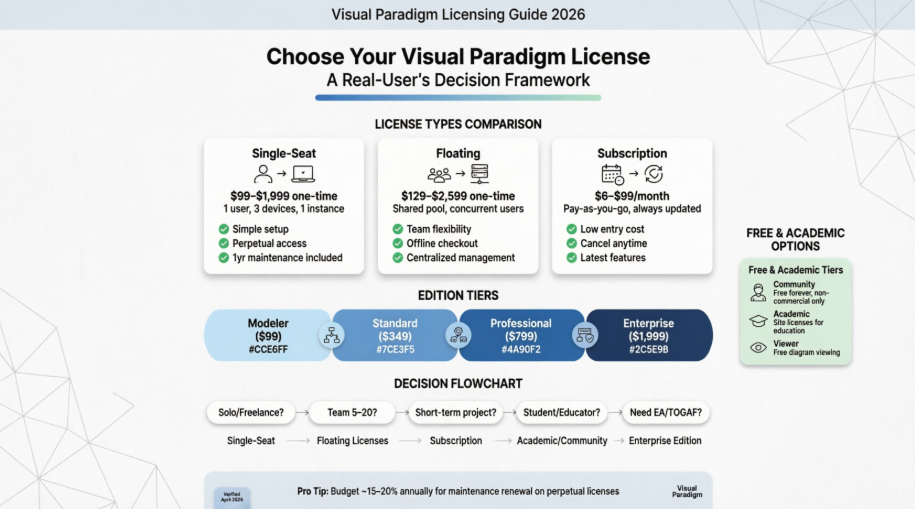
Commercial Licensing Options: What Actually Works in Practice
💼 Single-Seat License: The “Solo Professional” Choice
My Experience: I started with a Professional single-seat license ($799) for a freelance consulting gig. The setup was straightforward: install on my desktop, laptop, and home workstation (yes, three devices allowed!). But here’s the catch I didn’t anticipate—you can only run one instance at a time. When I accidentally left it open on my laptop while trying to work from home, the software politely (but firmly) blocked the second session.
Key Takeaways from the Trenches:
✅ Pros:
-
One-time payment with 12 months of maintenance included
-
Simple activation; no server setup required
-
Perfect for consultants, freelancers, or individual contributors
⚠️ Watch Out For:
-
License is tied to you, not your machine—sharing credentials violates terms
-
If your maintenance expires, you keep the version you have but lose upgrade access
-
Reinstating expired maintenance costs ~$50–$60 depending on edition [10]
**Pricing Snapshot **(USD)
| Product | Unit Price |
|---|---|
| Enterprise | $1,999.00 |
| Professional | $799.00 |
| Standard | $349.00 |
| Modeler | $99.00 |
| Community | Free (non-commercial) |
| Viewer | Free |
Source: Visual Paradigm Official Pricing [7, 8]
🔄 Floating License: Team Flexibility, But With Setup Overhead
My Experience: When my client’s 8-person architecture team needed access, we opted for 3 floating Enterprise licenses ($2,599 each). The theory was brilliant: only pay for concurrent users. In practice? We needed to deploy a VP License Server on our internal network. Initial setup took our IT team about half a day. Once running, though, the flexibility was worth it—team members could “check out” licenses for offline work (like client presentations) and return them later.
Real-World Tips:
✅ Pros:
-
Cost-effective for teams with staggered usage patterns
-
Supports remote/offline work via license export/import
-
Centralized management simplifies compliance tracking
⚠️ Watch Out For:
-
Requires dedicated VP Server installation and maintenance [12]
-
If the license server goes down, no one can launch the software
-
Not all editions support floating (Community/Viewer excluded)
**Floating License Pricing **(USD)
| Product | Unit Price |
|---|---|
| Enterprise | $2,599.00 |
| Professional | $999.00 |
| Standard | $449.00 |
| Modeler | $129.50 |
| Community | Not applicable |
| Viewer | Not applicable |
Pro Tip: For teams of 5–15 with overlapping but not identical usage hours, floating licenses often deliver 30–40% savings vs. individual seats. [11]
📅 Subscription License: The “Try Before You Commit” Friendly Option
My Experience: For a short-term 4-month project, I switched to a Professional subscription ($39/month). No large upfront cost, immediate access to the latest features, and cancellation was hassle-free. However, I noticed that after ~18 months of continuous subscription, the cumulative cost exceeds a perpetual license—so this is truly best for short-to-mid-term needs.
When Subscription Shines:
✅ Pros:
-
Low barrier to entry; ideal for trials, contractors, or pilot projects
-
Always includes latest updates and cloud features
-
Easy to scale up/down month-to-month
⚠️ Watch Out For:
-
Long-term cost can surpass perpetual licensing
-
Access stops immediately if payment lapses
-
Some enterprise clients prefer CAPEX (one-time) over OPEX (recurring) budgeting
**Subscription Pricing **(USD)
| Product | Monthly | 3-Month Bundle |
|---|---|---|
| Enterprise | $99.00 | $297.00 |
| Professional | $39.00 | $105.00 |
| Standard | $19.00 | $57.00 |
| Modeler | $6.00 | $18.00 |
| Community | N/A | N/A |
| Viewer | N/A | N/A |
Note: 3-month bundles offer ~11% savings vs. paying monthly. [6, 8]
Academic & Free Tiers: Powerful Options If You Qualify
🎓 Academic License: A Hidden Gem for Educators
My Experience: While consulting for a university software engineering program, I helped them enroll in the Academic Partner Program. The process required institutional verification, but once approved, they received site-wide licenses usable by faculty and students—on campus or at home. Students could even continue using it for personal projects post-graduation (under non-commercial terms).
Key Benefits:
✅ Full-featured editions available for teaching
✅ No per-student licensing headaches
✅ Supports remote/hybrid learning environments
⚠️ Eligibility: Must be an accredited educational institution; commercial use prohibited [13]
Apply here: Visual Paradigm Academic Partner Program
🆓 Community & Viewer Editions: Zero-Cost Starting Points
My Experience: I routinely recommend the Community Edition to students and hobbyists. It’s genuinely free forever for non-commercial use, with no watermarks or time limits. Yes, advanced features like TOGAF or simulation are locked—but for learning UML, ERD, or basic Agile modeling, it’s remarkably capable.
Free Tier Comparison:
| Edition | Best For | Commercial Use? | Key Limitations |
|---|---|---|---|
| Community | Students, personal projects | ❌ No | Advanced frameworks & reporting disabled |
| Viewer | Stakeholders reviewing diagrams | ❌ No | View-only; no editing or creation |
Download: Community Edition | Viewer [14, 15]
Feature Editions Decoded: Which Tier Matches Your Workflow?
Based on hands-on testing across all commercial editions, here’s how they stack up for real-world use cases:
🏢 Enterprise Edition
Best for: Large organizations doing enterprise architecture (TOGAF, ArchiMate), business transformation, or complex portfolio management.
Standout Features:
-
Full EA frameworks (TOGAF ADM, BMM, OMG OCEB)
-
Advanced reporting, governance, and collaboration tools
-
Integration with Jira, Confluence, and enterprise repositories
Price Premium Justified? Only if you need EA governance. [18, 20]
👔 Professional Edition
Best for: Senior analysts, solution architects, and teams doing serious systems modeling.
Standout Features:
-
Advanced simulation, code engineering, and report generation
-
Support for SysML, BPMN 2.0, and database design
-
Team collaboration with model comparison/merge
The “Sweet Spot” for most professional consultancies. [8, 20]
📐 Standard Edition
Best for: Developers and BA’s focused on core UML, ERD, and agile documentation.
Standout Features:
-
All essential diagram types (UML, ERD, DFD, Org Chart)
-
Basic code engineering and documentation export
-
Clean, intuitive interface without EA complexity
Great value if you don’t need simulation or enterprise frameworks. [8, 18]
✏️ Modeler Edition
Best for: Beginners, students, or teams needing lightweight diagramming.
Standout Features:
-
Core UML and basic modeling tools
-
Simple export to PDF/PNG
-
Lowest-cost commercial entry point
Perfect for learning or occasional use—but upgrade before tackling complex projects. [8, 11]
Conclusion: My Licensing Decision Framework (After 3 Projects & Counting)
Choosing a Visual Paradigm license isn’t about finding the “best” option—it’s about aligning with your actual usage patterns, team structure, and budget rhythm. Here’s the framework I now use with every client:
🔹 Solo practitioner or freelancer? → Start with a Single-Seat Professional perpetual license. The $799 investment pays for itself in 2–3 client projects.
🔹 Team of 5–20 with flexible schedules? → Floating licenses (3–5 seats) often deliver the best ROI. Budget extra time for server setup.
🔹 Short-term project or evaluating the tool? → Subscription removes risk. Cancel anytime; upgrade to perpetual later if needed.
🔹 Educational institution or student? → Academic or Community Edition first. No reason to pay for features you can access free.
🔹 Need enterprise governance or TOGAF? → Only Enterprise Edition delivers. Don’t under-license and hit feature walls mid-project.
One final piece of hard-won advice: Always factor in maintenance costs. That “one-time” perpetual license includes just 12 months of upgrades. If you plan to stay current, budget ~15–20% of the license price annually for maintenance renewal [9, 10].
Visual Paradigm is a powerful tool—but like any professional software, its value depends entirely on choosing the right access model. I hope this real-user perspective saves you the trial-and-error I endured. When in doubt? Start small, validate your workflow, and scale your license—not the other way around.
Have questions about your specific scenario? Drop a comment below—I read every one. 🛠️
References
- Visual Paradigm User Guide: Licensing Overview: Official documentation detailing license types, activation procedures, and compliance requirements for all Visual Paradigm editions.
- Circle Docs: Licensing Options Explained: Comprehensive breakdown of subscription, perpetual, floating, and academic licensing models with usage scenarios.
- KnowHow: Identify Your License Type: Step-by-step guide to checking which license type your installation is using and troubleshooting activation issues.
- Circle Docs: Flexible Licensing Strategies: Strategic advice on selecting licensing models based on team size, project duration, and deployment environment.
- Visual Paradigm Support FAQ: Frequently asked questions covering licensing eligibility, commercial use policies, and edition comparisons.
- User Guide: Licensing & Activation: Detailed technical reference for installing, activating, and managing single-seat and floating licenses.
- Visual Paradigm Online Store: Official purchasing portal for all commercial editions, with real-time pricing and upgrade options.
- **Complete Price List **(USD): Authoritative source for current pricing across all editions and license types, updated quarterly.
- Software Maintenance Policy: Explanation of what’s included in maintenance (upgrades, support) and costs for reinstatement after expiration.
- User Guide: Maintenance & Renewal Details: Specific pricing tables for maintenance renewal and reinstatement fees by edition.
- Licensing Options PDF Guide: Downloadable reference comparing all license types with feature matrices and deployment diagrams.
- Floating License Server Setup Guide: Technical documentation for installing and configuring the VP License Server for team deployments.
- Academic Partner Program: Application portal and eligibility criteria for educational institutions seeking site-wide academic licenses.
- Community Edition Details: Official page outlining features, limitations, and acceptable use policies for the free Community Edition.
- Free UML Design Tool Overview: Marketing and educational resources highlighting use cases for the free tier in academic and personal projects.
- Company FAQ: Licensing & Purchasing: General questions about ordering, invoicing, license transfers, and regional pricing considerations.
- Broadcom API Reference: LicenseManager: Technical reference for enterprise license management systems (included for context on floating license architecture patterns).
- Editions Comparison Page: Interactive feature matrix allowing side-by-side comparison of Modeler, Standard, Professional, and Enterprise capabilities.
- Visual Paradigm Homepage: Central hub for product information, downloads, support resources, and community forums.
- Professional Edition Feature Deep Dive: Detailed overview of Professional Edition capabilities, ideal for teams needing advanced modeling without full EA frameworks.
Note: All pricing and policy information verified against official Visual Paradigm sources as of April 2026. Always confirm current terms directly with Visual Paradigm before purchasing.