
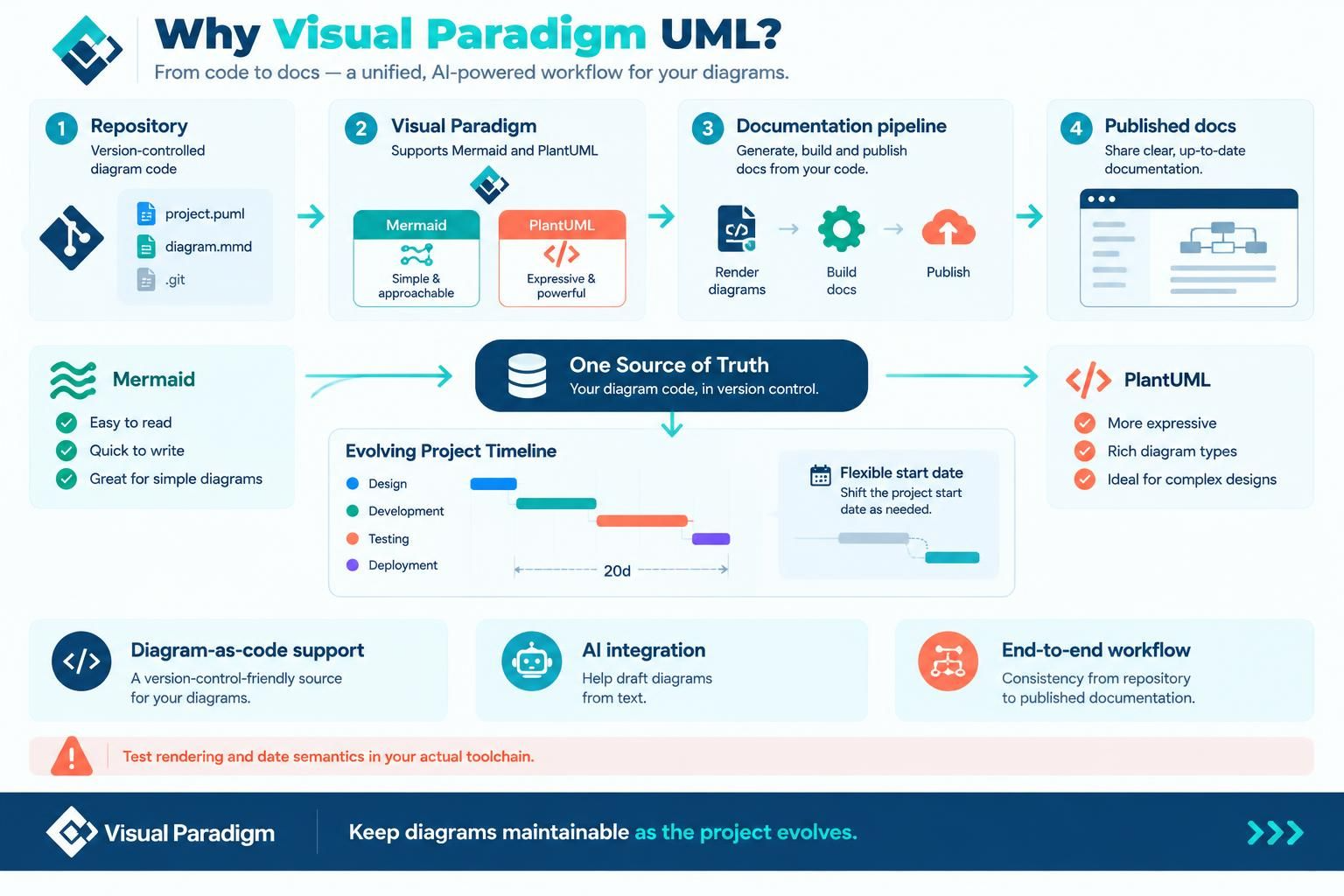
In modern software development and project management, maintaining accurate documentation is often a struggle. Diagrams become outdated as soon as they are created, leading to a disconnect between the project reality and its documentation. Visual Paradigm UML addresses this by introducing a unified, AI-powered workflow that transitions from code to documentation. This tutorial explores how to leverage Diagram-as-Code principles, specifically focusing on Gantt charts, to create robust, maintainable, and AI-friendly project timelines.
The Unified Workflow: From Repository to Published Docs
The core philosophy behind Visual Paradigm is the concept of a Single Source of Truth. Instead of managing static images that drift out of sync with the code, this workflow treats diagrams as version-controlled text files. The process follows a logical four-step evolution:
- Repository: The journey begins with version-controlled diagram code (such as
project.pumlordiagram.mmd) stored in a.gitrepository. This ensures that every change to the timeline or architecture is tracked. - Visual Paradigm: The core engine supports both Mermaid for simplicity and PlantUML for power. This dual support allows teams to choose the right syntax for their specific needs.
- Documentation Pipeline: The system automatically renders diagrams, builds the documentation, and publishes them. This eliminates manual copy-pasting and formatting errors.
- Published Docs: The final output is a shareable, up-to-date documentation set that accurately reflects the current state of the project.
Diagram-as-Code: Mermaid vs. PlantUML
Choosing the right syntax language is crucial for efficiency. Visual Paradigm’s support for both allows flexibility across different team structures.
Mermaid: Simplicity and Approachability
Mermaid is ideal for quick, readable diagrams. Its syntax is lightweight, making it perfect for simple flowcharts or basic timelines where the focus is on speed and readability rather than complex styling.
PlantUML: Expressive and Powerful
PlantUML is the powerhouse for complex designs. It offers more expressive capabilities, allowing for detailed Gantt charts, sequence diagrams, and custom styling. When your project requirements grow, PlantUML scales with you.
Building Robust Gantt Charts
One of the most common challenges in project management is maintaining the schedule. If a project is delayed, updating a Gantt chart manually is tedious. Visual Paradigm’s AI integration and PlantUML support solve this by enabling flexible, relative scheduling.
When defining Gantt charts in PlantUML, you can utilize relative time intervals instead of hard-coded absolute dates. This approach ensures that if the project start date shifts, the relative dependencies automatically adjust without requiring a complete rewrite of the schedule.
PlantUML Gantt Example
The following example demonstrates how to define a project timeline using PlantUML with relative intervals (e.g., 20d for 20 days) and dependencies.
@startgantt
[Design] starts at 0d
[Development] starts after [Design]
[Testing] starts after [Development]
[Deployment] starts after [Testing]
[Testing] is 10d
[Deployment] is 5d
@endgantt
In this structure, the “Testing” phase starts immediately after “Design” and “Development” are complete. By using relative references, you create a resilient diagram that adapts to changes in the project scope.
Tooling and AI Integration
Visual Paradigm UML enhances this workflow with advanced tools designed to streamline the modeling process:
- Visual Paradigm Gantt Chart Tool: A dedicated interface for creating and managing project timelines with visual ease.
- AI Chatbot: Leverage AI capabilities to generate complex diagrams directly from text prompts. This reduces the barrier to entry for non-designers and accelerates the drafting process.
- VPasCode Tool: This tool bridges the gap between code and visuals, ensuring that your diagrams remain accurate as your project evolves. It supports version control compatibility, ensuring that your diagram code is treated with the same rigor as your application code.
Why Choose Visual Paradigm UML?
Visual Paradigm stands out in the crowded landscape of UML and modeling tools by offering a comprehensive End-to-End Workflow. It ensures consistency from the repository to the documentation pipeline and finally to published docs. The standout benefit is the ability to maintain a single source of truth.
Whether you choose Mermaid for its simplicity or PlantUML for its power, Visual Paradigm ensures that your diagrams remain accurate as your project evolves. By understanding the nuances of these tools and utilizing the right combination, you can create robust, maintainable, and AI-friendly project timelines that scale with your team’s needs.
Note: Always test rendering and date semantics in your actual toolchain to ensure compatibility.