
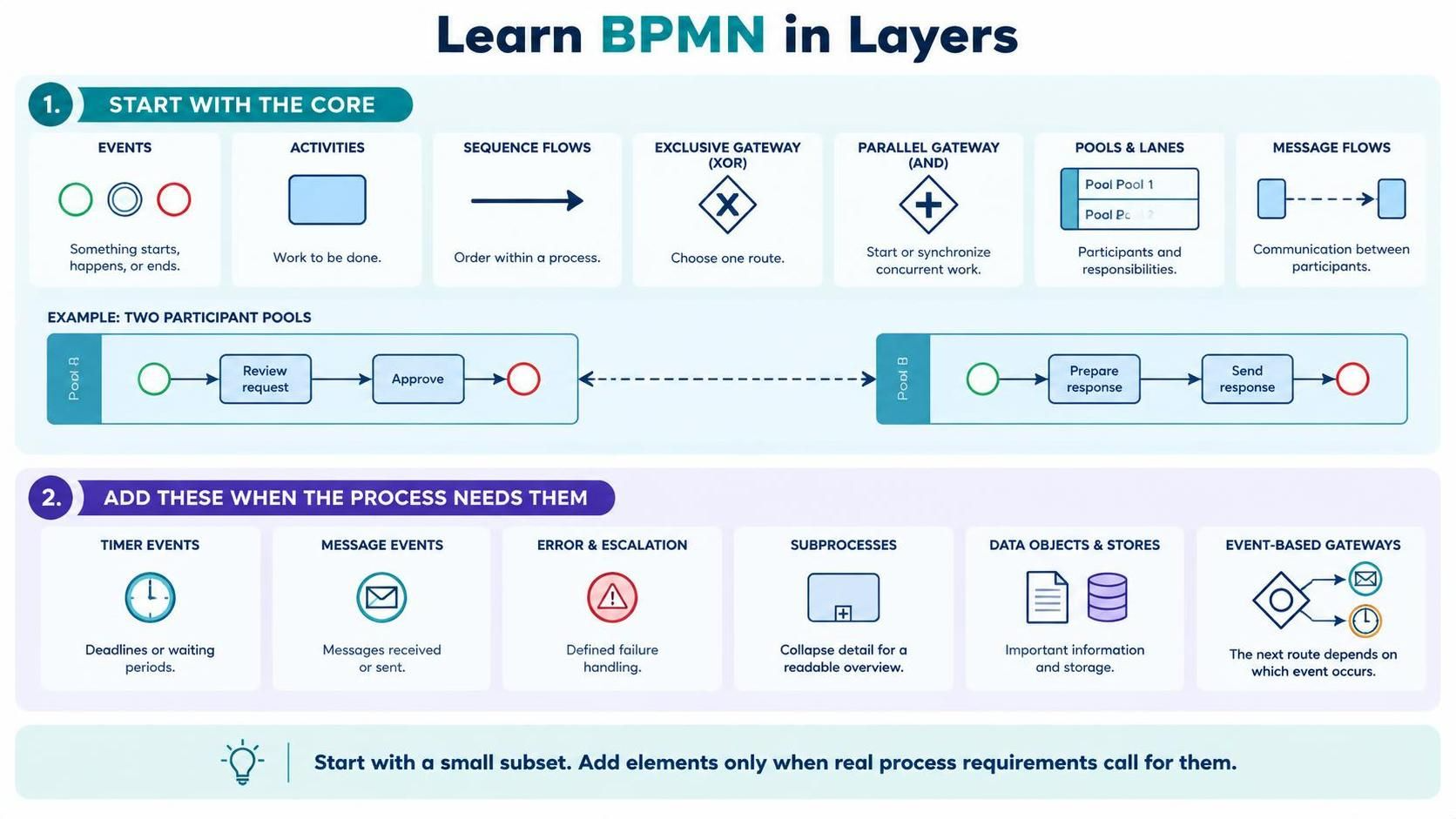
Business Process Model and Notation (BPMN) is the industry standard for visualizing business processes. However, its sheer breadth of elements can be overwhelming for newcomers. The most effective way to master BPMN is not to learn every symbol at once, but to adopt a “layered” learning strategy. By starting with a core subset of essential elements and expanding only as process complexity demands, you can build clear, maintainable diagrams without getting bogged down in syntax.
Phase 1: The Core Foundation
The first step in mastering BPMN is to understand the building blocks that drive the logic of a process. These elements form the skeleton of any diagram.
1. The Lifecycle: Events
Events are represented by circles and describe “what happens” rather than “what work is done.” They act as the triggers and terminators of process steps.
- Start Events: Usually depicted as a thin circle, these mark the beginning of a process or a specific branch within it.
- End Events: A thick circle indicating the completion of a process or a specific path.
- Intermediate Events: Occurring between activities, these can represent waiting periods (like a timer) or the arrival of a message.
2. The Work: Activities
Activities represent the actual work being performed. They are depicted as rounded rectangles. Unlike events, activities are actionable steps where a task is executed. In a layered approach, you can start with generic activities and later refine them into specific sub-processes.
3. The Path: Sequence Flows
Sequence flows are solid arrows that dictate the order of steps within a single participant (or lane). They represent the control flow—the “next step” logic. Understanding the distinction between control flow (sequence flow) and communication flow (message flow) is critical for accurate modeling.
4. The Logic: Gateways
Gateways determine how the process diverges or converges. They are the decision points of your diagram.
- Exclusive Gateway (XOR): Shown as a diamond with an ‘X’, this represents a choice. The process can only go down one path (e.g., if a loan is approved, do X; if rejected, do Y).
- Parallel Gateway (AND): Shown as a diamond with a ‘+’, this allows for concurrent execution. It splits the path into multiple branches that happen simultaneously, or waits for all incoming branches to complete before continuing.
5. The Context: Pools and Lanes
To model interactions between different departments or organizations, use Pools and Lanes. A Pool represents a distinct entity (like a company or a system), while Lanes divide the Pool to show specific responsibilities or roles.
6. The Connection: Message Flows
Message flows are dashed lines with a hollow arrowhead. They represent communication between different participants (e.g., between two Pools). It is a common beginner mistake to use a sequence flow for this; remember that a sequence flow is for internal steps, while a message flow is for inter-participant communication.
Phase 2: Expanding the Scope
Once you are comfortable with the core logic, you can layer in more sophisticated elements to handle real-world complexity. These should be introduced only when your specific process requirements demand them.
Timing and Communication
Real processes rarely happen in a vacuum. Timer Events allow you to model deadlines or waiting periods (e.g., “wait 3 days before sending a reminder”). Message Events allow you to specify exactly what is being sent or received when a communication step occurs.
Handling Complexity
As processes grow, they become cluttered. Subprocesses (activities with a plus sign) allow you to collapse a complex set of steps into a single box, keeping the high-level view readable. You can then drill down into the details of that subprocess in a separate diagram.
Robustness and Data
To make your processes robust, include Error and Escalation Handling. These events define what happens when things go wrong, ensuring failures are caught and handled gracefully rather than causing the process to crash. Additionally, Data Objects and Stores help you visualize the information being created, read, or archived during the process.
Event-Driven Logic
Finally, for scenarios where the next step depends on an unpredictable occurrence rather than a data decision, use Event-Based Gateways. These allow the process to wait for the first of several possible events to occur (e.g., a customer cancels vs. a customer confirms).
Conclusion
The key to effective BPMN modeling is discipline. Start with the core elements—Events, Activities, Sequence Flows, Gateways, and Pools. This subset covers the vast majority of standard business scenarios. Only add Timer Events, Subprocesses, or complex Gateways when the specific requirements of the process dictate it. This layered approach ensures your diagrams remain clear, understandable, and valuable to all stakeholders.