
In the vast ecosystem of software architecture and system design, clarity is paramount. When teams attempt to model complex systems, they often rely on the Unified Modeling Language (UML). However, standard UML elements do not always capture the specific nuances of a particular domain or technology stack. This is where the Profile Diagram becomes an essential instrument. 🛠️ Despite its utility, this concept is frequently misunderstood, leading to confusion among architects and developers alike.
This guide provides a comprehensive look at the Profile Diagram. We will strip away the confusion, examine the technical realities, and provide a clear path forward for implementing these extensions effectively. There is no magic here, only structured logic designed to enhance model expressiveness.
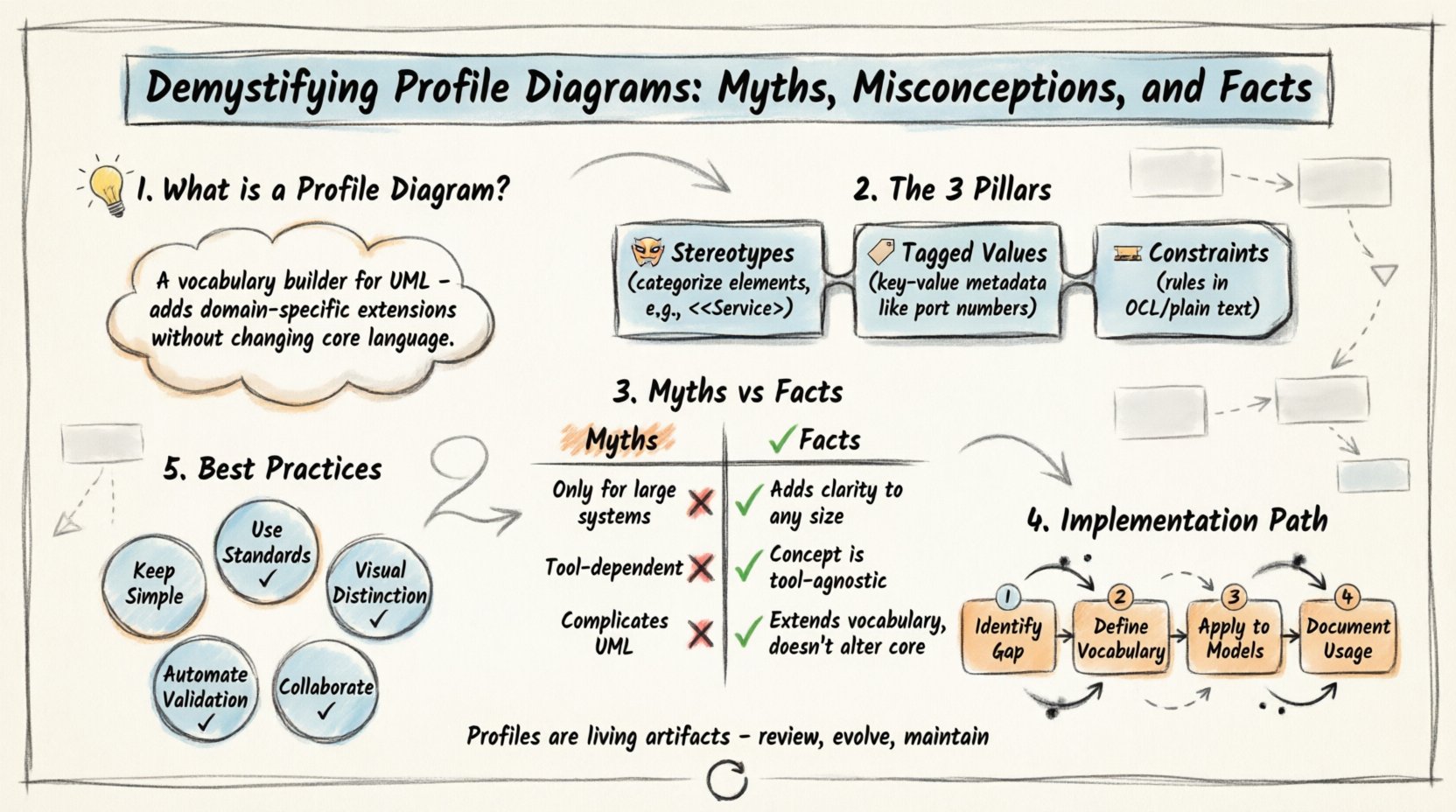
🧩 Understanding the Profile Diagram Concept
A Profile Diagram is a specialized type of UML diagram. Its primary function is to define a set of extensions that can be applied to existing UML models. Think of it as a vocabulary builder. If standard UML is the base language, a Profile adds the specific technical terms required for your project.
Without profiles, a model might describe a generic class. With a profile, that same class can be described as a specific implementation pattern, such as a Service, a Repository, or a Database Table. This distinction is critical for maintaining high-fidelity documentation.
Key Characteristics:
- Extensibility: It allows you to add new semantics to existing UML elements without changing the core language.
- Context Specific: Profiles are often tailored to specific platforms, industries, or architectural styles.
- Reusability: Once defined, a profile can be applied to multiple models within an organization.
When you create a profile, you are essentially creating a package of stereotypes, tagged values, and constraints. These elements hang off the standard UML metaclasses, enriching them with domain-specific meaning.
🏗️ The Anatomy of a Profile Extension
To understand how a profile functions technically, one must understand its constituent parts. A profile does not replace standard UML; it augments it. The three pillars of a profile are stereotypes, tagged values, and constraints.
1. Stereotypes 🎭
A stereotype is the mechanism used to categorize an element. In standard UML, you might see a class box. In a profile, you can annotate that box to indicate it represents a specific concept. For example, instead of just a Class, you might have a {Service} stereotype.
- Stereotypes are displayed in guillemets (e.g., <<MyStereotype>>).
- They change the icon or visual representation of the element in some modeling environments.
- They provide a semantic label that developers can instantly recognize.
2. Tagged Values 🏷️
While stereotypes label the element, tagged values store data about it. These are key-value pairs that allow for metadata storage. If a stereotype says “This is a Service,” a tagged value might say “This service runs on Port 8080” or “This service requires authentication.”
- Tagged values act like attributes for the model element itself.
- They enable code generation tools to read specific properties from the diagram.
- They help maintain consistency across the system architecture.
3. Constraints 🚧
Constraints define rules that must be satisfied. They are often expressed in OCL (Object Constraint Language) or plain text. For instance, a constraint might state that a specific profile element cannot be instantiated more than once in a given scope.
- Constraints ensure architectural integrity.
- They prevent invalid configurations in the design phase.
- They serve as validation rules for automated analysis.
🚫 Myths vs. Facts: The Reality Check
There is a significant amount of noise surrounding the use of profile diagrams in enterprise modeling. Some practitioners believe they are unnecessary overhead, while others treat them as a silver bullet. The following table separates the common misconceptions from the established facts.
| Myth | Fact |
|---|---|
| Myth: Profiles are only for large, complex systems. | Fact: Profiles add clarity to systems of any size. Small projects benefit from defined standards just as much as large ones. |
| Myth: You must use a specific software tool to create profiles. | Fact: The concept is tool-agnostic. While tools help visualize, the definition of a profile is a modeling standard. |
| Myth: Profiles complicate the standard UML syntax. | Fact: Profiles sit on top of standard syntax. They do not alter the core rules of UML; they simply extend the vocabulary.|
| Myth: Once created, a profile is static and never changes. | Fact: Profiles evolve. As technology stacks shift, the stereotypes and constraints must be updated to remain relevant. |
| Myth: Every element in the model needs a profile. | Fact: Use profiles selectively. Over-tagging creates noise and reduces readability. Only tag elements that require specific context. |
🛠️ Implementation Strategies
Successfully integrating a Profile Diagram into your workflow requires a methodical approach. It is not something to be rushed. The goal is to reduce ambiguity, not increase it.
Step 1: Identify the Gap 🕳️
Before drawing anything, analyze your current models. Where is the information missing? Are developers confused about the role of a specific component? Is there a recurring pattern that standard UML cannot describe clearly? This gap analysis determines what stereotypes you need to create.
Step 2: Define the Vocabulary 📖
Once you know the gap, define the terms. Create a list of stereotypes that map to your domain concepts. Ensure these terms are agreed upon by the entire team. Consistency is the enemy of confusion.
- Define the name of the stereotype clearly.
- Define which base UML class it extends (e.g., Class, Component, UseCase).
- List the required tagged values for this stereotype.
Step 3: Apply to Existing Models 🔄
Do not wait for a new project to start using the profile. Apply it to existing models to test its utility. This process reveals edge cases and potential conflicts in the definition. It is better to discover these issues during a review than during deployment.
Step 4: Document the Usage 📝
A profile is useless if no one knows how to use it. Create a companion document that explains:
- What each stereotype means.
- What constraints apply to it.
- Examples of correct usage.
- Common mistakes to avoid.
⚠️ Common Pitfalls and Errors
Even with a solid plan, teams often stumble when working with profile diagrams. Awareness of these pitfalls helps prevent common architectural failures.
Over-Engineering the Profile 🏗️
It is tempting to create a profile for every single detail. However, if your profile becomes as complex as the system itself, it becomes a burden. Keep the profile focused on high-level architectural concerns. Do not model implementation details that can be found in the code.
Inconsistent Application 📉
If one developer applies the {Database} stereotype to a table and another applies {Storage}, the model loses its value. Standardization is key. Enforce strict naming conventions for all stereotypes and tagged values.
Ignoring Version Control 📂
Profiles change over time. If you update a stereotype but forget to update the models using it, you create inconsistencies. Treat the profile definition as a versioned artifact. Ensure that models are checked against the specific version of the profile they were designed for.
Disconnect from Code 👾
A profile diagram should not exist in a vacuum. If the diagram says a component is a {Service}, but the code does not follow service-oriented patterns, the model is lying. Ensure the modeling layer aligns with the implementation layer.
🔄 Maintenance and Lifecycle
A profile is a living artifact. It requires maintenance just like any other piece of documentation or code. The lifecycle of a profile involves creation, deployment, review, and retirement.
Review Cycles 🔍
Schedule regular reviews of your profiles. Ask the following questions:
- Are these stereotypes still relevant?
- Has the technology stack changed?
- Are the tagged values providing useful data?
- Is the profile being used consistently?
Deprecation Strategy 🗑️
When a stereotype is no longer needed, do not simply delete it. Mark it as deprecated. Provide a migration path for existing models. Sudden removal of profile elements can break existing documentation and code generation pipelines.
🔗 Integration with Other Diagrams
Profile diagrams rarely stand alone. They are designed to work in concert with other UML diagrams. Understanding how they interact is crucial for a coherent architecture.
- Class Diagrams: Profiles add semantic meaning to classes. A
Classbecomes aServiceor aEntity. - Component Diagrams: Profiles help define the interface and dependency types of components.
- Deployment Diagrams: Profiles can describe the specific infrastructure requirements of a node.
- Sequence Diagrams: Profiles can label the types of messages or objects being exchanged.
By integrating profiles across these views, you ensure that the terminology remains consistent from the high-level component view down to the detailed interaction view.
🎯 Best Practices for Clarity
To maximize the value of your Profile Diagrams, adhere to these best practices.
- Keep it Simple: A profile should clarify, not confuse. If a stakeholder needs a manual to understand a diagram, the profile is too complex.
- Leverage Standard Conventions: Where possible, align your stereotypes with industry standards (e.g., SOA, MVC, Microservices).
- Visual Distinction: Use distinct colors or shapes for profile elements to make them stand out visually in the diagram.
- Automate Validation: If your environment supports it, use scripts to validate that models adhere to the defined constraints.
- Collaborative Design: Involve developers and stakeholders in the creation of the profile. Their input ensures the model matches reality.
🌐 The Future of Modeling Extensions
As software systems become more distributed and complex, the need for precise modeling language grows. Profile diagrams offer a scalable solution to this challenge. They allow organizations to adapt the modeling language to their specific needs without abandoning the universal standard of UML.
The flexibility provided by profiles ensures that documentation remains relevant as technology evolves. Whether you are moving from monolithic architectures to microservices, or adopting cloud-native strategies, your modeling vocabulary must adapt. Profiles provide the mechanism for that adaptation.
By treating profile diagrams as a core part of your architectural documentation strategy, you invest in long-term maintainability. You reduce the cognitive load on new team members who join the project. You create a shared language that bridges the gap between business requirements and technical implementation.
📝 Final Thoughts
The Profile Diagram is a powerful tool for system modeling. It addresses the limitations of standard UML by allowing for domain-specific extensions. However, its power comes with responsibility. It must be used with discipline, consistency, and a clear understanding of its purpose.
When implemented correctly, it transforms a generic diagram into a precise blueprint. It eliminates ambiguity and ensures that everyone involved in the project shares the same understanding of the system’s structure. Avoid the myths, respect the facts, and prioritize clarity above all else.
Start small. Define one or two critical stereotypes. Apply them to a single model. Review the results. Iterate. This gradual approach ensures that your modeling efforts yield tangible benefits without overwhelming the team.
Remember, the goal is not to create the most complex diagram possible. The goal is to communicate the design effectively. Profiles serve that communication. Use them wisely, and your architecture will be stronger for it. 🚀