
Imagine being able to transform a simple description of an online purchase process into a clear, professional UML Communication Diagram in seconds. This isn’t a futuristic dream; it’s a reality with Visual Paradigm’s AI Diagram Generation feature. The images showcase this powerful capability in action. The first image displays the user interface where a natural language prompt is entered to generate a diagram, while the second image reveals the final, fully rendered UML Communication Diagram. This AI-powered tool eliminates the tedious, time-consuming process of manually drawing complex object interactions, making it an essential solution for software developers, architects, and business analysts who need to visualize system collaboration quickly and accurately. By turning plain text into a structured visual model, Visual Paradigm accelerates design, improves team alignment, and ensures a clear understanding of how different system components interact.
How AI Communication Diagram Generation Works
Visual Paradigm’s AI Communication Diagram Generation is a seamless process that bridges the gap between natural language and professional UML modeling. The first step, as shown in
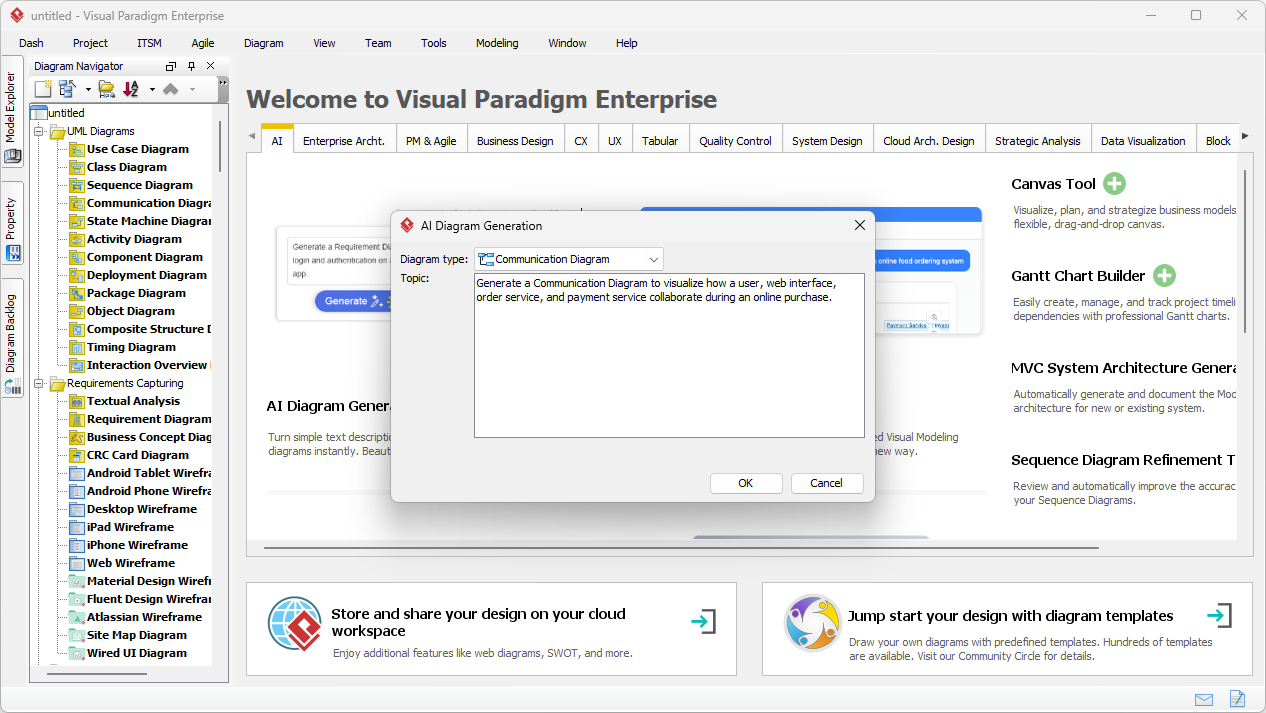
, is to initiate the AI tool. Users simply navigate to Tools > AI Diagram Generation and select the “Communication Diagram” type. The interface then prompts the user to provide a text description of the interaction scenario. The power of this tool lies in its ability to intelligently parse this description. It identifies the key participants (objects), their structural relationships (links), and the sequence of messages exchanged between them. For instance, a description like “A user selects a product and adds it to the cart. The web interface displays the order summary. The user confirms the purchase. The order service creates the order. The payment service processes the payment” is sufficient for the AI to infer the necessary objects, their connections, and the correct order of messages.
Once the user clicks “OK,” the AI processes the input and automatically constructs the diagram, as seen in
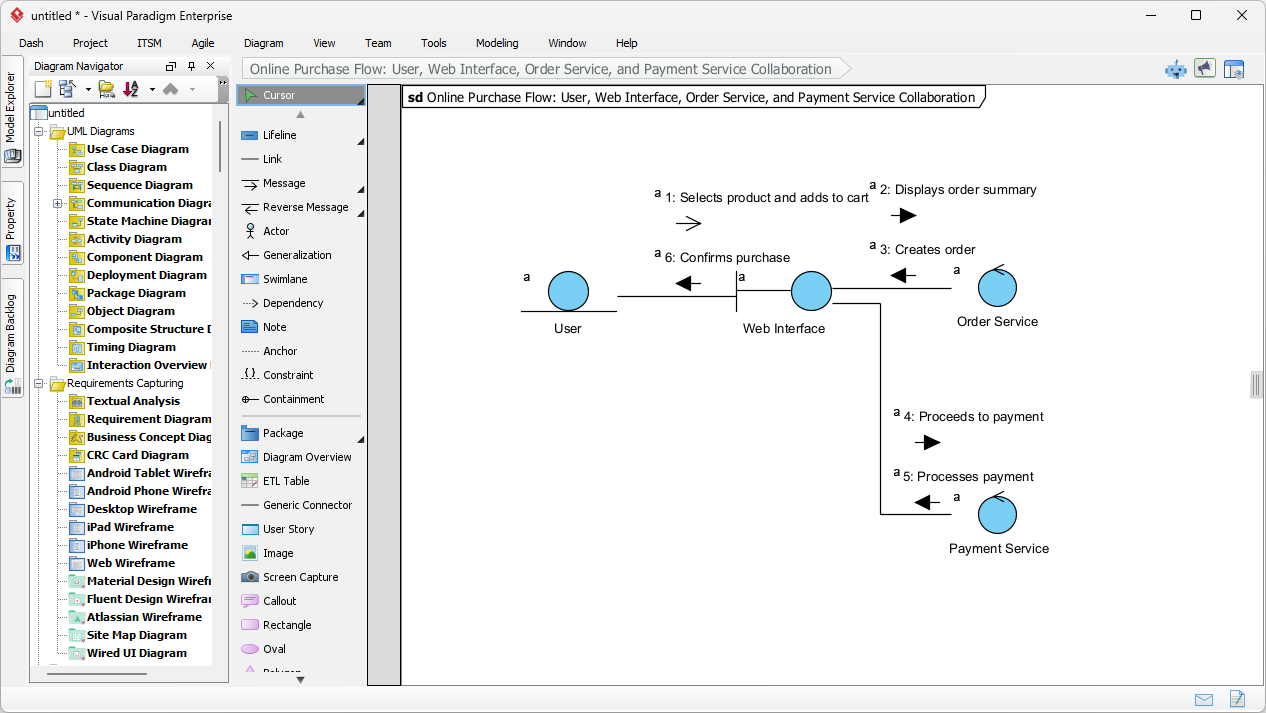
The result is a clean, professional UML Communication Diagram that visually represents the collaboration. The AI ensures the diagram adheres to UML notation, correctly placing objects (lifelines) and linking them with association lines. Messages are automatically numbered in a hierarchical sequence (e.g., 1, 1.1, 2) to show the flow of control. The entire process, from text input to a fully rendered diagram, is designed to be quick and efficient, saving users significant time on complex layout tasks.
Key Benefits of Using AI for Communication Diagrams
Utilizing an AI-powered tool for creating communication diagrams offers numerous advantages that enhance the software design and analysis workflow. One of the primary benefits is the significant time saved. Instead of manually positioning objects and drawing numerous connectors, the AI handles the complex layout, optimizing the diagram for readability and minimizing crossing lines. This allows users to focus on the high-level design and interaction logic rather than the mechanics of drawing.
Another major benefit is the ability to model from scenario descriptions. This feature is particularly powerful for business analysts and system designers who often start with textual use cases or requirements. By describing the interaction in plain English, they can instantly generate a visual model that illustrates both the structural relationships between objects and the behavior of their interaction. This dual perspective—seeing both who is involved and how they communicate—is crucial for understanding system architecture and identifying potential design issues.
Furthermore, the generated diagrams are not static. They are fully editable within Visual Paradigm’s editor, allowing users to refine the model, add parameters, or change message types as needed. This makes the AI-generated diagram a strong foundation for detailed design, code generation, or testing, ensuring a smooth transition from concept to implementation.
Practical Workflows and Use Cases
There are several effective workflows for leveraging AI Communication Diagram Generation in a project. A common use case is to create a diagram for a specific scenario, such as an online purchase flow. The user would follow the steps shown in:
Open the AI tool, select the “Communication Diagram” type, enter a detailed description of the interaction, and generate the diagram. The resulting output, seen in
Provides a clear visual representation of the collaboration between the User, Web Interface, Order Service, and Payment Service.
Another valuable workflow is to compare different interaction perspectives. After generating a communication diagram, a user can generate a sequence diagram for the same scenario. This allows for a side-by-side comparison, highlighting the differences in how each diagram emphasizes structure versus time. This comparison can be invaluable for team discussions and design reviews.
For sharing the results, the generated diagram can be easily exported to various formats, including image files (PNG, JPEG) and PDFs, making it simple to include in reports, presentations, or documentation. The entire process—from text to a professional, shareable diagram—demonstrates how AI can streamline the software modeling process.
Key Takeaways
-
AI-Powered Modeling: Visual Paradigm’s AI Diagram Generation turns natural language descriptions into professional UML Communication Diagrams instantly.
-
Save Time & Effort: The AI automatically handles complex layout, object placement, and message sequencing, eliminating manual drawing.
-
Visualize Collaboration: The diagrams clearly show both the structural relationships between objects and the sequence of messages exchanged.
-
Full Editability: The generated diagrams are fully editable within Visual Paradigm for refinement and integration with other models.
-
Enhanced Team Alignment: These diagrams improve communication and understanding among developers, architects, and business stakeholders.
Experience the power of AI-driven diagramming. Try Visual Paradigm’s AI Communication Diagram Generation today and transform your ideas into clear, professional visual models. Download Visual Paradigm now.
Related Links
AI-powered diagramming tools streamline the creation of UML communication diagrams by transforming natural language descriptions into structured visual models, facilitating a clearer representation of object interactions and system logic.
-
AI Chatbot for Diagram and Model Generation: This tool utilizes artificial intelligence to generate a wide range of models, including UML interaction diagrams, directly from simple text descriptions.
-
What is a Communication Diagram? A Complete Guide to UML Modeling: This foundational resource explains the purpose and structure of communication diagrams in the context of modeling object interactions within a software system.
-
Introducing Visual Paradigm AI Chatbot: A Smarter Way to Create Diagrams: The AI chatbot supports natural language diagram generation and contextual analysis, providing an intuitive way to build enterprise-level models.
-
Visual Paradigm AI Chatbot: Turn Your Ideas into Diagrams Instantly: This article details how the cloud-based AI assistant allows users to bypass manual drawing by instantly converting raw ideas into structured visual models.
-
AI Chatbot for Diagramming: How It Works with Visual Paradigm: By eliminating the need to memorize complex modeling syntax, this AI integration allows users to focus on the logical design of system interactions.
-
Visual Paradigm – UML Diagram Tool: This interactive interface supports various strategic and technical frameworks, including the automated generation of UML diagrams through AI chat.
-
Advanced Guide to Communication Diagrams in Visual Paradigm: For those using AI outputs, this guide provides techniques to refine and interpret complex interactions within a system.
-
Communication Diagram Gallery – Visual Paradigm: A collection of real-world examples that serve as design inspiration and reference for teams using AI to model object behaviors.
-
chatbot | Visual Paradigm User-Contributed Diagrams / Designs: This community resource demonstrates how users effectively leverage AI-powered chatbots to visualize design concepts and interactions.
-
How to Draw a Communication Diagram – Step-by-Step Tutorial: This tutorial offers a clear path for beginners to understand the notation and structure required for accurate communication diagram modeling.