
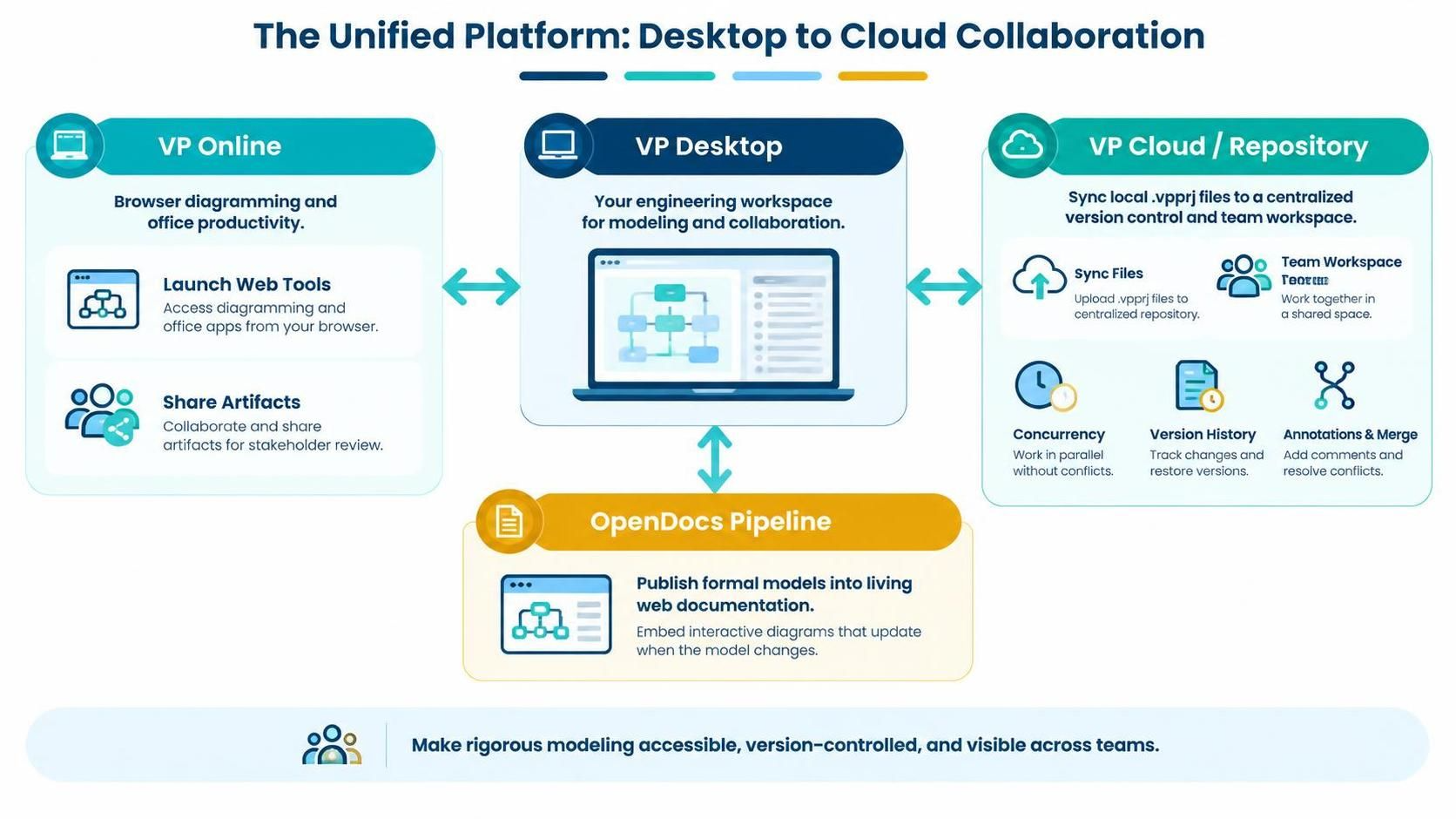
In the modern landscape of software engineering and systems design, the divide between “heavy” engineering work and “light” collaborative review is a common friction point. Historically, architects and engineers would spend hours crafting complex models on powerful desktop machines, only to be unable to share the results with stakeholders who lacked expensive software licenses.
Visual Paradigm has solved this through its Unified Platform. This ecosystem seamlessly integrates the rigorous power of VP Desktop with the accessibility of web-based tools and the organizational reach of cloud repositories. In this tutorial, we will dissect this architecture to understand how data flows from a local workspace to a living, breathing documentation pipeline.
1. The Core Engine: VP Desktop
At the center of this architecture lies VP Desktop. Think of this as the “engineering workspace” or the source of truth for your project. It is where the heavy lifting happens.
- Role: It is the environment where you utilize embedded AI, perform complex modeling, and author detailed technical diagrams.
- File Format: Projects are locally saved as
.vpprjfiles. - Workflow: This is where the formal models are constructed. Before any collaboration can occur, the work must be initiated here.
2. The Cloud Backbone: VP Cloud & Repository
Once a project is ready for team engagement, it moves to the VP Cloud / Repository. This component is not just a storage drive; it is a sophisticated version control system designed for technical models.
Key Capabilities:
- Version Control: It syncs local
.vpprjfiles to a centralized repository. This ensures that every change is tracked. - Concurrency: Multiple users can work on the same project simultaneously. The system handles merge conflict resolution, ensuring that two engineers don’t accidentally overwrite each other’s work.
- Collaboration Tools: Features like annotations allow team members to leave comments directly on the diagrams without needing to edit the core model.
3. The Access Layer: VP Online
One of the biggest challenges in engineering is stakeholder buy-in. Often, stakeholders (managers, clients, or QA) cannot install heavy desktop software. VP Online bridges this gap.
VP Online is a browser-based platform that allows users to:
- Launch Lightweight Web Tools: Access diagramming capabilities directly from a web browser.
- Share Artifacts: Stakeholders can review artifacts and provide feedback without requiring a desktop license. This democratizes the engineering process, making it accessible to the entire organization.
4. The Output Pipeline: OpenDocs
The final destination for your engineering work is the OpenDocs Pipeline. This is where static diagrams become “living” documentation.
The workflow involves pushing formal models from VP Desktop into OpenDocs. The result is a team wiki or documentation site where diagrams are embedded as live, interactive elements. Crucially, these diagrams update automatically whenever the underlying model changes in the desktop environment.
Architectural Summary
The Unified Platform creates a continuous loop:
- Author: Create the model in VP Desktop.
- Sync: Push the model to VP Cloud for versioning and team access.
- Review: Stakeholders interact with the model via VP Online in their browser.
- Publish: The system pushes the final approved state to OpenDocs for permanent record-keeping.
This architecture ensures that rigorous modeling work is not siloed on a single laptop but is accessible, version-controlled, and visible to the entire organization.