
Traditional project management often involves tedious manual effort—dragging and dropping shapes, manually calculating dates, and constantly adjusting dependencies when timelines shift. However, modern development environments are integrating Artificial Intelligence to streamline these complex processes. This tutorial explores the PERT (Program Evaluation and Review Technique) Chart and demonstrates how to leverage Visual Paradigm’s AI capabilities to generate professional-grade project schedules instantly.
Understanding the PERT Chart Structure
A PERT chart is a project management tool used to schedule, organize, and coordinate tasks within a project. Unlike a simple Gantt chart, a PERT chart focuses heavily on the dependencies between tasks and the critical path required to complete the project.
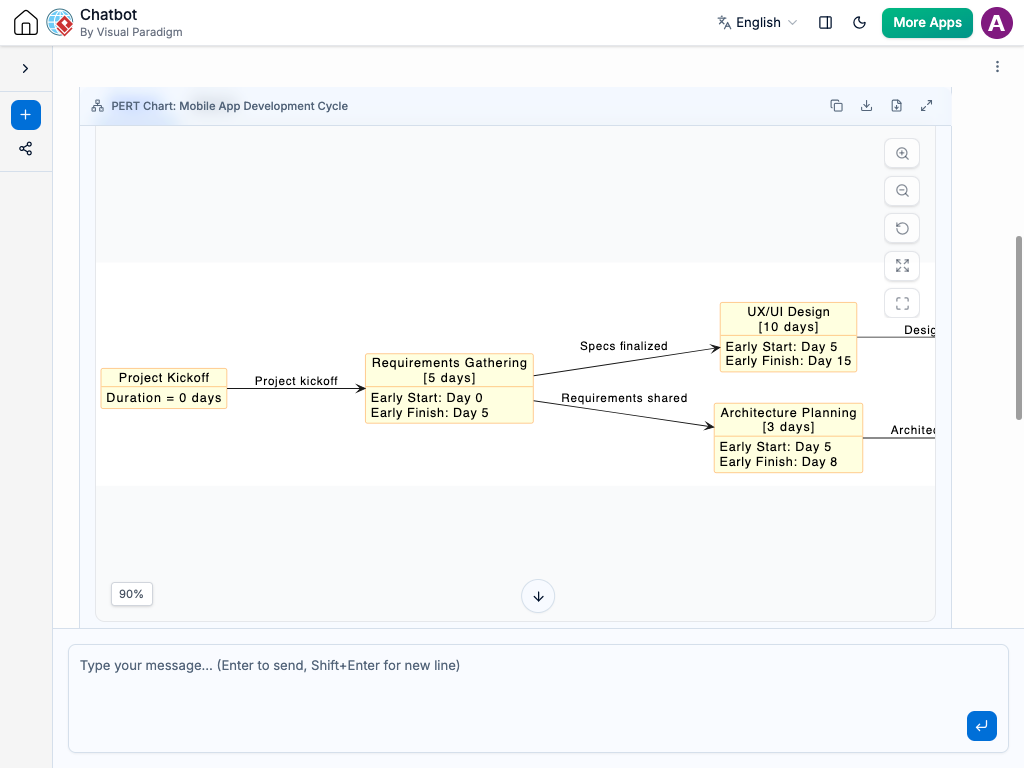
In the context of Visual Paradigm’s AI Chatbot, the chart is generated dynamically. Let’s break down the components visible in the generated Mobile App Development Cycle chart:
1. Nodes and Milestones
Each box in the diagram represents a specific task or milestone. In a PERT chart, nodes are critical because they mark the start or end of an activity. The diagram displays the following key elements within the nodes:
- Task Name: The identifier for the activity (e.g., “Project Kickoff”, “Requirements Gathering”).
- Duration: The estimated time required to complete the task (e.g., “5 days”).
- Early Start (ES): The earliest possible time a task can begin, based on the completion of all predecessor tasks.
- Early Finish (EF): The earliest possible time a task can be completed (ES + Duration).
2. Directed Edges and Dependencies
The arrows connecting the nodes represent the dependencies. They indicate that one task cannot start until the previous one is finished. Visual Paradigm’s AI intelligently parses these relationships.
- Finish-to-Start (FS): The most common dependency, where the successor task starts only after the predecessor finishes.
- Relationship Labels: The AI often adds descriptive text to the arrows (e.g., “Specs finalized”, “Requirements shared”) to clarify the specific condition required to transition between tasks.
Step-by-Step: Generating a PERT Chart with AI
The power of this tool lies in its natural language processing. Instead of manually constructing the network, you can describe your project plan to the chatbot.
- Define the Scope: Start by identifying your major phases. For a mobile app, these typically include Kickoff, Requirements, Design, and Architecture.
- Input Natural Language: In the chat interface, type a prompt like: “Create a PERT chart for a Mobile App Development Cycle. Start with Project Kickoff, then move to Requirements Gathering, which branches into UX/UI Design and Architecture Planning.”
- Review the Logic: The AI will generate the nodes and calculate the Early Start/Finish times. It automatically aligns the successor tasks to start immediately after the predecessor finishes.
- Iterate: If you need to adjust the timeline, simply ask the AI to modify the duration of a specific task. The chart will recalculate the entire schedule automatically.
Technical Modeling Concepts
Behind the scenes, the AI is applying standard project management algorithms. It constructs a directed acyclic graph (DAG) where:
Early Finish (EF) = Early Start (ES) + Duration
For a successor node, the ES is determined by the maximum EF of all its immediate predecessors. This ensures that no task is scheduled to start before its dependencies are complete.
Conclusion
By combining the rigor of PERT methodology with the speed of AI generation, Visual Paradigm removes the administrative burden of project planning. This allows project managers to focus on strategy rather than the mechanics of drawing arrows and calculating dates. Whether you are managing a simple 5-day sprint or a complex enterprise rollout, this AI-assisted approach ensures your critical path is always clear and accurate.