
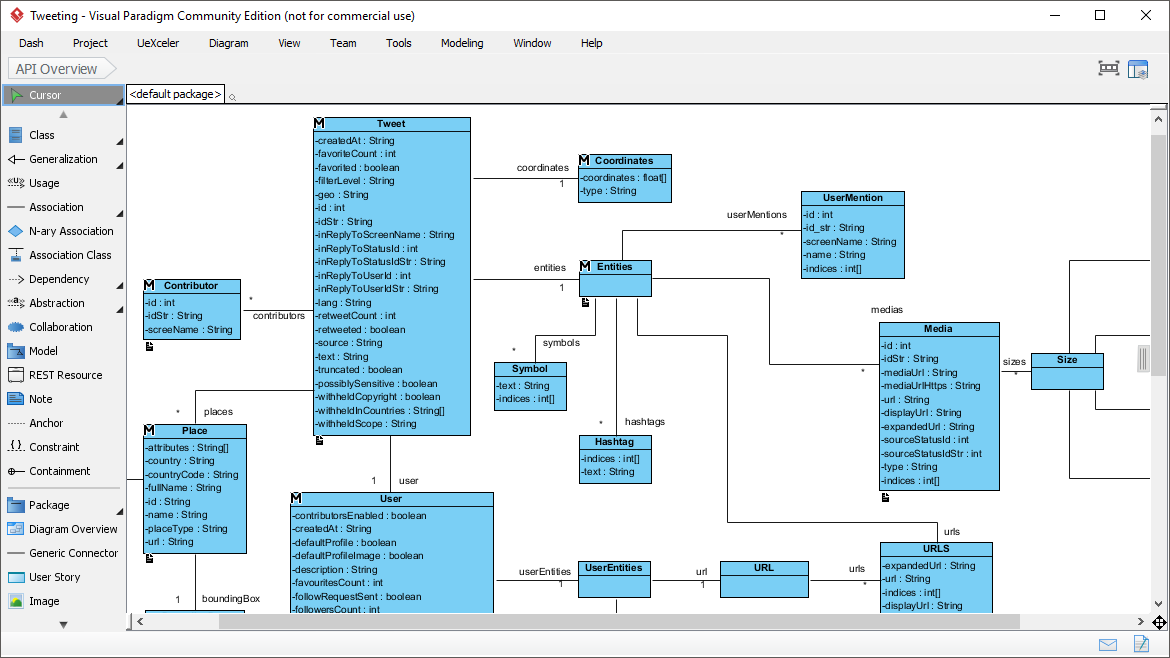
When designing software for social media platforms, the complexity of data relationships can quickly become overwhelming. This tutorial utilizes the Visual Paradigm Community Edition to deconstruct a sophisticated Class Diagram representing the Twitter API “Tweet” domain. By analyzing the screenshot provided, we will walk through the system architecture, explaining how a single data object like a “Tweet” is linked to nested objects like “Entities,” “Coordinates,” and “User Mentions.”
Understanding the Class Diagram Foundation
A Class Diagram is the backbone of Object-Oriented Design (OOD). It defines the structure of your system by identifying Classes (the blue boxes in the diagram), their Attributes (the data stored, like String or int), and Relationships (lines connecting the boxes).
In this specific model, the central class is Tweet. It acts as the entry point for the data structure. Notice the “M” icon in the top-left corner of the class headers. In Visual Paradigm, this specific icon denotes a Model Element, indicating that this class represents a conceptual model within the system’s architecture.
Decoding the Attributes: Data Types and Access Modifiers
Before looking at how classes connect, we must understand what they contain. The attributes listed within the boxes follow a strict syntax: [access_modifier] name : type.
- Access Modifiers: Observe the symbols before the attribute names.
-(Minus): Represents Private. For example,-createdAt : Stringis private, meaning it is only accessible within the class itself.+(Plus): Represents Public. These are attributes accessible by external classes.
- Data Types: The values are strictly typed.
String: Text data (e.g.,-idStr : String).int: Whole numbers (e.g.,-favoriteCount : int).boolean: True/False values (e.g.,-favorited : boolean).String[]: Arrays or Lists of text (e.g.,-country : String[]).
Exploring the “Entities” Aggregation
The most complex relationship in this diagram is the connection between Tweet and Entities. The line labeled entities connects the two with a multiplicity of 1 on the Tweet side and (star) on the Entities side. This implies a One-to-Many relationship: One Tweet can contain zero or many Entities.
The Entities class is a composite object that groups together several sub-objects:
- Hashtags (
hashtags): A list of hashtags used in the tweet. - User Mentions (
userMentions): A list of other users tagged in the tweet. - Symbols (
symbols): Any symbols used. - Media (
medias): Images or videos attached. - URLs (
urls): Links shared within the content.
Diving Deeper: The User and Place Models
The diagram also models the context of the tweet through the User and Place classes.
1. The User Class
The User class represents the author of the tweet. It is linked to the Tweet class. Notice the attribute contributorsEnabled : boolean, which tracks if retweets are allowed. This class also links to UserEntities, which contains metadata specific to the user, such as their defaultProfileImage.
2. The Place Class
Location data is handled by the Place class. It includes attributes like fullName (e.g., “New York, NY”) and countryCode. The relationship between Tweet and Place is marked with places and a multiplicity of , indicating that a tweet can be associated with multiple location definitions (though typically a tweet has one primary location).
Advanced Relationship Types: N-ary Associations
One of the most powerful features of Visual Paradigm is its ability to handle complex relationships. Look at the relationship between Contributor and Tweet (labeled contributors) and Place and Tweet (labeled places).
While these look like simple associations, they represent N-ary Associations. In a standard diagram, you might see a simple line. Here, the model explicitly defines a relationship class or association class to manage the data between the main entities. The “Contributor” class holds attributes like id and screenName, suggesting that contributors are distinct entities linked to the tweet, separate from the main author.
Visualizing the Hierarchy
The diagram organizes data into a clear hierarchy:
- Level 1: The Tweet (The Root Object).
- Level 2: Entities, Place, User, Coordinates.
- Level 3: Detailed lists within Entities (Hashtag, Media, UserMention).
For developers, this structure maps directly to Object-Oriented code. You would create a Java or C# class named Tweet containing a private instance variable of type Entities, and potentially a List<Place> or Map<String, User> depending on the implementation requirements.
Why Use Visual Paradigm for This?
Visual Paradigm simplifies the creation of these complex diagrams through features like:
- Intelligent Syntax Checking: The tool ensures that your relationships (like the 1-to-Many links) follow UML specification rules.
- Contextual Toolbars: When you select the Tweet class, you can quickly add attributes or relationships without navigating deep menus.
- Export Capabilities: This diagram can be exported to PDF or SVG for inclusion in technical documentation, allowing stakeholders to visualize the data model without needing the software installed.