
In the landscape of modern systems engineering and software architecture, clarity is currency. As organizations expand across time zones and cultures, the need for robust, shared visual languages becomes critical. Profile Diagrams serve this exact purpose. They allow teams to define domain-specific extensions to a base metamodel, creating a customized vocabulary for complex projects. However, when teams are distributed, the mechanics of maintaining consistency, managing changes, and ensuring understanding become significantly more complex. This guide outlines the operational strategies required to manage Profile Diagrams effectively without relying on specific tools, focusing instead on process, governance, and human coordination.
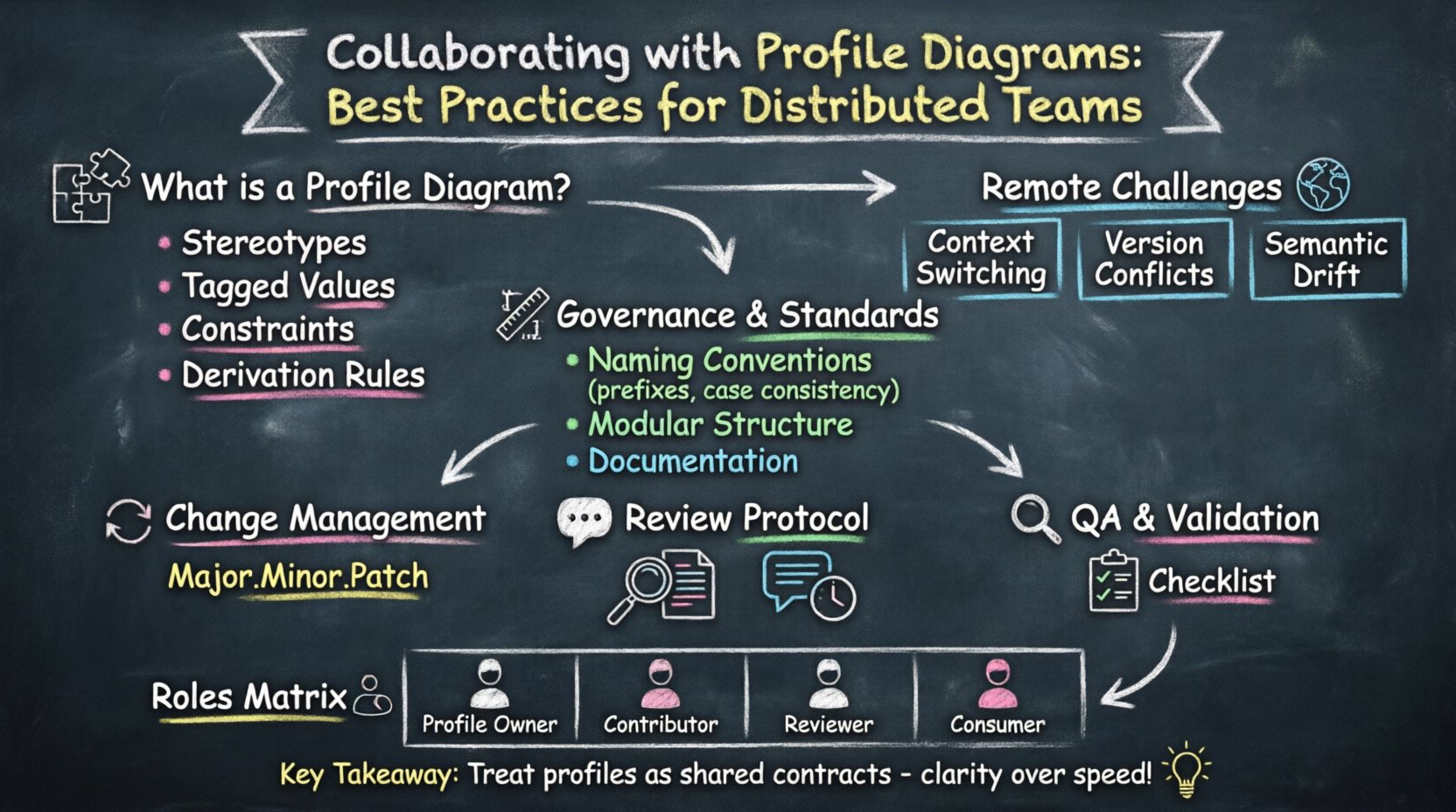
Understanding the Role of Profile Diagrams 🧩
A Profile Diagram is not merely a drawing; it is a definition of rules. It establishes stereotypes, tagged values, and constraints that extend the underlying modeling language. In a centralized team, these definitions might evolve organically through informal discussions. In a distributed environment, this organic evolution leads to fragmentation. Different regions might interpret the same concept differently, resulting in incompatible models that cannot be merged or analyzed together.
Think of a Profile Diagram as a contract between the modeling team and the users of that model. It dictates how data is tagged, how behaviors are constrained, and how elements relate to one another in a specific domain context. When working remotely, this contract must be explicit, versioned, and accessible to all stakeholders regardless of their location.
Key Components of a Profile
- Stereotypes: Custom types that extend existing metaclasses. For example, defining a specific
Servicetype that behaves differently from a genericComponent. - Tagged Values: Properties attached to stereotypes. These allow for metadata storage, such as compliance levels, security classifications, or deployment targets.
- Constraints: Logical rules that restrict the usage of elements. These ensure that the model adheres to business logic or regulatory requirements.
- Derivation Rules: Instructions on how new model elements should be generated or derived from the profile definitions.
Each of these components requires rigorous management when the team is spread out. A change in a stereotype in one region must propagate correctly to models in another region without causing errors or data loss.
Specific Challenges for Remote Modeling Teams 🌍
Distributed collaboration introduces friction points that do not exist in co-located environments. Understanding these frictions is the first step to mitigating them. The physical separation creates latency in feedback loops, making it harder to resolve ambiguity quickly.
1. Context Switching and Asynchronous Workflows
When a team member in one time zone creates a profile extension, the reviewer in another time zone may not see it for 12 hours. By then, the context might have shifted. The reviewer might interpret the intent differently than the creator. This delay can lead to rework. To counter this, documentation must be self-sufficient. The diagram itself cannot rely on a quick conversation to explain its intent.
2. Version Conflicts
Multiple developers working on the same Profile Diagram simultaneously can lead to conflicts. If two engineers define different tagged values for the same stereotype, the model becomes inconsistent. In a distributed setup, preventing this requires a clear protocol for who has edit rights at any given time, or a mechanism to merge changes safely.
3. Semantic Drift
Over time, the meaning of a stereotype can drift. A term used to mean Database in one project might evolve to mean Data Lake in another. Without a central authority or regular synchronization, the distributed team loses a shared mental model. This drift makes the Profile Diagram less useful as a communication tool.
Establishing Governance and Standards 📏
Without software constraints, human governance becomes the primary control mechanism. You must establish a set of standards that everyone agrees to follow. This is not about policing behavior, but about creating a predictable environment where collaboration can happen smoothly.
1. Naming Conventions
Consistency in naming is paramount. A profile extension should never use ambiguous names. If a stereotype is named API, every team member must know exactly what that implies. Use a namespace-like prefix structure to group related stereotypes. This reduces the chance of naming collisions.
- Prefix Usage: Use prefixes like
com.company.domainto indicate ownership and scope. - Case Consistency: Adopt PascalCase or camelCase and stick to it strictly. Mixing styles confuses parsers and human readers alike.
- Descriptive Length: Avoid abbreviations unless they are universally understood within the organization. Clarity trumps brevity.
2. Structure and Hierarchy
Profile Diagrams should not be monolithic. Break them down into logical packages. A large profile with hundreds of stereotypes is difficult to navigate. Group stereotypes by their functional area. For example, separate Security stereotypes from Deployment stereotypes. This modular approach allows different teams to work on different parts of the profile without stepping on each other’s toes.
3. Documentation Standards
Every element in a profile needs a description. This description should answer: What is it? When should it be used? What are the prerequisites? In a remote setting, this text is the primary source of truth. It replaces the ability to walk over to a colleague and ask.
Ensure that documentation is stored alongside the model definitions. Do not keep it in a separate wiki unless the wiki is integrated into the workflow. If the model changes and the text does not, the documentation becomes misleading.
Managing Changes and Version Control 🔄
Change management is the backbone of collaboration. Even without specific tooling, the principles of version control apply. You need a system to track who changed what, when, and why.
1. The Change Request Process
Do not allow direct edits to the main profile branch without review. Implement a formal request process. A team member identifies a need for a new stereotype or a modification to an existing one. They submit a request detailing the change. This request is reviewed by a designated architect or lead.
- Justification: Why is this change necessary? What problem does it solve?
- Impact Analysis: How will this affect existing models? Are there dependencies?
- Approval: Formal sign-off before implementation begins.
2. Versioning Strategy
Assign version numbers to every release of the Profile Diagram. Use semantic versioning (Major.Minor.Patch). A major change to the semantics of a stereotype requires a major version bump. This signals to consumers of the profile that they need to update their models. A minor version bump indicates new additions that do not break existing usage. A patch version indicates bug fixes.
This strategy allows teams to lock onto specific versions of the profile. If a distributed team is working on a legacy project, they can continue using version 1.0 while a new project adopts version 2.0. This prevents accidental incompatibilities.
3. Communication of Updates
When a new version is released, notify all stakeholders. Do not assume everyone knows to check the repository. Send a summary of changes. Highlight what is deprecated, what is new, and what has changed in behavior. This proactive communication prevents confusion.
Communication Protocols for Diagram Reviews 🗣️
Reviewing a Profile Diagram remotely requires more structure than reviewing a standard document. Visual models are dense with information. A casual review often misses critical errors. Establish a protocol for how reviews are conducted.
1. Pre-Review Preparation
Before a review meeting begins, the author should annotate the diagram. Use comments or notes to highlight areas that are experimental or areas that require specific attention. This guides the reviewer’s focus. It reduces the time spent asking “What is this part?” and increases time spent on “Is this correct?”.
2. The Review Meeting
Even in distributed teams, synchronous review sessions can be valuable. However, they must be efficient. Do not use the meeting to explain basic concepts. Use the meeting to resolve conflicts and make decisions. Prepare an agenda. Limit the scope of the diagram being reviewed to a manageable size.
- Timeboxing: Allocate a specific time slot. Do not let the review drag on.
- Screen Sharing: Ensure the reviewer can see the diagram clearly.
- Decision Log: Record all decisions made during the meeting. This serves as a reference for future disputes.
3. Asynchronous Feedback
Not all feedback can happen live. Allow for asynchronous comments. Team members can review the diagram at their convenience and leave feedback. The author then addresses these comments before the next synchronous meeting. This respects time zone differences and allows for deeper thought on complex issues.
Quality Assurance and Validation 🔍
Once a Profile Diagram is published, it must be validated. Quality assurance ensures that the definitions are syntactically correct and semantically sound. In a distributed environment, QA acts as a gatekeeper to prevent low-quality definitions from spreading.
1. Consistency Checks
Run consistency checks across the profile. Ensure that stereotypes do not reference non-existent types. Ensure that tagged values are defined before they are used. Automated tools can assist here, but manual verification is also necessary. A checklist should be used to verify common errors.
2. Usability Testing
Before a profile is fully adopted, test it with a small group of users. Ask them to model a small scenario using the new stereotypes. If they struggle to use the profile, it is too complex. Simplify the definitions. A profile that is hard to use will be ignored, leading to a fallback to custom, undocumented solutions.
3. Compliance Audits
Periodically audit the profile against the organization’s standards. Ensure that naming conventions are still being followed. Ensure that the profile has not drifted from its original intent. This audit should be a scheduled event, not a reactive one.
Roles and Responsibilities Matrix 👥
Clear roles prevent overlap and gaps in responsibility. In a distributed team, it is easy for someone to assume someone else is handling a task. Define who does what.
| Role | Responsibilities | Authority Level |
|---|---|---|
| Profile Owner | Overall accountability for the profile’s integrity. Resolves conflicts. Approves major changes. | High |
| Contributor | Creates new stereotypes. Updates documentation. Submits change requests. | Low |
| Reviewer | Validates technical accuracy. Checks for naming compliance. Ensures alignment with standards. | Medium |
| Consumer | Uses the profile in models. Provides feedback on usability. Reports errors. | None |
Assigning these roles clearly helps distributed teams understand the workflow. A contributor knows they cannot publish without a Reviewer’s sign-off. A Consumer knows where to report issues.
Common Pitfalls and How to Avoid Them ⚠️
Even with best practices, mistakes happen. Knowing common pitfalls allows you to anticipate them and build defenses.
1. Over-Engineering
Teams often try to define every possible scenario in the profile. This makes the profile too rigid. Avoid creating stereotypes for edge cases. It is better to have a few flexible stereotypes than hundreds of specific ones. Allow users to extend the model using standard mechanisms where possible.
2. Lack of Backward Compatibility
When a stereotype is changed, existing models using that stereotype may break. Always maintain backward compatibility whenever possible. If a change is necessary, deprecate the old version and introduce the new one. Do not remove old definitions without a long transition period.
3. Ignoring the Human Element
Profiles are technical, but they are used by people. If the profile is too abstract, people will not understand it. Use clear examples. Provide templates that show how to use the profile correctly. Visual aids help bridge the gap between technical definitions and practical application.
4. Siloed Development
Teams working on different parts of the profile should not work in isolation. Schedule regular sync-ups between profile contributors. Share knowledge about what others are building. This prevents duplicate efforts and ensures the profile remains cohesive.
Onboarding New Team Members 🚀
As teams grow, new members will join. They need to understand the Profile Diagram quickly. A poor onboarding process leads to errors and frustration.
- Guided Tutorials: Create step-by-step guides that walk a new member through creating a simple model using the profile.
- FAQ Section: Document common questions. What is the difference between Stereotype A and Stereotype B?
- Mentorship: Pair new members with experienced profile users for the first few weeks.
- Access Control: Ensure new members have the correct permissions to view and edit the profile. Do not grant full access immediately.
Investing time in onboarding pays off in reduced support tickets and higher quality models. It ensures that the distributed team maintains a high standard of work regardless of tenure.
Maintaining Long-Term Viability 🏗️
A Profile Diagram is a living artifact. It requires maintenance to remain useful. Regular reviews ensure that the profile evolves with the business needs. Without maintenance, it becomes a legacy burden that slows down development.
Set a quarterly review cycle. During this cycle, evaluate the usage statistics. Which stereotypes are used most? Which are never used? Remove the unused ones. This keeps the profile lean and focused. A smaller profile is easier to learn and easier to maintain.
Additionally, keep an eye on industry standards. If the underlying metamodel evolves, your profile must adapt. Ensure that your definitions align with the latest capabilities of the modeling language. This ensures future-proofing.
Summary of Collaboration Strategies 📝
Collaborating on Profile Diagrams in a distributed environment requires discipline. It relies on clear governance, structured workflows, and effective communication. By treating the profile as a shared contract rather than a private document, teams can achieve alignment. The key is to prioritize clarity over speed. Taking the time to document and review ensures that the final models are accurate and usable.
Focus on the standards. Define the roles. Manage the changes. Validate the quality. These steps create a foundation for successful remote modeling. When everyone speaks the same language, defined by a well-maintained Profile Diagram, the distributed team functions as a single, cohesive unit. This alignment drives efficiency and reduces the risk of costly errors in system architecture.
Remember that the goal is not just to create a diagram, but to facilitate understanding. The profile is a tool for communication. If it hinders communication, it has failed its purpose. Continuously seek feedback from the users. Adapt the profile to fit their workflow. In this way, the Profile Diagram becomes an enabler of collaboration rather than a barrier to it.