
Introduction: Why Architecture Documentation Matters in Today’s Complex Landscapes
By a Practicing Software Architect & C4 Model Enthusiast
In an era where enterprise software ecosystems grow increasingly interconnected, the ability to clearly communicate system architecture isn’t just helpful—it’s essential. After spending the last 18 months implementing the C4 model across three different organizations, I can confidently say that finding the right visualization framework and tooling makes the difference between documentation that gathers dust and documentation that actively guides development decisions.
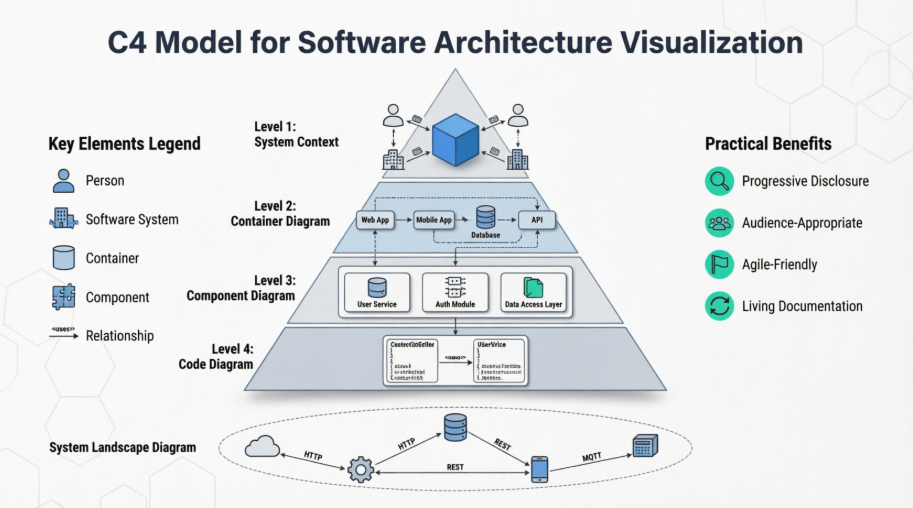
This guide shares my hands-on experience with the C4 model methodology and Visual Paradigm Online’s implementation of it. Whether you’re a technical lead trying to align stakeholders, a developer documenting a new microservice, or an architect managing a portfolio of systems, you’ll find practical insights on how to make architecture diagrams that people actually use.
Understanding System Landscape Diagrams: The Big Picture View
Before diving into individual system diagrams, it’s crucial to understand where your system fits within the broader ecosystem. The system landscape diagram serves exactly this purpose.
“A system landscape diagram is really just a system context diagram without a specific focus on a particular software system.”
When to Use a System Landscape Diagram
-
You’re responsible for a portfolio of software systems
-
You need to onboard new team members to your organization’s tech stack
-
You’re planning integration projects or migration initiatives
-
Leadership needs a high-level map for strategic planning
Key Characteristics
| Aspect | Description |
|---|---|
| Scope | Enterprise, organization, department, or business unit |
| Primary Elements | People (roles) and software systems within the chosen boundary |
| Intended Audience | Both technical and non-technical stakeholders, internal and external |
| Level of Detail | High-level; focuses on system-to-system relationships, not internal structure |
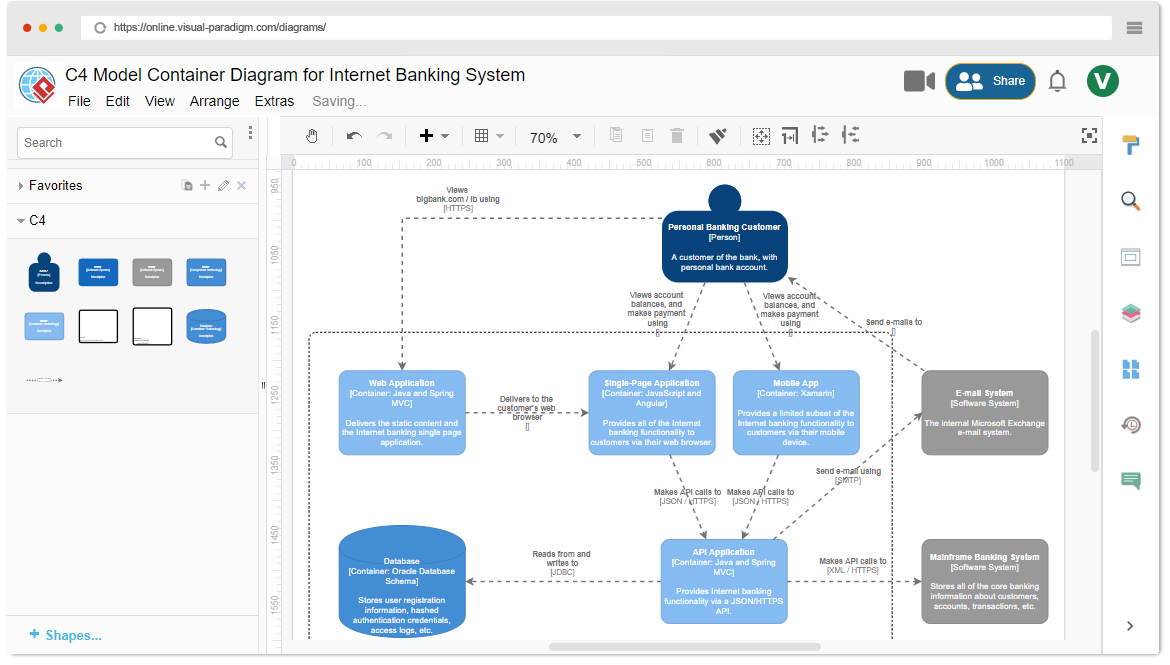
Figure: Visual representation of C4 model elements and relationships
What is the C4 Model? A Practitioner’s Perspective
The C4 model, created by software architect Simon Brown, has become my go-to framework for architectural communication. What sets it apart is its deliberate focus on abstraction levels—allowing you to tell different stories to different audiences without overwhelming anyone.
Why the C4 Model Resonates with Teams
-
Progressive disclosure: Start high-level, drill down only when needed
-
Technology-agnostic notation: Focus on structure and relationships, not implementation details
-
Bridge between technical and non-technical: Context diagrams work for executives; component diagrams satisfy developers
-
Complements agile practices: Lightweight enough for iterative refinement
Core Philosophy
“The C4 model is based on a structural decomposition of a software system into containers and components. It allows you to visualize the architecture of your system by breaking it down into its fundamental building blocks.”
A Brief History: How the C4 Model Evolved
Understanding the model’s origins helps appreciate its design choices:
-
2006-2011: Simon Brown develops the C4 model, drawing inspiration from UML and the 4+1 architectural view model
-
2018: Official website launches under Creative Commons license; community adoption accelerates
-
Present: Widely adopted in enterprise architecture, DevOps, and agile teams globally
What I appreciate most: The model remained pragmatic. It doesn’t try to replace UML—it complements it by providing the missing “why” and “who” before the “how.”
The Four Levels of C4: A Hierarchical Approach
The C4 model’s power lies in its layered structure. Here’s how I use each level in practice:
Level 1: System Context Diagrams
Purpose: Show your system in scope and its relationships with users and external systems.
When I use it:
-
Project kickoffs with stakeholders
-
Onboarding documentation
-
Architecture decision records (ADRs)
Pro tip: Keep external dependencies minimal—focus on who interacts with what, not how.
Level 2: Container Diagrams
Purpose: Decompose the system into interconnected containers (applications, data stores, microservices).
When I use it:
-
Designing microservice boundaries
-
Planning deployment architectures
-
Discussing technology choices with engineering teams
Pro tip: A “container” is a runtime unit—not a Docker container necessarily. Think: web app, mobile app, database, message queue.
Level 3: Component Diagrams
Purpose: Break down containers into interrelated components (modules, classes, services).
When I use it:
-
Sprint planning for complex features
-
Code reviews and refactoring discussions
-
Documenting API contracts between internal modules
Pro tip: Only create component diagrams for containers that need deeper explanation. Not everything requires this level of detail.
Level 4: Code Diagrams
Purpose: Map architectural elements to actual code structures using UML, ERD, or IDE-generated diagrams.
When I use it:
-
Detailed design documentation
-
Onboarding senior engineers to complex modules
-
Generating living documentation from code
Pro tip: Automate where possible. Let your IDE or documentation generator produce these—manual maintenance rarely scales.
Key Elements of C4 Diagrams: The Building Blocks
Across Levels 1-3, the C4 model uses five consistent elements. Here’s how I think about each:
| Element | Represents | My Usage Guidance |
|---|---|---|
| Person | Users, roles, or external actors | Use job titles or roles (e.g., “Customer,” “Support Agent”) rather than specific names |
| Software System | High-level applications or services | Limit to systems outside your immediate team’s control |
| Container | Deployable units: apps, databases, services | Ask: “Can this be independently deployed or scaled?” If yes, it’s likely a container |
| Component | Logical modules within a container | Use when explaining internal structure; avoid over-componentizing |
| Relationship | Interactions, dependencies, data flows | Label with what is exchanged and why—not just “uses” or “calls” |
Hands-On with Visual Paradigm Online: My Template-Driven Workflow
One of the biggest hurdles when adopting the C4 model is getting started. That’s where Visual Paradigm Online‘s template library became a game-changer for my team.
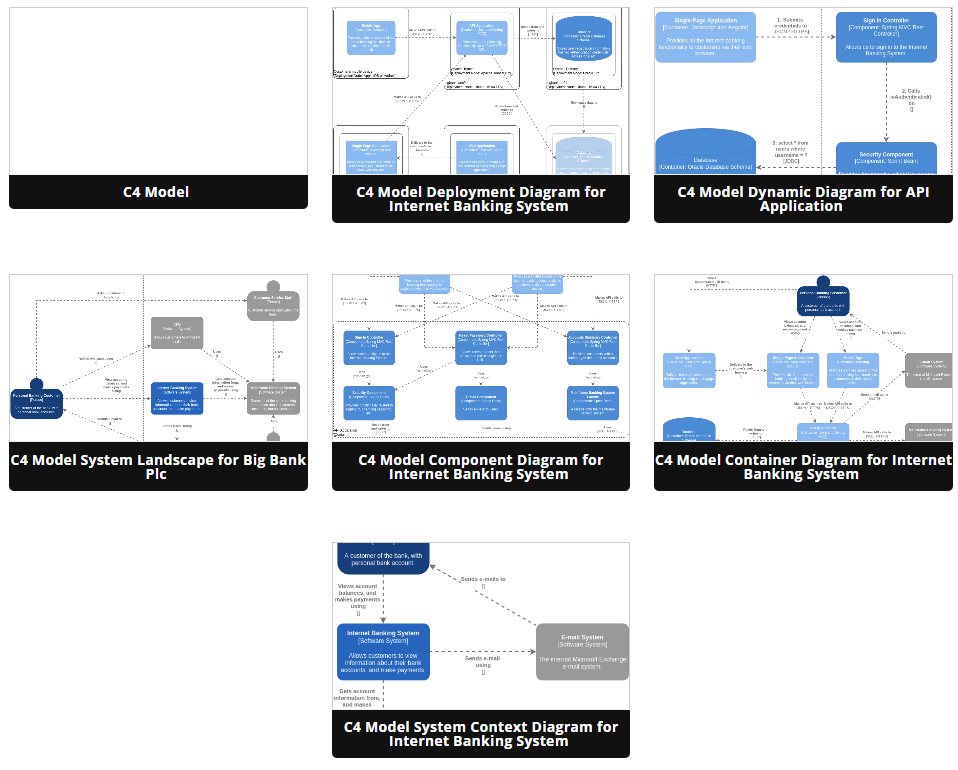
Figure: Browsing C4 model templates in Visual Paradigm Online
My 5-Step Implementation Process
-
Start with Templates, Not Blank Canvases
Visual Paradigm Online offers pre-built C4 templates for common scenarios (e-commerce, microservices, cloud migration). I use these as scaffolding—customizing rather than creating from scratch saves hours. -
Collaborate in Real-Time
Architecture is a team sport. I invite backend engineers, DevOps specialists, and product owners to comment directly on diagrams. The real-time collaboration feature prevents the “diagram in a vacuum” problem. -
Iterate, Don’t Perfect
I treat diagrams as living artifacts. Version 1 captures the consensus; Version 2 reflects implementation learnings. Visual Paradigm’s easy editing encourages this iterative mindset. -
Export for the Right Audience
-
PDF for executive reviews
-
PNG for Confluence/Slack
-
Interactive links for engineering wikis
Context-appropriate formatting increases adoption.
-
-
Link Diagrams to Code
Where possible, I embed diagram URLs in README files or ADRs. This creates a traceable path from architecture decision to implementation.
What I Love About the Tool
✅ Intuitive drag-and-drop interface with C4-specific shapes
✅ Consistent styling that enforces model semantics
✅ Easy sharing and permission controls
✅ Responsive support when exploring advanced features
Areas for Growth (Honest Review)
⚠️ Learning curve for team members unfamiliar with architectural notation
⚠️ Limited offline functionality (cloud-first approach)
⚠️ Advanced customization requires familiarity with the platform’s style engine
Practical Tips from the Trenches: Maximizing C4 Model Impact
After implementing C4 diagrams across multiple projects, here are the lessons that made the biggest difference:
🔹 Start with the audience, not the tool
Ask: “What decision does this diagram help someone make?” Design backward from that answer.
🔹 Use consistent naming conventions
“User Management Service” is clearer than “UMS_v2_prod.” Consistency reduces cognitive load.
🔹 Color-code by ownership or technology
Visual cues help stakeholders quickly identify patterns (e.g., all Java services in blue, third-party APIs in gray).
🔹 Document relationships with intent
Instead of “System A → System B,” write “System A sends order events to System B for fulfillment.”
🔹 Review diagrams in architecture guilds
Regular peer reviews catch inconsistencies and spread modeling best practices across teams.
🔹 Archive, don’t delete
Old diagrams provide valuable context for why decisions were made. Tag them with “superseded” rather than removing them.
Conclusion: Architecture as a Conversation, Not a Deliverable
Adopting the C4 model with Visual Paradigm Online hasn’t just improved my documentation—it’s transformed how my teams think about system design. The model’s layered approach respects different stakeholders’ needs, while the tooling lowers the barrier to creating clear, maintainable diagrams.
The biggest insight I’ve gained? Great architecture diagrams aren’t about perfection—they’re about clarity, collaboration, and continuous improvement. When a new engineer can understand our system landscape in 30 minutes, or when a product manager can confidently discuss integration points with a vendor, that’s when the C4 model delivers real value.
If you’re considering adopting this approach: start small. Pick one system, create its context diagram, and share it with one stakeholder. Iterate based on feedback. The model scales with your needs—and with practice, it becomes second nature.
In a world of increasing technical complexity, the ability to visualize, communicate, and evolve architecture isn’t a luxury. It’s a core competency. The C4 model, paired with thoughtful tooling like Visual Paradigm Online, gives you a practical, proven path to build that competency—one diagram at a time.
References
- C4 Model Tool Features: Visual Paradigm Online’s comprehensive C4 model tool features, templates, and collaborative capabilities for creating professional software architecture diagrams.
- Visual Paradigm Online: Cloud-based diagramming and modeling platform supporting C4 model, UML, BPMN, and more—designed for agile teams and enterprise architecture documentation.
- Mastering C4 Diagrams in Visual Paradigm: A Hands-On Review of All Four Creation Methods: Comprehensive practitioner review comparing manual modeling, AI generation, PlantUML integration, and API-based approaches for C4 diagram creation in Visual Paradigm.
- The AI Revolution in C4 Architecture Diagramming: A Comprehensive Guide: In-depth exploration of how AI is transforming traditional C4 modeling workflows, featuring step-by-step tutorials for Visual Paradigm’s AI-powered tools.
- Comprehensive C4 Model Software | Visual Paradigm: Official feature overview detailing Visual Paradigm’s support for all six C4 diagram types, AI-powered generation capabilities, and enterprise reporting features.
- C4 Diagram Tool Features | Visual Paradigm: Central hub documenting the full capabilities of Visual Paradigm’s C4 modeling solution, including desktop and online platform comparisons.
- C4 Diagram Tool Solution | Visual Paradigm: Solution-focused page highlighting use cases, benefits, and implementation strategies for C4 modeling with Visual Paradigm.
- Visual Paradigm Full C4 Model Support Release: Official release announcement detailing native support for all six C4 diagram types in Visual Paradigm Desktop, with technical implementation notes.
- AI Diagram Generator: Complete C4 Model: Release notes for the AI-powered feature that generates entire C4 model suites from single text prompts, including workflow examples.
- From Prompt to Architecture: My Hands-On Review of Visual Paradigm’s AI-Powered C4 Diagram Studio: First-person review comparing traditional manual control versus AI-powered speed for C4 diagram creation.
- Mastering C4 Diagrams: All Four Creation Methods: Detailed comparison of manual modeling, AI generation, PlantUML integration, and programmatic API approaches.
- Beginner’s Guide to C4 Model Diagrams | Visual Paradigm Blog: Accessible introduction to C4 modeling concepts with practical examples using Visual Paradigm templates.
- Online C4 Model Tool | Visual Paradigm: Feature page for the web-based C4 diagram editor, highlighting drag-and-drop functionality, templates, and collaboration features.
- Visual Paradigm C4 Tutorial | YouTube: Video walkthrough demonstrating C4 diagram creation workflows in Visual Paradigm, suitable for visual learners.
- Diagrams as Code: The Power of C4: Deep dive into treating architecture diagrams as version-controlled code artifacts, with practical CI/CD integration examples.
- AI-Powered C4-PlantUML Markdown Editor Release: Announcement of the integrated Markdown editor that combines AI-generated PlantUML code with live preview for documentation-as-code workflows.
- C4-PlantUML Studio | Visual Paradigm: Feature page for the specialized browser-based tool that bridges AI-powered diagram generation with PlantUML code export for version control.
- From Blank Page to Architecture Blueprint: A Review of Visual Paradigm’s AI-Powered C4-PlantUML Studio: Practitioner review highlighting how the C4-PlantUML Studio addresses real-world documentation challenges with AI assistance.
Related posts:
 A Hands-On Review & Implementation Guide to the C4 Model
 Comprehensive Guide to ArchiMate 4 in Visual Paradigm 18.0: A Complete Transition & Best Practices
 Mastering Modern Software Design: A Comprehensive Guide to UML Modeling with Visual Paradigm
 From Diagrams to Live Docs: A Hands-On Review of OpenDocs’ New WordPress Export Feature