In the complex landscape of system architecture, clarity is paramount. When standard modeling languages fall short of expressing domain-specific nuances, a specialized mechanism becomes necessary. This is where the profile diagram comes into play. It serves as a critical tool for extending modeling capabilities without altering the core language. For architects, understanding this extension mechanism is not optional; it is essential for maintaining precision across diverse platforms.
This guide explores the mechanics, construction, and strategic application of profile diagrams. We will move beyond surface-level definitions to examine the underlying structure that allows for semantic enrichment. By the end of this walkthrough, you will have a robust understanding of how to define, apply, and maintain these diagrams within your architectural framework.
Understanding the Core Concept 🔍
A profile diagram represents a specialized view of a metamodel. It allows architects to define new abstractions based on existing language constructs. Think of it as adding a new dialect to a conversation without breaking the grammar rules. This mechanism ensures that specific domain requirements can be modeled accurately while retaining compatibility with the broader ecosystem.
Without this capability, architects would be forced to model complex business rules using generic elements that do not convey the intended meaning. Profiles bridge the gap between generic modeling standards and specific implementation needs. They provide a structured way to introduce domain-specific terminology into the model.
Why Profiles Matter in Architecture
- Domain Specificity: They allow the model to speak the language of the business domain directly.
- Standardization: They ensure that extensions follow a consistent pattern across the organization.
- Tool Independence: They define semantics that can be understood by various tools supporting the standard.
- Evolution: They allow the model to evolve as requirements change without rewriting the entire structure.
Anatomy of a Profile 🧩
Constructing a profile involves defining several distinct components. Each component plays a specific role in extending the metamodel. Understanding these parts is the first step toward effective implementation. A profile is not merely a collection of tags; it is a structured definition of new concepts.
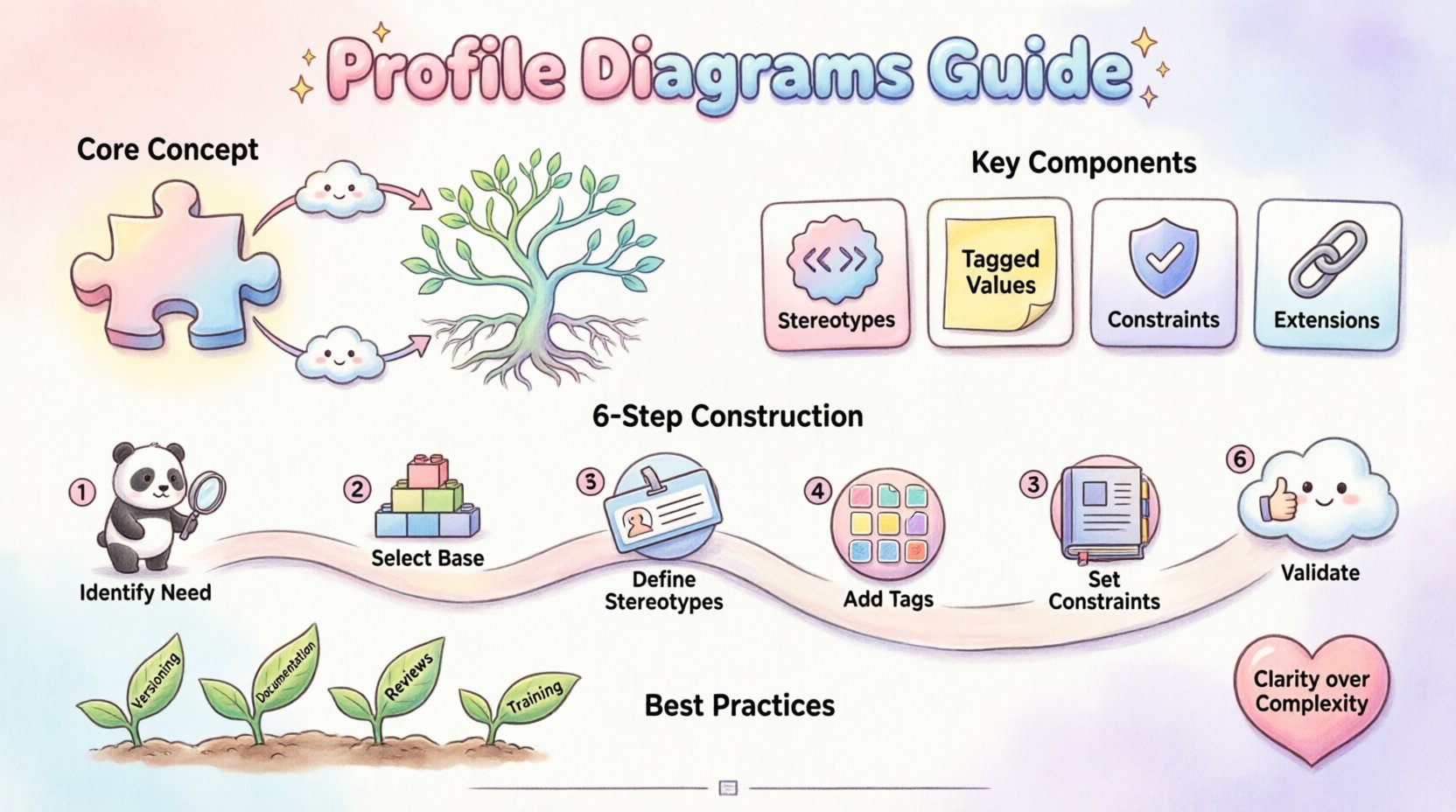
Key Components
The foundation of any profile lies in its relationship with the base metamodel. You extend specific classes from the standard language to create new elements. These extensions form the core of your custom vocabulary.
| Component | Function | Example Usage |
|---|---|---|
| Stereotypes | Defines new types of elements | <<Service>>, <<Controller>> |
| Tagged Values | Attaches properties to elements | Version: 1.0, Priority: High |
| Constraints | Defines rules and logic | Required: true, MaxLength: 50 |
| Extensions | Links new elements to base classes | Extends Class, Extends Association |
Defining Stereotypes
Stereotypes are the most visible part of a profile. They appear as text enclosed in guillemets (<< >>) within the model. They indicate that an element belongs to a specific category defined by the profile. When you define a stereotype, you are essentially creating a new keyword for your modeling language.
For example, in a software architecture, you might define a stereotype called <<Microservice>>. Applying this to a class tells the team that this class represents a deployable unit. This adds semantic weight that a generic class label cannot provide.
Building the Structure 🛠️
Creating a profile requires a systematic approach. It is not a task to be undertaken lightly, as changes can ripple through the entire model. The process involves defining the extension points, associating them with base classes, and then fleshing out the details with attributes and constraints.
Step-by-Step Construction
- Identify the Need: Determine which domain concepts are not covered by standard elements. Document the gap.
- Select Base Classes: Choose the standard classes you wish to extend. Typically, this involves Class, Association, or Component.
- Define Stereotypes: Create the new types based on the selected base classes. Name them clearly and consistently.
- Add Tagged Values: Attach relevant properties to the new types. These provide the data context needed for the model.
- Establish Constraints: Define the rules that govern the usage of these new elements. This ensures data integrity.
- Validate: Test the profile against sample models to ensure it functions as intended.
Managing Dependencies
Profiles often rely on other profiles. A complex architecture might have a base profile that defines common services, and a specialized profile that defines specific business rules. Managing these dependencies is crucial. If a base profile changes, all dependent profiles must be reviewed for compatibility.
It is advisable to keep profiles modular. Instead of one massive profile containing everything, create smaller profiles for specific domains. This reduces coupling and makes maintenance more manageable.
Applying Profiles to Models 📂
Once a profile is defined, it must be applied to the model. This process links the custom definitions to the actual elements in your diagram. Without application, the profile remains theoretical and offers no value to the visual representation.
The Application Process
- Import the Profile: Ensure the model environment recognizes the profile definition.
- Select the Element: Choose the class, association, or component you wish to extend.
- Assign the Stereotype: Apply the specific stereotype from the profile to the element.
- Fill Properties: Populate the tagged values with actual data relevant to the element.
- Visual Configuration: Adjust the diagram display to show the stereotype and values clearly.
Consistency is key during this phase. If one team member applies a stereotype differently than another, the model loses its semantic integrity. Establishing a naming convention and usage guide is essential before widespread application.
Stereotypes and Tagged Values 🏷️
These two features are the primary vehicles for customization. They allow you to attach meaning and data to the structural elements of your model.
Stereotype Hierarchy
Not all stereotypes are created equal. Some are fundamental, while others are specific. You can create hierarchies of stereotypes to manage complexity. A base stereotype might define general behavior, while a child stereotype refines it for a specific scenario.
For instance, a <<DataEntity>> stereotype might exist. You could then create <<User>> and <<Product>> as specialized versions. This allows you to inherit properties while adding specific constraints.
Tagged Value Examples
Tagged values provide the metadata. They are key-value pairs that describe the element further. They are often used for code generation, documentation, or validation.
| Tag Name | Data Type | Purpose |
|---|---|---|
| Author | String | Identifies the owner of the element |
| Status | Enumeration | Tracks the lifecycle stage (Draft, Review, Approved) |
| Complexity | Integer | Indicates implementation difficulty |
| APIEndpoint | String | Links to the actual service URL |
When defining these values, be mindful of the data types. Using the wrong type can lead to validation errors later. Always specify whether a value is mandatory or optional.
Constraints and Logic ⚙️
Profiles are not just about labels; they are about rules. Constraints define the logic that governs how elements can be used. They ensure that the model adheres to business rules and architectural standards.
Types of Constraints
- Invariant: A rule that must always be true for the model.
- Precondition: A condition that must be met before an action occurs.
- Postcondition: A condition that must be true after an action completes.
- Derived: A value calculated from other elements.
For example, a constraint might state that a <<Service>> element must always have at least one <<Interface>> attached. This prevents the creation of orphaned services in the model. Constraints are often expressed using formal languages or OCL (Object Constraint Language) to ensure precision.
Maintenance and Best Practices 🛡️
Once a profile is in use, it requires ongoing management. The model evolves, and the profile must evolve with it. Neglecting maintenance leads to technical debt within the modeling layer.
Maintenance Strategies
- Versioning: Treat profiles like software. Assign version numbers to track changes.
- Documentation: Keep a separate document explaining the intent of each stereotype and tag.
- Review Cycles: Schedule regular audits to remove unused or deprecated elements.
- Training: Ensure all architects understand the current profile definitions.
Common Pitfalls
- Over-Engineering: Creating too many stereotypes for simple concepts. Keep it simple.
- Inconsistency: Using different names for the same concept in different models.
- Hardcoding: Putting implementation details into the profile that should be dynamic.
- Ignoring Standards: Creating proprietary extensions that cannot be read by standard tools.
Common Challenges 🚧
Implementing profiles is not without difficulties. Architects often face resistance when introducing new concepts. Some team members may prefer sticking to standard elements to avoid complexity.
Addressing Resistance
Clear communication is vital. Explain the benefits of the profile in terms of clarity and reduced errors. Show how it saves time in the long run by automating validation. Demonstrate how it improves the quality of the generated code or documentation.
Tool Compatibility
Different modeling tools support profiles differently. Some may struggle with complex inheritance or custom constraints. It is important to test your profile in the specific environment where it will be used. If a tool does not support a specific feature, you may need to adapt the profile or choose a different tool.
Interoperability and Standards 🌐
Profiles are most valuable when they can be shared. A profile defined for one project should ideally be reusable for others within the organization. This requires adherence to standards.
Sharing Profiles
- Export Formats: Ensure profiles can be exported in standard formats compatible with other tools.
- Namespace Management: Use unique namespaces to prevent naming conflicts between different profiles.
- Version Control: Store profile definitions in a version control system alongside code.
By following these practices, you ensure that your architectural models remain consistent and portable. This is crucial for large organizations where multiple teams collaborate on the same system.
Final Thoughts on Implementation 🎯
The journey to effective profile usage requires patience and discipline. It is a long-term investment in the quality of your architectural documentation. When done correctly, it transforms the model from a static diagram into a living representation of the system’s intent.
Architects who master this mechanism gain the ability to model complex systems with precision. They reduce ambiguity and improve communication across teams. The effort spent on defining and maintaining profiles pays dividends in reduced errors and clearer specifications.
Start small. Define a few key stereotypes for your current project. Gather feedback. Refine the definitions. Expand gradually as the need arises. This iterative approach ensures that the profile remains relevant and useful without becoming a burden.
Remember that the goal is clarity, not complexity. Every element in your profile should serve a clear purpose. If a stereotype does not add semantic value, remove it. Keep the language clean and focused on the domain.
As you continue to build your architectural framework, keep these guidelines in mind. They will help you create models that are robust, maintainable, and aligned with business goals. The profile diagram is a powerful tool in your arsenal. Use it wisely to shape the future of your systems.