


Modern software systems are complex. They span multiple domains, interact with diverse technologies, and must adhere to strict regulatory standards. Standard modeling languages like UML (Unified Modeling Language) provide a solid foundation, but they often lack the specificity required for unique architectural challenges. This is where the Profile Diagram becomes an essential tool in the solution architect’s toolkit. A profile diagram allows you to extend the modeling language itself, creating a specialized vocabulary for your specific domain.
This guide provides a deep dive into the mechanics, strategic applications, and decision criteria for utilizing profile diagrams. It is designed for solution architects who need to balance modeling precision with communication clarity. We will explore when to introduce these extensions and how to maintain them without creating unnecessary overhead.
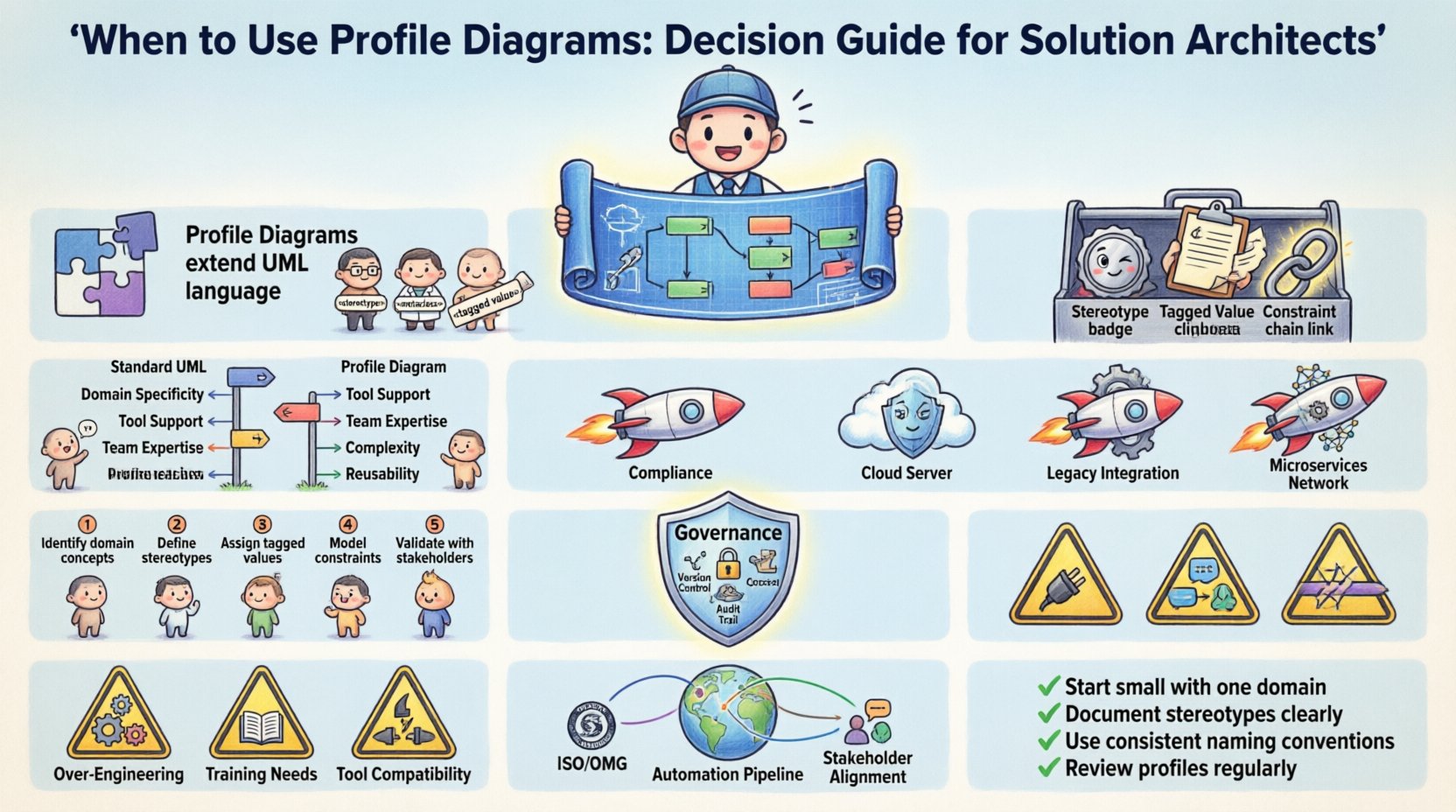
Understanding the Purpose of Profile Diagrams 🧩
A profile diagram is not a diagram of a system in the traditional sense. It is a diagram of the language used to describe the system. In formal modeling terms, a profile is a mechanism to extend the semantics of a modeling language. It allows architects to define new concepts, or stereotypes, that map to the underlying metamodel.
Consider a scenario where your organization builds cloud-native applications. Standard UML classes do not inherently understand concepts like AWS Region, Container Image Tag, or Serverless Function Timeout. If you force these concepts into standard class attributes, the model becomes cluttered and loses semantic meaning. A profile diagram solves this by defining a new stereotype, such as <<CloudRegion>>, which carries specific tagged values and constraints.
Key characteristics of a profile diagram include:
- Abstraction: It sits above the specific implementation details, focusing on conceptual definitions.
- Extension: It adds meaning to existing elements without altering the core language.
- Standardization: It ensures that all stakeholders use the same terminology for specific architectural patterns.
For a solution architect, the decision to create a profile is a governance choice. It defines the rules of engagement for the modeling effort. If used correctly, it reduces ambiguity. If used incorrectly, it adds cognitive load.
Core Components Explained 🔧
To utilize profile diagrams effectively, one must understand the building blocks. These components allow the modeling language to be customized for your context.
1. Stereotypes
Stereotypes are the primary unit of extension. They are named keywords that classify an element. In a profile diagram, you define what a stereotype represents. For example, a standard Class element might be stereotyped as <<Service>> or <<Database>>. This visual cue immediately tells the reader the role of the component within the architecture.
- Visual Distinction: Stereotypes often render with specific icons or borders in modeling tools.
- Semantic Weight: They carry meaning that standard keywords do not.
2. Tagged Values
Tagged values are key-value pairs attached to elements. They allow you to store metadata that is not part of the standard language. If you define a stereotype <<APIEndpoint>>, you might need tagged values for RateLimit, AuthenticationType, or LatencySLA.
- Flexibility: Allows for dynamic data storage within the model.
- Validation: Can be used to trigger code generation or validation rules.
3. Constraints
Constraints define rules that elements must follow. These are often expressed in formal languages like OCL (Object Constraint Language) or natural language. For instance, a constraint might state that a <<Database>> cannot have more than five direct connections to a <<Service>>.
- Integrity: Ensures architectural rules are respected during design.
- Documentation: Serves as a written contract for the system behavior.
Decision Matrix: Standard vs. Extended Modeling 📊
Creating a profile is not a trivial task. It requires maintenance and stakeholder agreement. Before investing time in a profile diagram, compare it against the standard modeling approach. The following table outlines the decision criteria.
| Criteria | Use Standard UML | Use Profile Diagram |
|---|---|---|
| Domain Specificity | General purpose systems | Highly specialized domain (e.g., Finance, Healthcare) |
| Tool Support | Widely supported | Requires tooling capable of profile management |
| Team Expertise | General modeling knowledge | Requires training on new stereotypes |
| Complexity | Low to Medium | High (requires governance) |
| Reusability | Universal concepts | Project or Enterprise-wide patterns |
If your organization frequently encounters the same modeling gaps across multiple projects, a profile diagram is the correct choice. If the need arises only once, standard extensions or comments are likely sufficient.
Strategic Use Cases for Solution Architecture 🚀
There are specific scenarios where profile diagrams offer tangible value. These use cases align with the core responsibilities of a solution architect: defining structure, ensuring compliance, and enabling automation.
1. Regulatory Compliance Modeling
In regulated industries, specific data handling rules must be documented. A profile can define a <<PII>> (Personally Identifiable Information) stereotype. This element forces the architect to explicitly mark data flows containing sensitive information. Tagged values can specify the encryption standard required for that data.
- Benefit: Auditors can trace compliance requirements directly through the model.
- Implementation: Define constraints that prevent data from flowing between zones without encryption tags.
2. Cloud Infrastructure Standardization
When migrating to the cloud, organizations often standardize on specific services. A profile can map abstract components to concrete cloud resources. A <<Storage>> stereotype might define specific tagged values for StorageClass (e.g., Hot, Cold, Archive) and ReplicationPolicy.
- Benefit: Reduces ambiguity during the deployment phase.
- Implementation: Use profiles to generate infrastructure-as-code snippets based on the defined values.
3. Legacy System Modernization
When integrating legacy systems, the technology stack is often non-standard. A profile can define a <<LegacyAdapter>> stereotype. This allows the team to model the interface without confusing it with modern microservices. It isolates the complexity of the legacy layer.
- Benefit: Prevents the modernization team from treating legacy code as if it were native.
- Implementation: Tag all legacy components to ensure they are excluded from automated deployment pipelines.
4. Microservices Governance
In a distributed architecture, defining boundaries is critical. A profile can enforce service boundaries. A <<DomainService>> stereotype can enforce rules about database access. For example, a constraint might state that a Domain Service cannot access a database directly, only through a Repository pattern.
- Benefit: Enforces architectural patterns at the design level.
- Implementation: Use static analysis tools to verify that stereotype constraints are met in the codebase.
Implementation Steps for New Profiles 📝
Once you have decided that a profile is necessary, the implementation must be deliberate. A poorly designed profile can lead to confusion. Follow this structured approach to introduce profile diagrams into your workflow.
Step 1: Identify the Gap
Analyze current models. Where do stakeholders ask questions about the meaning of a symbol? Where does standard UML fail to capture a business rule? Document these gaps. Do not create profiles for abstract concepts; create them for concrete, recurring needs.
Step 2: Define the Metamodel
Map your new concepts to the existing metamodel. Ensure that your stereotypes inherit from valid base elements. For example, a <<Message>> should inherit from Element or Connector, not from Class, unless there is a strong reason.
- Check: Ensure the new elements fit logically into the existing graph.
- Check: Avoid creating circular dependencies in the metamodel.
Step 3: Establish Tagged Value Standards
Define the data types for your tagged values. Use standard formats (e.g., ISO dates, semantic versions) to ensure compatibility with other tools. Avoid free-text fields where possible, as they hinder automation.
Step 4: Create the Documentation
A profile is useless if the team does not understand it. Create a reference guide. Include the visual representation of the stereotype, the list of available tagged values, and examples of valid usage.
Step 5: Pilot the Profile
Do not roll out the profile to the entire enterprise immediately. Select a single project to pilot the new modeling language. Gather feedback on usability. Did the new terms make the model clearer or more confusing? Adjust the definitions based on this feedback.
Governance and Maintenance Protocols 🛡️
Profiles are living artifacts. They require maintenance to remain useful. Without governance, a profile can become a source of technical debt.
Version Control
Just like code, profiles must be versioned. If you change a tagged value definition, existing models might break. Maintain a version history for the profile definition. Reference the version in the model metadata.
- Backward Compatibility: Try to add new tagged values without removing old ones.
- Deprecation: If a stereotype is no longer needed, mark it as deprecated rather than deleting it immediately.
Access Control
Not every architect should be able to modify the profile definition. Define a core team responsible for the profile. This prevents fragmentation where different teams create conflicting stereotypes for the same concept.
Audit Trails
Maintain a record of who approved which profile changes. This is crucial for regulatory environments where design decisions must be traceable. Link the profile version to the project requirements.
Common Pitfalls to Avoid ⚠️
Even with the best intentions, architects often stumble when introducing custom modeling languages. Be aware of these common errors.
- Over-Engineering: Do not create a stereotype for every single component type. If you need more than 20 stereotypes for a specific diagram, reconsider the design. The goal is clarity, not categorization.
- Ignoring Tooling: Some modeling tools handle profiles differently. Ensure the profile you design is supported by the tools your team actually uses. A profile that cannot be rendered correctly is a failure.
- Lack of Training: Introducing a profile requires a training session. Do not assume developers and testers will understand the new notation without explanation. Include the profile definition in the onboarding material.
- Hybrid Models: Do not mix standard UML and profile stereotypes in a way that creates ambiguity. If a
Classis used interchangeably with a<<Service>>, the model loses meaning. Be consistent. - Ignoring Semantics: Ensure the stereotype name matches its behavior. If a stereotype is named
<<Readonly>>, the model should enforce read-only constraints. Do not create labels that are merely cosmetic.
Integrating Profiles into Broader Architecture 🌐
A profile diagram does not exist in isolation. It must integrate with the broader architectural documentation. This ensures that the definitions are applied consistently across views.
Alignment with Standards
Ensure your profile aligns with enterprise architecture standards. If the organization uses TOGAF or ArchiMate, your UML profiles should map to these frameworks. This allows for cross-framework analysis and reporting.
Automation Pipelines
Modern architecture relies on automation. Configure your CI/CD pipelines to read the profile diagrams. For example, a pipeline can scan for <<SecurityReview>> tags and trigger a security audit if one is found. This bridges the gap between design and operation.
- Quality Gates: Set quality gates that fail if required tagged values are missing.
- Code Generation: Use the tagged values to generate boilerplate code, reducing manual errors.
Stakeholder Communication
Use the profile diagrams to communicate with non-technical stakeholders. A well-defined profile can translate technical constraints into business language. For example, a <<ComplianceZone>> stereotype can be explained to management as a “Legal Boundary” rather than a network segment.
Summary of Best Practices ✅
Utilizing profile diagrams is a strategic decision that enhances the precision of your architectural models. It allows you to speak the language of your domain rather than the language of the tool. To succeed, adhere to the following principles:
- Start Small: Begin with one or two critical stereotypes before expanding.
- Keep it Simple: Avoid complex inheritance hierarchies unless absolutely necessary.
- Document Rigorously: Treat profile definitions as code; they require documentation and review.
- Validate Early: Test the profile in a pilot project to catch usability issues.
- Review Regularly: Schedule quarterly reviews to remove obsolete stereotypes.
By following this decision guide, solution architects can ensure that profile diagrams serve as a bridge between abstract requirements and concrete implementation. They become a mechanism for enforcing quality and consistency, rather than just another layer of documentation. The goal is not to make the model more complex, but to make the meaning clearer.
When the need for specificity arises, and standard notation falls short, the profile diagram offers the flexibility required to build robust, compliant, and maintainable systems. Use it wisely, govern it strictly, and let it define the language of your architecture.