


Introduction to Database Normalization
Database normalization is a fundamental technique in relational database design aimed at organizing data to minimize redundancy, ensure data integrity, and prevent anomalies during data operations like insertion, update, or deletion. Developed by Edgar F. Codd in the 1970s as part of his relational model, normalization involves structuring a database into tables and defining relationships between them based on rules called normal forms. By adhering to these forms, databases become more efficient, scalable, and easier to maintain over time.
In essence, normalization transforms a database from a potentially chaotic collection of data into a streamlined, logical structure. It’s widely used in systems ranging from simple applications to complex enterprise databases, ensuring that data is stored in a way that supports accurate querying and reporting without unnecessary duplication.
Key Concepts of Database Normalization
Normalization progresses through a series of “normal forms,” each building on the previous one to address specific types of data redundancy and dependency issues. Here are the primary normal forms, explained with examples:
1. First Normal Form (1NF)
- Definition: A table is in 1NF if all values are atomic (indivisible) and there are no repeating groups or arrays within columns. Each row-column intersection must contain a single value, and each record must be unique.
- Key Rule: Eliminate multivalued attributes by creating separate rows or tables.
- Example: Consider a table for customer orders with a column “Items” containing “Apple, Banana, Orange.” To achieve 1NF, split this into separate rows: one for each item per order. This prevents issues like updating a single item affecting the entire list.
2. Second Normal Form (2NF)
- Definition: A table is in 2NF if it is in 1NF and all non-key attributes are fully functionally dependent on the entire primary key (no partial dependencies).
- Key Rule: Remove subsets of data that apply to multiple rows by placing them in separate tables and linking via foreign keys.
- Example: In a table with columns OrderID (primary key), CustomerID, CustomerName, and Item, CustomerName depends only on CustomerID (partial dependency). To normalize to 2NF, move CustomerID and CustomerName to a separate Customers table, referencing CustomerID as a foreign key in the Orders table.
3. Third Normal Form (3NF)
- Definition: A table is in 3NF if it is in 2NF and there are no transitive dependencies (non-key attributes do not depend on other non-key attributes).
- Key Rule: Ensure that all attributes depend directly on the primary key, not through another attribute.
- Example: In an Employees table with EmployeeID, DepartmentID, and DepartmentLocation, DepartmentLocation depends on DepartmentID (transitive). Normalize by creating a Departments table with DepartmentID and DepartmentLocation, linking back via foreign key.
Higher Normal Forms
- Boyce-Codd Normal Form (BCNF): A stricter version of 3NF, where every determinant is a candidate key. It’s useful for handling overlapping candidate keys.
- Fourth Normal Form (4NF): Addresses multivalued dependencies, ensuring no independent multivalued facts in the same table.
- Fifth Normal Form (5NF): Deals with join dependencies, breaking down tables further to eliminate redundancy from complex relationships.
These forms are cumulative; achieving higher levels requires satisfying lower ones. While 3NF is often sufficient for most practical databases, higher forms are applied in scenarios with complex data relationships.
Why Database Normalization is Tedious
Despite its benefits, normalization can be a labor-intensive and error-prone process, especially for large or complex datasets. Here’s why it’s often considered tedious:
- Manual Analysis of Dependencies: Identifying functional, partial, and transitive dependencies requires deep analysis of data relationships. This involves reviewing requirements, spotting redundancies, and predicting anomalies—tasks that demand expertise and time.
- Iterative Table Splitting: Each normal form may require restructuring tables, adding keys, and redefining relationships. For instance, moving from 1NF to 3NF might involve multiple iterations of splitting tables, which can lead to a proliferation of tables and joins, complicating queries.
- Balancing Normalization and Performance: Over-normalization can lead to excessive joins, slowing down read operations. Designers must often denormalize strategically for performance, adding another layer of decision-making.
- Documentation and Testing: Manually documenting changes and testing for anomalies (e.g., insertion anomalies where data can’t be added without nulls) is time-consuming. Errors in this phase can result in data inconsistencies.
- Scalability Issues: For evolving databases, renormalization after schema changes is repetitive and risky, potentially disrupting production systems.
In summary, normalization’s tedium stems from its manual, iterative nature, requiring precision to avoid data integrity issues while maintaining usability.
How Visual Paradigm’s DBModeler AI Tool Streamlines Database Normalization
Visual Paradigm, a leading provider of diagramming and design tools, has introduced DBModeler AI—an AI-powered database design tool that automates and simplifies the normalization process. This tool leverages artificial intelligence to transform natural language descriptions into fully normalized database schemas, reducing manual effort and accelerating development.
Key Features and Workflow
DBModeler AI’s workflow is interactive and guided, making it accessible for both novices and experts:
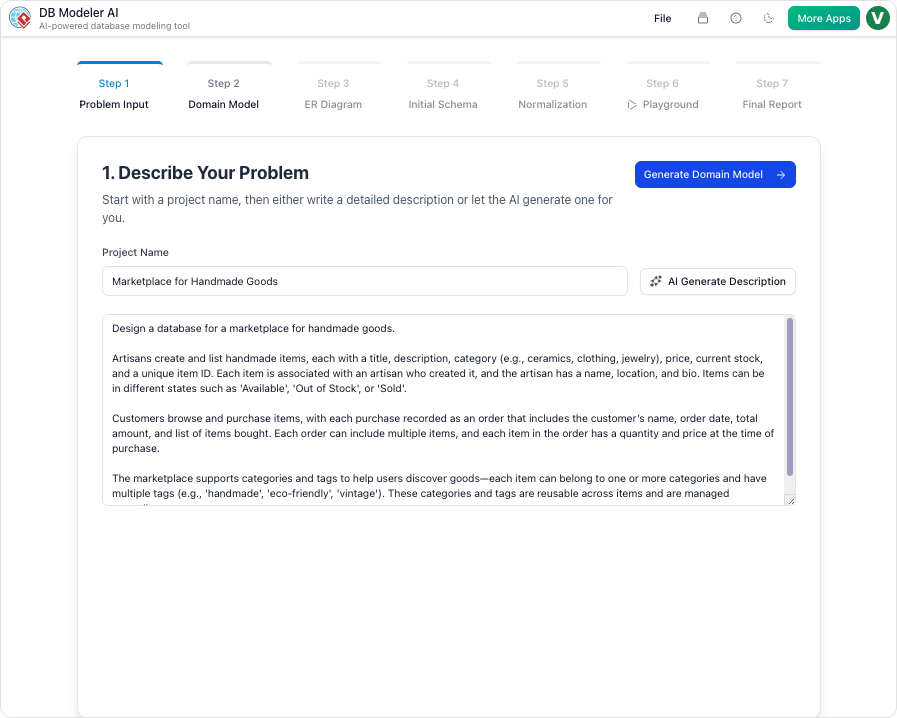
- Input Requirements in Plain English: Start by describing your database needs in natural language, e.g., “A system for tracking customer orders, including products, quantities, and shipping details.”
- Generate Domain Class and ER Diagrams: The AI instantly creates an editable PlantUML domain class diagram and a detailed Entity-Relationship (ER) diagram, visualizing entities, attributes, and relationships.
- Automated Normalization: It progressively normalizes the schema from 1NF to 3NF, providing step-by-step rationales and explanations for each change. This educational aspect helps users understand why adjustments are made, such as eliminating redundancies or transitive dependencies.
- SQL Generation and Testing: Produces PostgreSQL-compatible SQL DDL scripts. A built-in live SQL playground, seeded with AI-generated sample data, allows immediate testing of queries without setting up a database environment.
- Real-Time Editing and Export: Edit diagrams, SQL, or documentation interactively. Export everything as PDF or JSON for sharing or integration.
By automating dependency analysis and table restructuring, DBModeler AI eliminates much of the tedium, allowing designers to focus on refinement rather than starting from scratch. It streamlines the process by offering visual feedback, AI-driven insights, and rapid prototyping, cutting design time significantly.
Use Cases for DBModeler AI in Database Normalization
DBModeler AI is versatile, catering to various professionals and scenarios:
- Developers Bootstrapping Projects: For side projects or prototypes, developers can quickly generate normalized schemas from requirements, test SQL, and iterate without manual diagramming.
- Students and Learners: Interactive normalization with explanations serves as a teaching tool, helping students grasp concepts like functional dependencies through hands-on examples.
- Product Managers Translating Business Needs: Convert high-level business requirements into technical ERDs and schemas, bridging the gap between stakeholders and technical teams.
- System Architects Handling Complexity: Prototype intricate data models for enterprise systems, document relationships, and ensure normalization before implementation.
In real-world applications, such as e-commerce platforms or CRM systems, the tool ensures efficient designs that scale, reducing long-term maintenance costs.
Recommendation: Why Choose Visual Paradigm’s DBModeler AI
If you’re dealing with database design, I highly recommend Visual Paradigm’s DBModeler AI as a game-changer for streamlining normalization. Its AI-assisted approach not only saves time but also enhances accuracy and learning, making tedious tasks manageable. Available through Visual Paradigm’s platform, it’s ideal for teams seeking efficient, collaborative tools. For more details, visit their official site to explore features and get started.
What is DBModeler AI?
DBModeler AI is a web-based tool that of database requirements into fully normalized, production-ready database schemas. It guides users through a , combining and testing.
Core Features
| Feature | Description |
|---|---|
| AI-Driven Architecture | Translates app ideas into detailed technical requirements using natural language. |
| Multi-Level Diagramming | Generates editable PlantUML domain class diagrams and ER diagrams. |
| Stepwise Normalization | Progresses schemas through 1NF, 2NF, and 3NF with explanations for redundancy elimination. |
| Live SQL Playground | Tests schemas instantly with an in-browser SQL client and AI-generated sample data. |
| Full Control | Allows real-time edits to diagrams, SQL, and documentation; exports to PDF/JSON. |
Step-by-Step Workflow
| Step | Action |
|---|---|
| 1. Problem Input | Describe your application in plain English; AI expands it into technical requirements. |
| 2. Domain Class Diagram | Visualize high-level objects/attributes in an editable PlantUML diagram. |
| 3. ER Diagram | Convert the domain model into a database-specific ER diagram with keys/relationships. |
| 4. Initial Schema | Translate the ER diagram into PostgreSQL-compatible SQL DDL statements. |
| 5. Intelligent Normalization | Optimize the schema from 1NF to 3NF with AI-powered rationales for changes. |
| 6. Interactive Playground | Experiment with the schema in an in-browser SQL client seeded with realistic data. |
| 7. Final Report & Export | Export diagrams, documentation, and SQL scripts as PDF/JSON. |
Target Use Cases
- Developers: Quickly bootstrap and validate database layers for projects.
- Students: Learn relational modeling and normalization interactively.
- Product Managers: Convert business requirements into technical specs/ERDs.
- System Architects: Prototype and document complex data relationships visually.
Tips for Best Results
- .
- Use AI explanations during normalization as learning tools.
- before production export.
Why It Stands Out
DBModeler AI by combining automation with user control. It’s particularly useful for .
Would you like help exploring for your needs?