


In complex system design, standard modeling languages often reach their limits. When a generic framework cannot capture the specific nuances of a domain, architects turn to Profile Diagrams. These diagrams serve as the backbone for customizing metamodels, allowing teams to define domain-specific concepts without altering the core language. This guide explores the structural patterns that define effective profile design, ensuring clarity, scalability, and maintainability in your architectural documentation.
Understanding how to structure a profile is critical. It is not merely about adding new symbols; it is about defining the rules of engagement for a specific technology stack or business domain. Whether you are modeling a distributed cloud environment or a regulated financial system, the underlying patterns remain consistent. This article dissects these patterns, offering a technical look at how to build robust profiles.
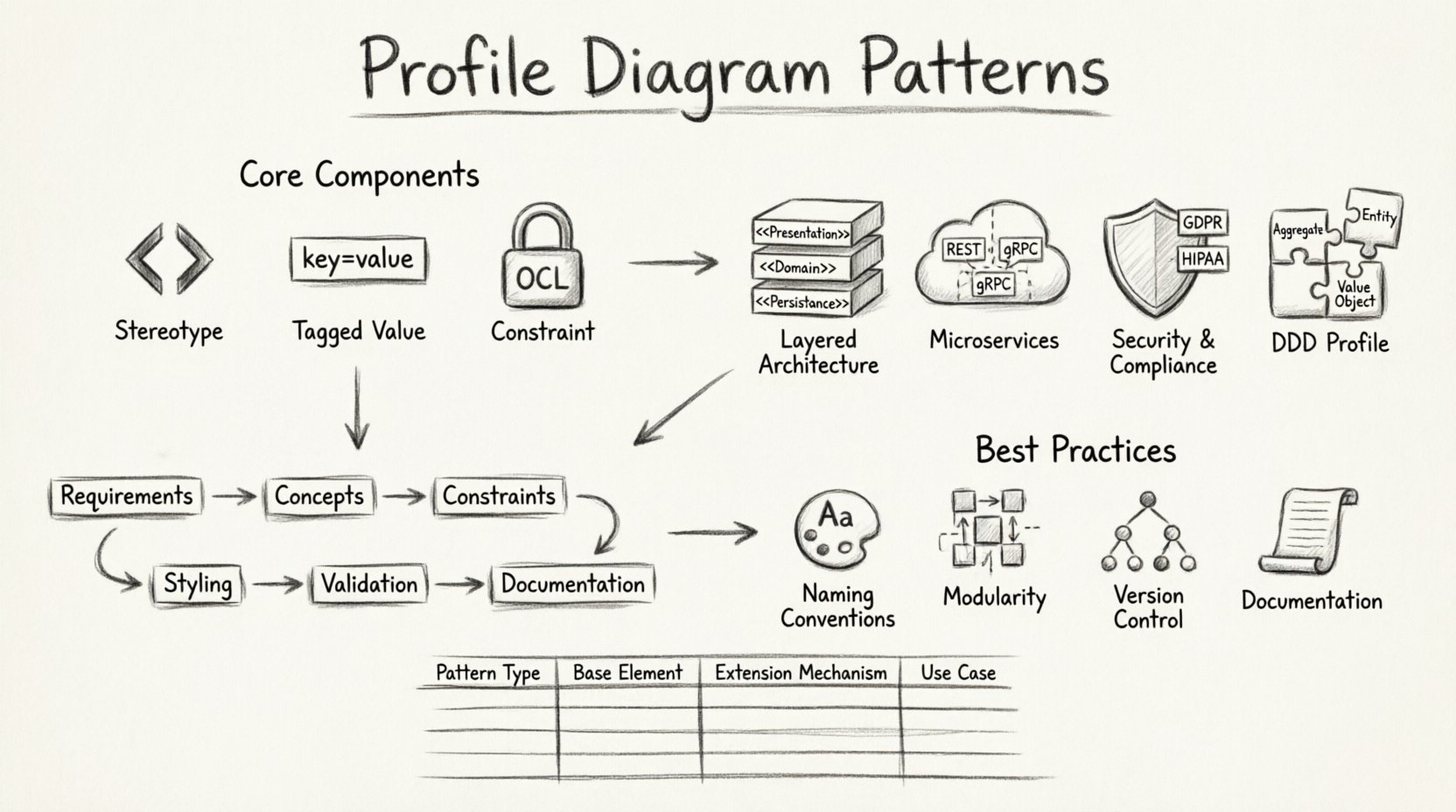
Understanding the Core Components 📐
Before diving into patterns, one must understand the atomic units that make up a profile. A profile extends a metamodel by adding new stereotypes, tagged values, and constraints. These components work together to provide semantic meaning to otherwise abstract shapes.
1. Stereotypes
Stereotypes are the primary mechanism for extension. They allow you to classify model elements using a specific notation. Instead of a generic class, you might define a <<Service>> or a <<Repository>>. This visual distinction helps stakeholders quickly identify the role of an element within the architecture.
- Notation: Typically displayed in guillemets (e.g., <<Stereo>>) above the element name.
- Inheritance: Stereotypes can inherit from other stereotypes, creating a hierarchy of types.
- Constraints: A stereotype can enforce specific structural rules on the elements it modifies.
2. Tagged Values
While stereotypes define the type, tagged values provide the properties. They act as key-value pairs attached to model elements, storing metadata that is not visible in standard diagrams.
- Metadata Storage: Used to store deployment info, version numbers, or compliance flags.
- Validation: Tagged values can be typed (e.g., String, Integer, Boolean) to ensure data integrity.
- Generation: These values often drive code generation or documentation reports.
3. Constraints
Constraints define the logical rules that must be satisfied for the model to be valid. They go beyond syntax to ensure semantic correctness.
- OCL: Object Constraint Language is commonly used to define these rules.
- Context: Constraints apply to specific instances or relationships between elements.
- Verification: Automated tools can check these constraints to prevent architectural drift.
Architectural Patterns for Profile Design 🔄
Profile diagrams are not created in a vacuum. They follow specific patterns based on the architectural style of the system. Below are the most common patterns used in enterprise modeling.
Pattern 1: The Layered Architecture Profile 🏛️
In traditional layered systems, separation of concerns is paramount. A profile for this architecture defines stereotypes for each layer, ensuring that dependencies flow in one direction only.
- UI Layer: Defined as
<<Presentation>>. Handles user interaction and rendering logic. - Business Logic: Defined as
<<Domain>>. Contains the core rules and state management. - Data Access: Defined as
<<Persistence>>. Manages storage and retrieval operations.
This pattern enforces strict dependency rules. For instance, a <<Presentation>> element cannot depend directly on a <<Persistence>> element. The profile diagram visualizes these allowed paths, preventing tight coupling.
Pattern 2: The Microservices Profile ☁️
Modern distributed systems require a profile that understands boundaries, communication protocols, and deployment units. This profile extends the standard class diagram to represent service boundaries.
- Service Boundary: A composite structure that encapsulates internal logic.
- Communication: Stereotypes for REST, gRPC, or Message Queues.
- Deployment: Tagged values for container images, resource limits, and environment variables.
When modeling microservices, the profile must handle the concept of eventual consistency. Tagged values can indicate data synchronization requirements between services. This ensures that the architectural model reflects the reality of distributed state management.
Pattern 3: The Security & Compliance Profile 🔒
Certain industries require strict adherence to standards like GDPR, HIPAA, or SOC2. A security profile adds a layer of metadata to every component, ensuring that security requirements are traceable throughout the design.
- Classification: Tagged values for data sensitivity (e.g., Public, Internal, Confidential).
- Authentication: Stereotypes for authentication mechanisms (OAuth, JWT, SAML).
- Encryption: Constraints requiring specific encryption standards for data at rest and in transit.
This pattern is vital for audit trails. By attaching security constraints to the model, organizations can automatically generate compliance reports based on the diagram structure.
Pattern 4: Domain-Driven Design (DDD) Profile 🧩
DDD focuses on the business domain rather than technical implementation. A DDD profile emphasizes aggregates, entities, and value objects over standard classes.
- Aggregates: Root entities that encapsulate related objects.
- Repositories: Interfaces for persisting aggregates.
- Domain Services: Logic that does not belong to a specific entity.
This profile shifts the focus from database tables to business concepts. It helps developers align their code structure with the mental model of the business stakeholders.
Structural Rules and Dependencies 📊
Creating a profile is only half the battle. Managing the relationships between the profile and the standard metamodel is crucial. Below is a comparison of how different profile patterns interact with base elements.
| Pattern Type | Base Element | Extension Mechanism | Primary Use Case |
|---|---|---|---|
| Layered | Class | Stereotype + Dependency | Monolithic Separation |
| Microservices | Component | Stereotype + Interface | Distributed Systems |
| Security | Node | Tagged Value + Constraint | Compliance & Audit |
| DDD | Class | Stereotype + Association | Business Logic Alignment |
Understanding this table helps in selecting the right extension mechanism. For example, if you need to enforce a rule about data flow, a constraint is better than a tagged value. If you need to group elements visually, a stereotype is the correct choice.
Implementation Workflow 🛠️
Building a profile requires a structured approach to avoid technical debt. Follow this workflow to ensure your profile integrates smoothly with your modeling environment.
- Requirement Analysis: Identify the gaps in the standard metamodel. What concepts are missing? What rules need enforcement?
- Concept Definition: Draft the stereotypes and tagged values. Define the inheritance hierarchy.
- Constraint Specification: Write the OCL or logical constraints that validate the model.
- Visual Styling: Define how the new elements appear in the diagram (icons, colors, shapes).
- Validation: Test the profile against a sample model to ensure no errors occur.
- Documentation: Create a reference guide for the team on how to use the new profile.
It is essential to iterate on this process. Profiles often evolve as the system architecture changes. A static profile will quickly become obsolete.
Best Practices for Maintenance 📝
Maintaining a profile is often more difficult than creating it. As the team grows, the risk of inconsistency increases. Adhere to these best practices to keep the profile healthy.
1. Naming Conventions
Consistency is key. Use a standardized naming convention for stereotypes. Avoid generic names like <<Type>>. Instead, use domain-specific names like <<OrderHandler>>.
2. Modularity
Do not create a monolithic profile. Split profiles into logical modules. For example, separate the security profile from the deployment profile. This allows teams to use only the parts they need without loading unnecessary metadata.
3. Version Control
Treat the profile definition as code. Store it in a version control system. This allows you to track changes, revert updates, and manage different versions for different projects.
4. Documentation
Every stereotype should have a clear definition. Explain what it represents, what tagged values are required, and what constraints apply. A profile without documentation is a liability.
Common Pitfalls and Warnings ⚠️
Even experienced architects make mistakes when extending metamodels. Be aware of these common issues.
- Over-Engineering: Creating too many stereotypes for simple concepts adds unnecessary complexity. Keep it simple.
- Tool Lock-in: Ensure the profile is portable. If it relies on proprietary features, it cannot be shared across different modeling tools.
- Ignoring Standard Elements: Do not redefine standard UML elements unless absolutely necessary. Use existing stereotypes where possible.
- Lack of Governance: Without a review process, profiles drift. Establish a governance board to approve changes to the profile.
Advanced: Metamodel Relationships 🧠
Deep understanding of profiles requires knowledge of how they relate to the underlying metamodel. A profile is essentially a package of extensions.
Importing Packages
Profiles often need to import standard packages to extend them. This creates a dependency chain. Ensure that the base packages are stable and versioned.
Extending Relationships
You can extend relationships, not just classes. For example, you can define a stereotype on an Association to indicate it represents a specific type of communication channel. This adds semantic meaning to the links between elements.
Profile Inheritance
Profiles can inherit from other profiles. This allows you to build a base profile and then create specialized profiles on top of it. For instance, a <<CloudProfile>> might inherit from a <<GenericITProfile>> and add cloud-specific constraints.
Measuring Profile Effectiveness 📏
How do you know if a profile is working? Look for these indicators of success.
- Consistency: Are all models in the system using the profile correctly?
- Clarity: Can a new developer understand the architecture just by looking at the diagrams?
- Automation: Is the profile enabling automated checks or code generation?
- Feedback: Are stakeholders finding the diagrams more useful than before?
If the profile causes confusion rather than clarity, it may need to be simplified. The goal is to reduce cognitive load, not increase it.
Future Considerations 🚀
The landscape of modeling is evolving. As systems become more complex, the need for precise profiles will grow. Keep an eye on emerging standards that might influence your profile design.
- Model-Driven Architecture (MDA): Profiles are central to MDA. Ensure your profiles support transformation rules.
- Integration with CI/CD: Modern workflows require models to be part of the pipeline. Profiles should support metadata that triggers build processes.
- AI-Assisted Modeling: Future tools may use AI to suggest profile extensions based on natural language requirements.
Summary of Key Takeaways ✅
Profile diagrams are powerful tools for customizing architectural modeling. They allow teams to speak their own language while maintaining the rigor of a formal standard.
- Structure: Define clear stereotypes, tagged values, and constraints.
- Patterns: Use established patterns for Layered, Microservices, Security, and DDD architectures.
- Maintenance: Treat the profile as a living document with version control and governance.
- Clarity: Prioritize readability and simplicity over complexity.
By following these guidelines, you can create profile diagrams that serve as a reliable foundation for your system architecture. They bridge the gap between abstract design and concrete implementation, ensuring that every stakeholder understands the system from their own perspective.
Remember, the best profile is one that is understood and used consistently by the entire team. Focus on adoption and education, and the technical benefits will follow naturally.