


Are you struggling to understand your market position and your competitors’ moves? Creating a comprehensive competitive analysis can feel overwhelming, but with the right tool, it’s a straightforward process. The AI-Powered Competitive Analysis Tool from Visual Paradigm makes it easy to generate a professional report that guides your strategic decisions. This tool uses a structured 6-step wizard to help you define objectives, identify rivals, gather data, and synthesize insights into actionable recommendations. The best part? You can use AI to generate a complete analysis draft in seconds, saving you hours of research and data organization. Let’s walk through how it works, step by step.
Quick summary
-
Use the AI-Powered Competitive Analysis Tool to generate a strategic report in minutes.
-
Follow a guided 6-step process: Define Objectives, Identify Competitors, Gather Data, Analyze Factors, Identify Opportunities/Threats, and Summarize Recommendations.
-
Generate a full analysis with AI by describing your business and industry.
-
Use interactive tables to input and edit your data.
-
Save your work locally and print a professional final report.
Step 1: Define Your Objectives and Scope
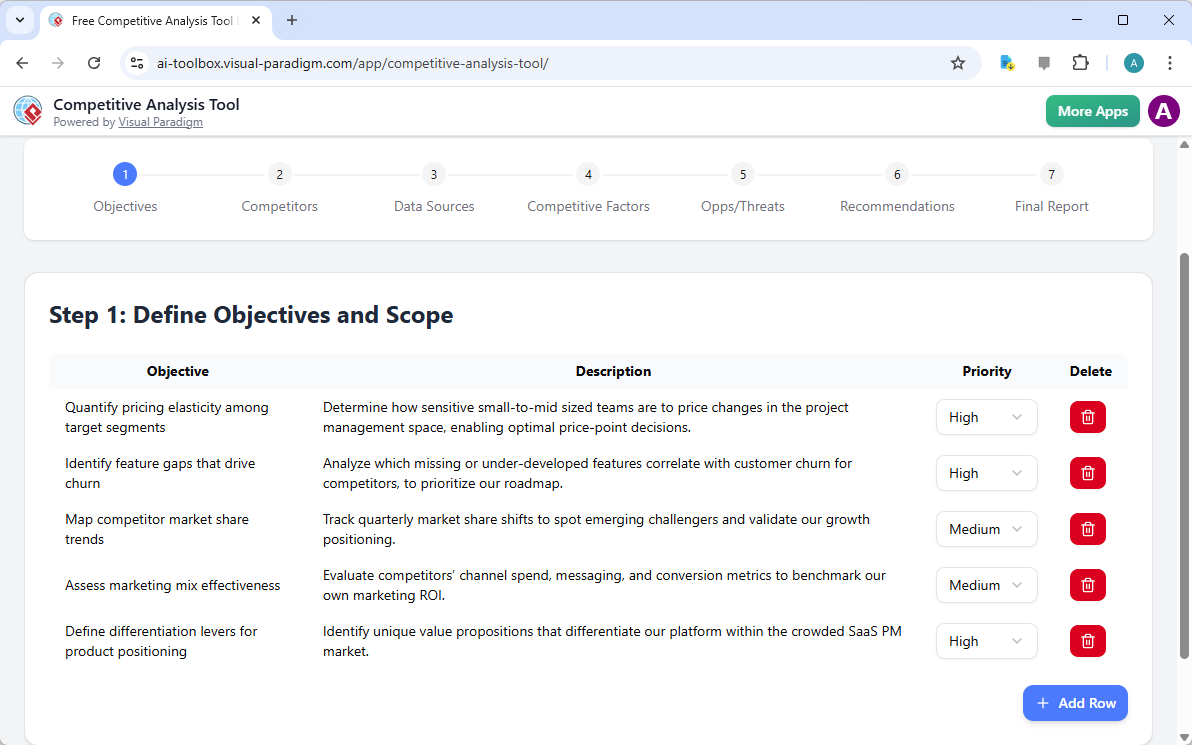
The first step in any competitive analysis is to clearly define your goals. The tool starts with a simple prompt where you provide your business context. For example, a SaaS company specializing in project management software might enter “SaaS – Project Management Software” and a brief description of its offerings. Once you click “Generate with AI,” the tool populates your first step with a list of relevant objectives. These might include quantifying pricing elasticity, identifying feature gaps, mapping market share trends, or assessing marketing mix effectiveness. The AI suggests these objectives based on your industry, ensuring your analysis is focused and relevant. You can easily add, edit, or delete objectives in the table, and the tool will automatically update the rest of the process to reflect your priorities.

Step 2: Identify Your Key Competitors
After defining your objectives, the tool guides you to Step 2: Identify Key Competitors. Here, you’ll see a table populated with a list of potential rivals, such as Asana, Monday.com, ClickUp, Trello, and Basecamp. The AI has already categorized them by market position—like “Market leader” or “Rapid growth challenger”—and listed their key products and target audiences. This helps you quickly understand the competitive landscape. You can add new competitors, modify their details, or delete entries as needed. The tool is designed to be flexible, allowing you to focus on your top 3-5 direct competitors for a more focused analysis.

Step 3: Gather Your Data
With your competitors identified, the next step is to gather the data you need to analyze them. Step 3, “Gather Data,” provides a structured table with common data types like Pricing, Features, Market Share, and Customer Reviews. For each type, the AI suggests reliable sources, such as company websites for pricing, product comparison sites for features, and G2 or Trustpilot for customer reviews. You can edit the source and details for each data type to reflect your specific research. This step ensures you collect the right information in a consistent format, making the analysis process more efficient and less prone to errors.

Step 4: Analyze Competitive Factors
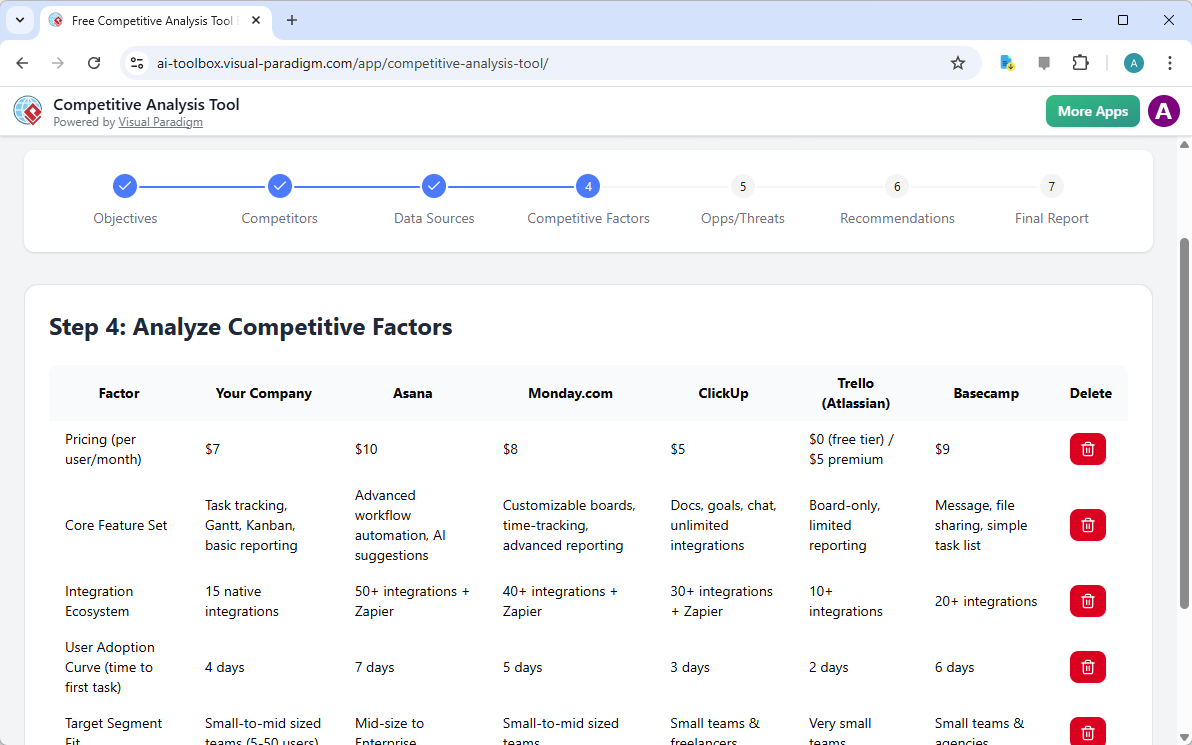
Now it’s time to dive into the analysis. Step 4, “Analyze Competitive Factors,” presents a comprehensive comparison table. The tool compares your company against each competitor across critical factors like pricing, core feature sets, integration ecosystems, and user adoption. For instance, it might show that your company offers a $7 per user/month plan, while Asana charges $10, and ClickUp offers a $5 plan. The table also highlights your strengths and weaknesses, such as having a more robust core feature set or a faster user adoption curve. This side-by-side comparison makes it easy to see where you stand and where you can improve.
Step 5: Identify Opportunities and Threats
After analyzing the data, the tool helps you synthesize your findings. Step 5, “Identify Opportunities and Threats,” is where you turn your insights into strategic actions. The tool provides a table to list potential opportunities and threats, along with their impact level and a suggested action plan. For example, an opportunity might be the high demand for lightweight, affordable project management tools, with a recommended action to introduce a freemium tier. A threat could be a competitor’s aggressive discounting, prompting a recommendation to implement value-based pricing. You can also link each opportunity or threat to the relevant competitors and objectives, creating a clear roadmap for your strategy.

Step 6: Summarize and Recommend Actions
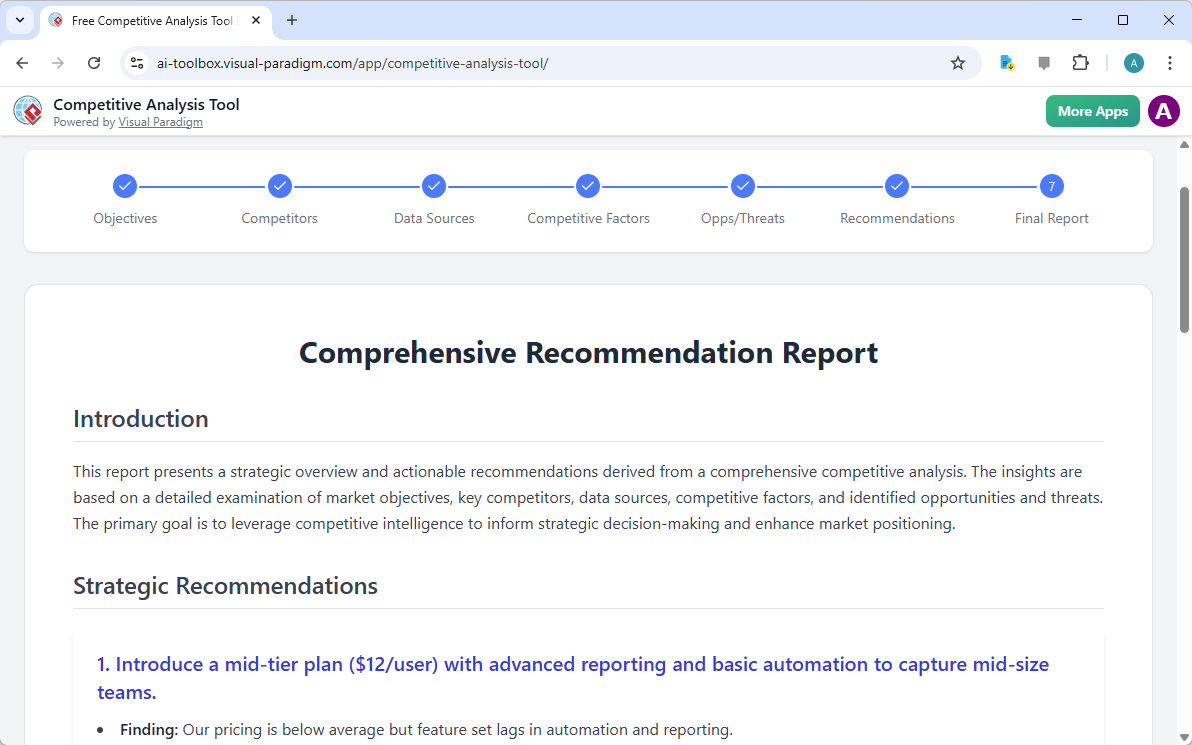
With all your analysis complete, Step 6, “Summarize and Recommend Actions,” consolidates everything into a single, coherent strategy. The tool generates a summary of your findings and translates them into strategic recommendations. For example, it might recommend introducing a mid-tier plan to capture mid-size teams, based on your pricing being below average but your feature set lagging in automation. You can edit the recommendations to refine your strategy. This step is crucial for creating a clear, actionable plan that you can present to your team or leadership.

Final Report: Your Strategic Summary
After you’ve completed all six steps, you can move to the final step: the “Final Report.” This is where all your hard work comes together into a professional, easy-to-read document. The report provides a strategic overview and actionable recommendations derived from your competitive analysis. It includes an introduction that explains the purpose of the analysis, a section on strategic recommendations, and a detailed breakdown of your findings. The report is designed to be shared with stakeholders, making it a powerful tool for presenting your competitive intelligence. You can print the report directly from the tool, or save it as a PDF for easy sharing.
Creating a comprehensive competitive analysis doesn’t have to be a daunting task. With the AI-Powered Competitive Analysis Tool from Visual Paradigm, you can generate a professional report in minutes. By following the structured 6-step process, you can define your objectives, identify your competitors, gather data, analyze your position, and develop strategic recommendations. The AI feature allows you to generate a complete analysis draft quickly, saving you time and effort. The tool ensures your data remains private and gives you the flexibility to edit and refine your analysis. Ready to gain a deep understanding of your market? Try the AI-Powered Competitive Analysis Tool today at https://ai-toolbox.visual-paradigm.com/app/competitive-analysis-tool/.
Related Links
-
Visual Paradigm AI Competitive Analysis Tool: An AI-powered tool designed to streamline the process of gathering and analyzing competitor data for strategic planning.
-
Online Competitive Analysis Editor: A web-based editor that allows users to create and customize competitive analysis reports using various templates and AI features.
-
Features of Visual Paradigm Competitive Analysis Tool: Explore the comprehensive features available in Visual Paradigm for conducting thorough market research and competitor benchmarking.
-
Free AI Competitive Analysis Tool Release: Details regarding the release of a free AI-driven tool for conducting competitive market analysis within the Visual Paradigm ecosystem.
-
Competitor Analysis – Wikipedia: A detailed overview of competitor analysis, covering its definition, importance in marketing strategy, and common frameworks used in the industry.