


Imagine you’re a business analyst tasked with defining a new library management system. You have the requirements, but the process of translating them into a clear, professional use case diagram feels like a chore. That’s where the AI-Powered Use Case Diagram Refinement Tool from Visual Paradigm comes in. This innovative software acts as a digital architect, transforming a simple text description into a sophisticated visual model in minutes. The tool guides you through a structured, three-step workflow, starting with a basic domain input. From there, an AI engine generates an initial PlantUML diagram, which you can then refine using intelligent analysis to apply UML best practices. This process dramatically accelerates the design phase, ensuring your system documentation is both accurate and professional. The final output is a high-quality, scalable SVG image, ready for presentations or integration into a larger project model. This is not just a diagram maker; it’s a powerful tool for bridging the gap between abstract requirements and tangible system design.
Quick summary
-
Use the AI-Powered Use Case Diagram Refinement Tool to convert a text description into a professional UML Use Case Diagram.
-
Follow a guided 3-step workflow: Input domain description, generate an initial diagram, and refine it with AI.
-
Benefit from AI-driven analysis to apply UML best practices and enhance diagram quality.
-
Export the final diagram as an SVG file or import it directly into Visual Paradigm Online for advanced modeling.
Step 1: Define Your System’s Problem Domain
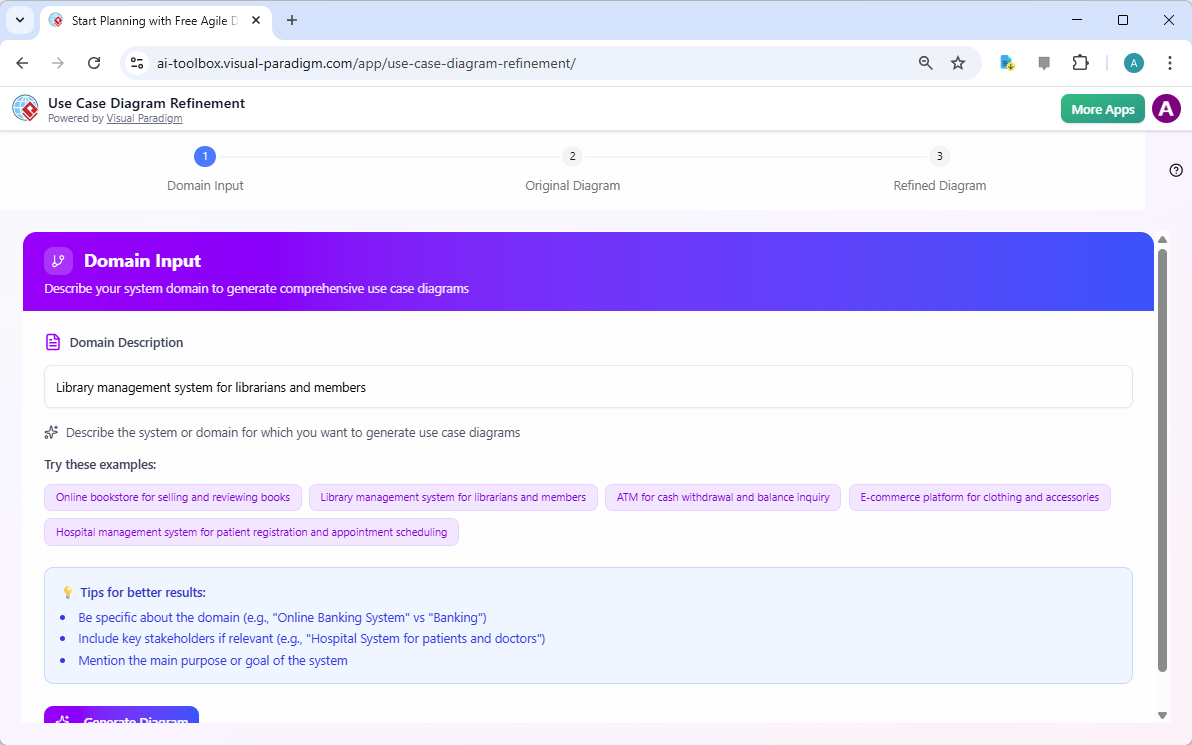
The journey begins with a clear understanding of the system you want to model. The first step, labeled “Domain Input,” is where you provide a concise description of the system’s purpose. In the provided image, the user has entered “Library management system for librarians and members.” This is the crucial starting point. The tool’s AI engine uses this text to understand the key actors (librarians, library members) and the core functionalities (borrowing, returning, searching). The interface is designed for simplicity, with helpful tips to improve results, such as being specific about the domain and mentioning key stakeholders. This step is about capturing the essence of the problem domain, and the AI does the heavy lifting of translating that into a foundational diagram structure. The process is fast, efficient, and eliminates the need for manual drawing, allowing you to focus on the strategic aspects of system design.
Step 2: Generate the Initial Use Case Diagram
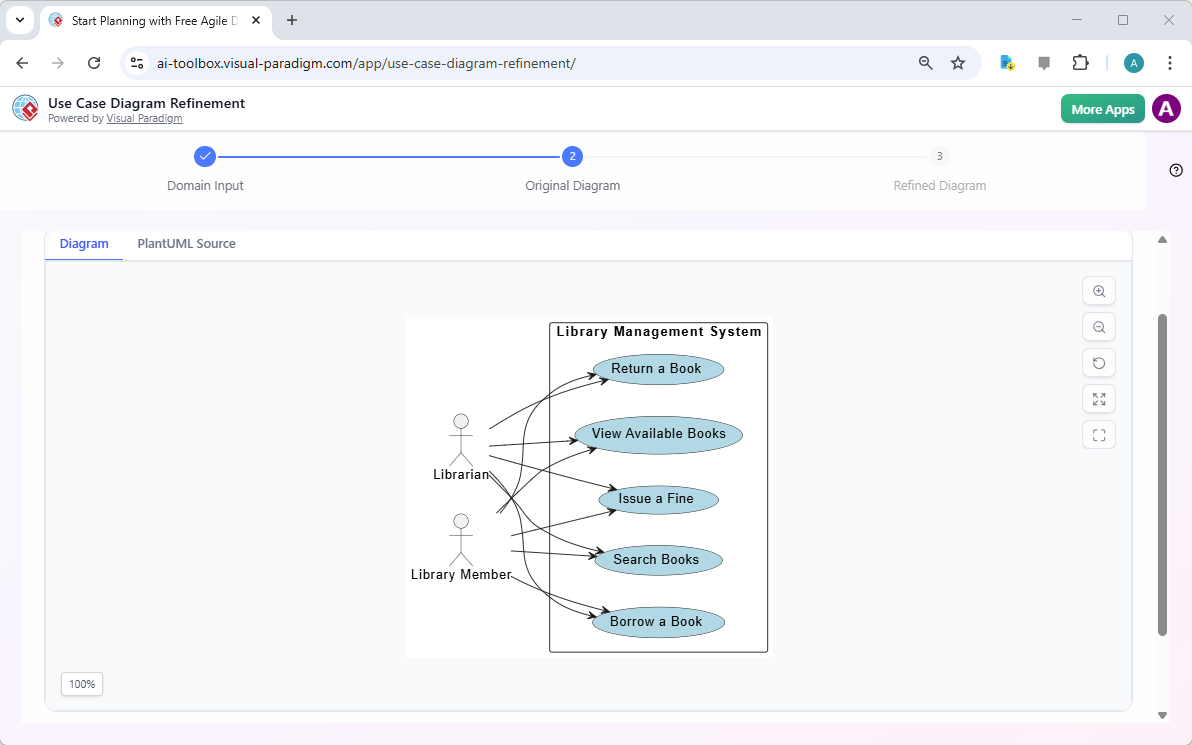
After defining the domain, the tool automatically generates an initial use case diagram. This is the first visual representation of your system. As seen in the second image, the AI has created a diagram for the library system. It correctly identifies the actors (Librarian and Library Member) and the primary use cases (Borrow a Book, Return a Book, etc.), connecting them with lines to show their interactions. The diagram is rendered using PlantUML, a text-based language, which means the underlying code is visible and editable. This initial diagram serves as a baseline, providing a clear visual map of the system’s core functionalities. The tool offers options to export this diagram as an SVG file for immediate use in documents or presentations. Alternatively, you can click the “Import to Visual Paradigm” button to seamlessly transfer the diagram into a more comprehensive modeling environment for further development. This step is crucial for validating that the AI has correctly interpreted your domain description.
Step 3: Refine Your Diagram with AI
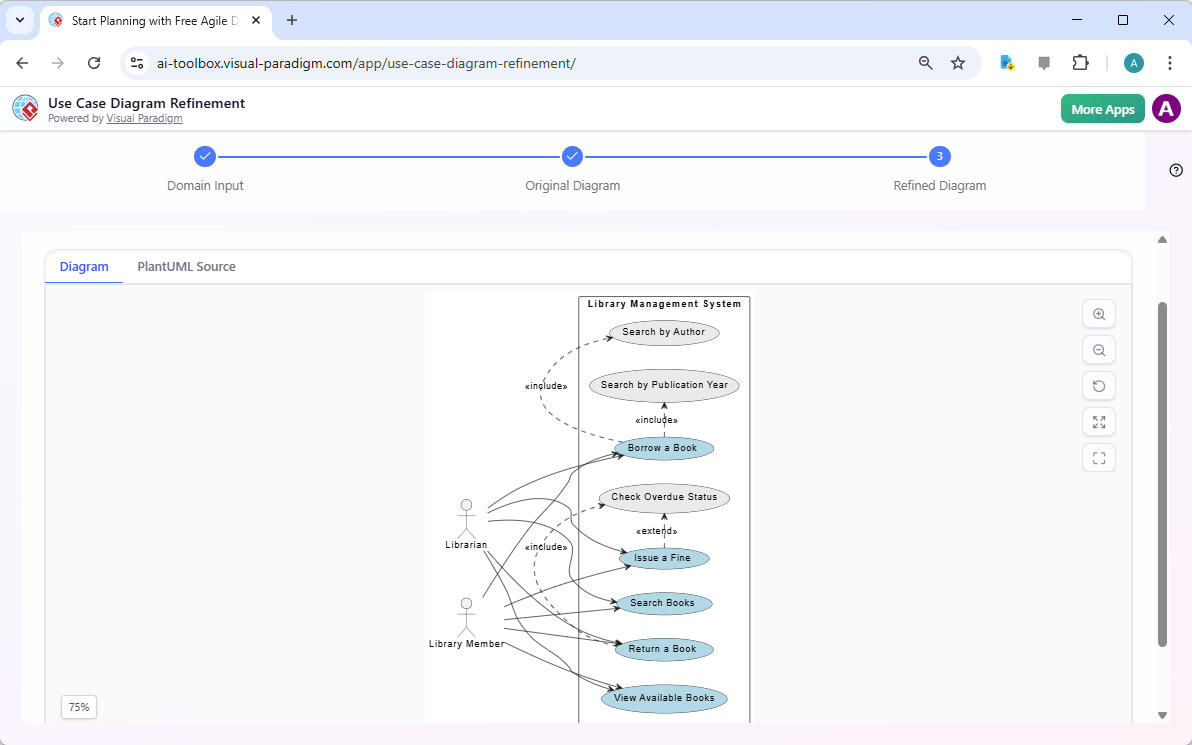
The true power of this tool lies in its ability to refine the initial diagram. The third image showcases the result of the AI-driven refinement process. The diagram is now significantly more detailed and complex. It has added new use cases like “Search by Author” and “Search by Publication Year,” which are linked to the main “Search Books” use case using the “include” relationship. It has also introduced an “extend” relationship for the “Issue a Fine” use case, which extends the “Borrow a Book” use case, indicating a conditional or optional behavior. This level of detail is critical for creating a robust and accurate system model. The AI analyzes the initial diagram and the original domain description to identify these complex relationships and apply UML best practices. This refinement process ensures that the diagram is not only visually clear but also technically sound, making it a powerful communication tool for stakeholders. The refined diagram is now ready for export or further editing in Visual Paradigm Online.
Seamless Integration and Professional Output
The value of this tool extends beyond just creating a diagram. It’s designed for a professional workflow. The ability to export the final diagram as an SVG file ensures you have a high-quality, scalable image for any purpose, from a simple presentation slide to a detailed project document. The most powerful feature, however, is the direct integration with Visual Paradigm Online. This allows you to take your AI-generated and refined use case diagram and immediately import it into a full-featured modeling platform. From there, you can collaborate with team members, add detailed descriptions to each use case, link to other diagrams (like sequence or activity diagrams), and build a comprehensive system model. This seamless transition from a quick sketch to a detailed, collaborative project is a game-changer for software architects and business analysts. The tool provides a clear path from initial concept to detailed documentation.
Who Benefits from This AI Tool?
The AI-Powered Use Case Diagram Refinement Tool is designed for a wide range of professionals who need to define and document system functionality. Business Analysts can use it to quickly turn business requirements into visual diagrams, fostering clear communication with technical teams. Project Managers can leverage it to define project scope and identify key functionalities early on. Software Architects can rapidly prototype and validate use case models to ensure they align with user needs. Even students and educators can benefit, using it as a practical learning tool to understand use case analysis and PlantUML diagramming. The tool’s ability to accelerate diagram creation and enhance quality allows all users to focus on the analysis of system functionality rather than the manual effort of drawing.
Stop spending hours on manual diagramming. With the AI-Powered Use Case Diagram Refinement Tool, you can generate a professional, UML-compliant use case diagram in minutes. Simply describe your system’s problem domain, and let the AI do the rest. Try it today and see how it can transform your system design process.
Try the AI-Powered Use Case Diagram Refinement Tool Now
Related Links
-
AI-Powered Use Case Diagram Refinement Tool – Smart Diagram Enhancement: Leverage AI to automatically refine and optimize your use case diagrams for clarity, consistency, and completeness.
-
AI-Powered Sequence Diagram Refinement in Visual Paradigm: Discover how Visual Paradigm’s AI tool transforms use-case descriptions into precise and professional sequence diagrams with minimal manual effort.
-
AI-Powered Use Case Diagram Refinement Tool by Visual Paradigm: A smart AI feature that enhances and refines existing use case diagrams by suggesting improvements, identifying missing actors, and optimizing structure.
-
Using AI to Refine Use Case Diagrams in Visual Paradigm: Tutorial on utilizing Visual Paradigm’s AI-powered diagram refinement tool to enhance accuracy and completeness of use case diagrams.
-
Use Case Diagram Refinement Tool: AI-Powered Modeling Guide: This guide explains how AI-powered tools in Visual Paradigm enhance use case diagram creation and refinement through intelligent modeling assistance.
-
Accelerating Scrum Kickoff with AI-Powered Use Case Refinement: A case study demonstrating how AI-driven tools enhance use case diagram refinement during Scrum project initiation.